 ADevGuide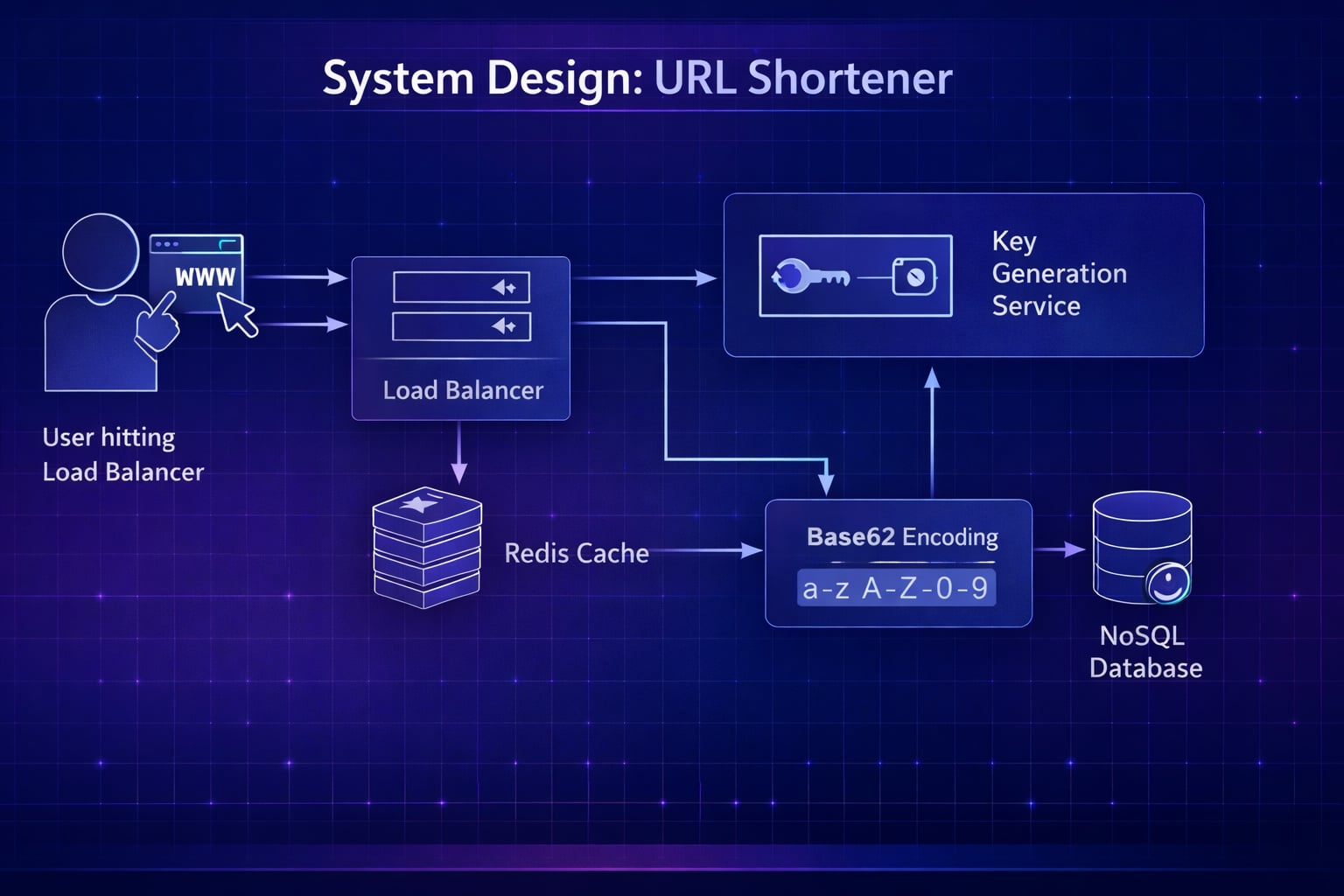
Designing a URL shortener like TinyURL or Bitly is one of the most common system design interview questions. It seems simple at first - mapping a long string to a short one - but quickly becomes complex when you consider scale, concurrency, and hash collisions.
Need a quick revision before interviews? Read the companion cheat sheet: System Design Interview: Url Shortener System Design CheatSheet.
Table of Contents
Open Table of Contents
- Interview Framework: How to Approach This Problem
- Step 1: Clarifying Requirements
- Step 2: Core Assumptions and Constraints
- Step 3: High-Level Architecture
- Step 4: The Hardest Problem - Generating Unique IDs
- Step 5: Database Design and Storage
- Step 6: Key Technical Decision - 301 vs 302 Redirects
- Step 7: Scaling the System
- Step 8: Security and Permissions
- Step 9: Handling Edge Cases
- Step 10: Performance Optimizations
- Real-World Implementations
- Common Interview Follow-Up Questions
- Q: How would you support custom aliases (for example,
tiny.url/sale-2026)? - Q: How do you add expiring links without hurting redirect performance?
- Q: How would you detect and block malicious destination URLs?
- Q: How do you provide detailed analytics without increasing redirect latency?
- Q: What if your key generation strategy must change later?
- Q: How would you support custom aliases (for example,
- Conclusion
- References
- YouTube Videos
Interview Framework: How to Approach This Problem
In a system design interview, when asked to design a URL Shortener, follow this structure:
- Clarify requirements (5 minutes) - Functionality and volumes.
- Back-of-envelope Math (3 minutes) - This is crucial here. Storage runs out fast.
- High-level design (10 minutes) - API and Data Flow.
- Deep dive (20 minutes) - Focus on the shortening algorithm (Base62 vs Hashing).
- Scale (10 minutes) - Caching and cleanup.
Key mindset: Prove you understand Trade-offs between collision handling and throughput.
Step 1: Clarifying Requirements
Questions to Ask the Interviewer
Q: Can users choose their own alias (custom URL)?
- Answer: Yes, but optional. Default is random.
Q: Do the links expire?
- Answer: Standard links last 5 years.
Q: What is the scale?
- Answer: 100M new URLs per month. 10 Billion reads per month (100:1 read/write ratio).
Functional Requirements
- Shorten: Given a long URL, return a unique short URL.
- Redirect: Given a short URL, redirect to the original long URL.
- Custom Alias: Allow specific custom aliases (
tinyurl.com/MyResume). - Analytics: Track click counts (optional but good to mention).
Non-Functional Requirements
- Low Latency: Redirection must be extremely fast (< 20ms).
- High Availability: If the service is down, all redirects fail. Aim for 99.99%.
- Unpredictable: Ideally, the next short URL shouldn’t be guessable (security).
Step 2: Core Assumptions and Constraints
Traffic Estimates
- Writes: 100 Million / month ≈ 40 writes/sec.
- Reads: 10 Billion / month ≈ 4,000 reads/sec.
- Ratio: Read-heavy (100:1).
Storage Estimates
- Duration: 5 Years.
- Total Objects: 100M/month × 12 × 5 = 6 Billion URLs.
- Object Size: 500 bytes (ID, LongURL, UserID, Timestamp).
- Total Capacity: 6B × 500 bytes ≈ 3TB.
- Conclusion: We can easily fit the metadata in a NoSQL cluster or sharded SQL.
Bandwidth Estimates
- Reads: 4,000 req/sec × 500 bytes ≈ 2 MB/sec. (Trivial)
Step 3: High-Level Architecture
System Flow Diagram
flowchart TD
    Client["Client Browser"] --> LB["Load Balancer"]
    LB --> WebSvc["Shortener Service<br/>Web Server"]

    WebSvc --> Cache[("Cache<br/>Redis")]
    WebSvc --> DB[("Database<br/>NoSQL/SQL")]

    subgraph "Write Path"
    WebSvc -.-> KGS["Key Generation Service<br/>(Optional)"]
    KGS -.-> KGS_DB[("Exhausted Keys DB")]
    end

    classDef service fill:#e1f5fe,stroke:#01579b,stroke-width:2px,color:#000000
    classDef storage fill:#fff3e0,stroke:#e65100,stroke-width:2px,color:#000000
    classDef client fill:#f3e5f5,stroke:#4a148c,stroke-width:2px,color:#000000
    classDef infrastructure fill:#f5f5f5,stroke:#616161,stroke-width:2px,color:#000000

    class Client client
    class WebSvc,KGS service
    class Cache,DB,KGS_DB storage
    class LB infrastructure
API Design (REST)
1. Create Short URL
POST /api/v1/data/shorten
- Input:
{ longUrl: "https://...", customAlias: "optional" } - Output:
{ shortUrl: "https://tiny.url/xyz123" }
2. Redirect (Get)
GET /api/v1/{shortUrl}
- Output: HTTP 301/302 Redirect to Long URL.
Step 4: The Hardest Problem - Generating Unique IDs
We need a short string like http://tt.com/u7yX9. How do we generate the u7yX9 part?
Constraints: Length
Using Base62 encoding (A-Z, a-z, 0-9):
- Length 6: 62⁶ ≈ 56.8 Billion combinations.
- Length 7: 62⁷ ≈ 3.5 Trillion combinations.
- Since we need to store 6 Billion URLs (from Step 2), Length 7 is sufficient.
Approach 1: Hash Collision (MD5/SHA)
Hash the long URL MD5(long_url).
- Problem: MD5 produces 128-bit strings (too long).
- Truncation: Take first 7 characters.
- Critical Flaw: Collisions. Different long URLs might hash to the same first 7 chars.
- Resolution: Check DB -> if exists, append salt -> re-hash. (Slows down writes significantly).
Approach 2: Key Generation Service (KGS) - Recommended
We pre-generate unique 7-character strings offline and store them in a “Token DB”.
- Key DB: Has two tables:
UsedKeysandUnusedKeys. - Process:
- KGS loads 1000 unused keys into memory.
- Web Server requests a key.
- KGS hands one out and marks it used.
- Pros: Zero collisions. Extremely fast (no hashing on the fly).
- Cons: Need to handle concurrency so KGS doesn’t give the same key twice (use
SELECT ... FOR UPDATEor strict locking).
Step 5: Database Design and Storage
Schema:
{
  "hash": "u7yX9", // Primary Key
  "originalUrl": "https://google.com/search?q=...",
  "creationDate": "2026-02-12T...",
  "expirationDate": "2031-02-12T...",
  "userId": "UserID_OPTIONAL"
}
Which DB Type?
- NoSQL (DynamoDB / Cassandra):
- ✅ Highly scalable for billions of rows.
- ✅ Fast Key-Value lookups.
- ✅ Easier to shard.
- SQL (PostgreSQL):
- ✅ Transactional support (good if tracking complex user analytics).
- ❌ Harder to scale horizontally to 100TB+.
Verdict: NoSQL (DynamoDB) is the industry standard for this read-heavy, simple structure.
Step 6: Key Technical Decision - 301 vs 302 Redirects
301 (Permanent Redirect)
- Browser caches the mapping. Next time user types
tiny.url/xyz, browser goes directly to Long URL without hitting your server. - Pro: Reduced server load.
- Con: You lose analytics. You don’t know if the user clicked it again.
302 (Temporary Redirect)
- Browser always hits your server first for the new location.
- Pro: Accurate analytics (click tracking).
- Con: Higher server load.
Decision: Use 302 if Analytics is a business requirement (usually yes). Use 301 if reducing server cost is the priority.
Step 7: Scaling the System
1. Caching (Critical)
Since 80/20 rule applies (20% of URLs generate 80% of traffic), we should cache popular mappings.
- Technology: Redis / Memcached.
- Eviction: LRU (Least Recently Used).
- Flow: GET request -> Check Redis -> If Miss, Check DB -> Write to Redis -> Return.
2. Database Sharding
How to store 3TB of data?
- Hash-Based Sharding:
hash(short_url) % n. - Determine which shard holds the data based on the short URL ID.
Step 8: Security and Permissions
- Prediction Attack:
If using auto-increment IDs (
tiny.url/1,tiny.url/2), competitors can scrape all your data by iterating numbers.- Fix: Use KGS with random distribution, or simple Base62 + large random offset.
- Malicious Links:
Users shortening phising links.
- Fix: Integrate with Google Safe Browsing API to scan long URLs before shortening.
Step 9: Handling Edge Cases
- KGS Failure: If the Key Gen Service dies, writes stop.
- Solution: Run redundant KGS instances with standby keys in memory.
- Redirect Loops: User shortens
tiny.url/abcwhich points totiny.url/abc.- Fix: Detect domains that match your own service and reject them.
Step 10: Performance Optimizations
- Geo-Distribution: Run read replicas of the DB (or Edge Caching via Cloudflare) in multiple regions to reduce latency for global users.
- Cleanup: A “Lazy Cleanup” process. Don’t constantly scan for expired links. Only check expiration when a user clicks a link. If expired, delete it and return error. Run a background sweeper monthly for the rest.
Real-World Implementations
TinyURL
- Originally used simple base62 conversion of database IDs.
- Suffered from predictable URLs (enumerability).
Bitly
- Started as a utility, pivoted to Enterprise Analytics.
- Uses heavy caching and 302 redirects to track every interaction for marketing insights.
Common Interview Follow-Up Questions
Q: How would you support custom aliases (for example, tiny.url/sale-2026)?
Answer: “I’d treat custom alias creation as a transactional write:
- Validate alias format and reserved keywords.
- Check uniqueness with conditional write (
put-if-absent) in the alias table. - Enforce namespace rules for enterprise accounts.
- Add abuse checks to block impersonation and trademark misuse.
Trade-off: Alias flexibility improves product value, but requires stricter moderation and conflict handling.”
Q: How do you add expiring links without hurting redirect performance?
Answer: “Expiration should be evaluated at read time with lightweight metadata:
- Store
expiresAtwith each mapping. - Keep it in cache payload so redirect path can reject expired links quickly.
- Return a dedicated expired-link page and analytics event.
- Run async cleanup jobs to remove old rows from storage.
This keeps the hot redirect path fast while still honoring expiration contracts.”
Q: How would you detect and block malicious destination URLs?
Answer: “I would combine pre-check and post-check controls:
- Scan long URLs with threat-intel APIs before creation.
- Re-scan high-traffic links periodically since reputation can change.
- Maintain internal deny lists and domain risk scores.
- Add click-time interstitial warnings for suspicious but not fully blocked links.
Trade-off: Strict blocking reduces abuse, but false positives require fast appeal workflows.”
Q: How do you provide detailed analytics without increasing redirect latency?
Answer: “Separate redirect serving from analytics ingestion:
- Redirect service returns immediately after lookup.
- Emit click events asynchronously to Kafka/PubSub.
- Aggregate metrics in batch/stream jobs for dashboards.
- Use sampled logs plus exact counters for high-value enterprise links.
This protects p95 latency while still delivering rich reporting.”
Q: What if your key generation strategy must change later?
Answer: “Design for migration from day one:
- Version short codes (for example
v1,v2) in metadata. - Keep resolver backward-compatible across versions.
- Roll out new generator for new links only.
- Migrate old records lazily when accessed, if needed.
This avoids large risky rewrites and allows incremental evolution.”
Conclusion
Designing a URL Shortener tests your ability to handle:
- Atomicity: Generating unique keys without duplicates.
- Scale: 100:1 read ratios requiring heavy caching.
- Simplicity: Choosing NoSQL over SQL for simple KV data.
References
YouTube Videos
-
“Design a URL Shortener - System Design Interview” - Gaurav Sen [https://www.youtube.com/watch?v=JQDHz72OA3c]
-
“System Design Interview: A Framework for Beginners and Seniors” - ByteByteGo [https://www.youtube.com/watch?v=bUHFg8CZFws]