 ADevGuide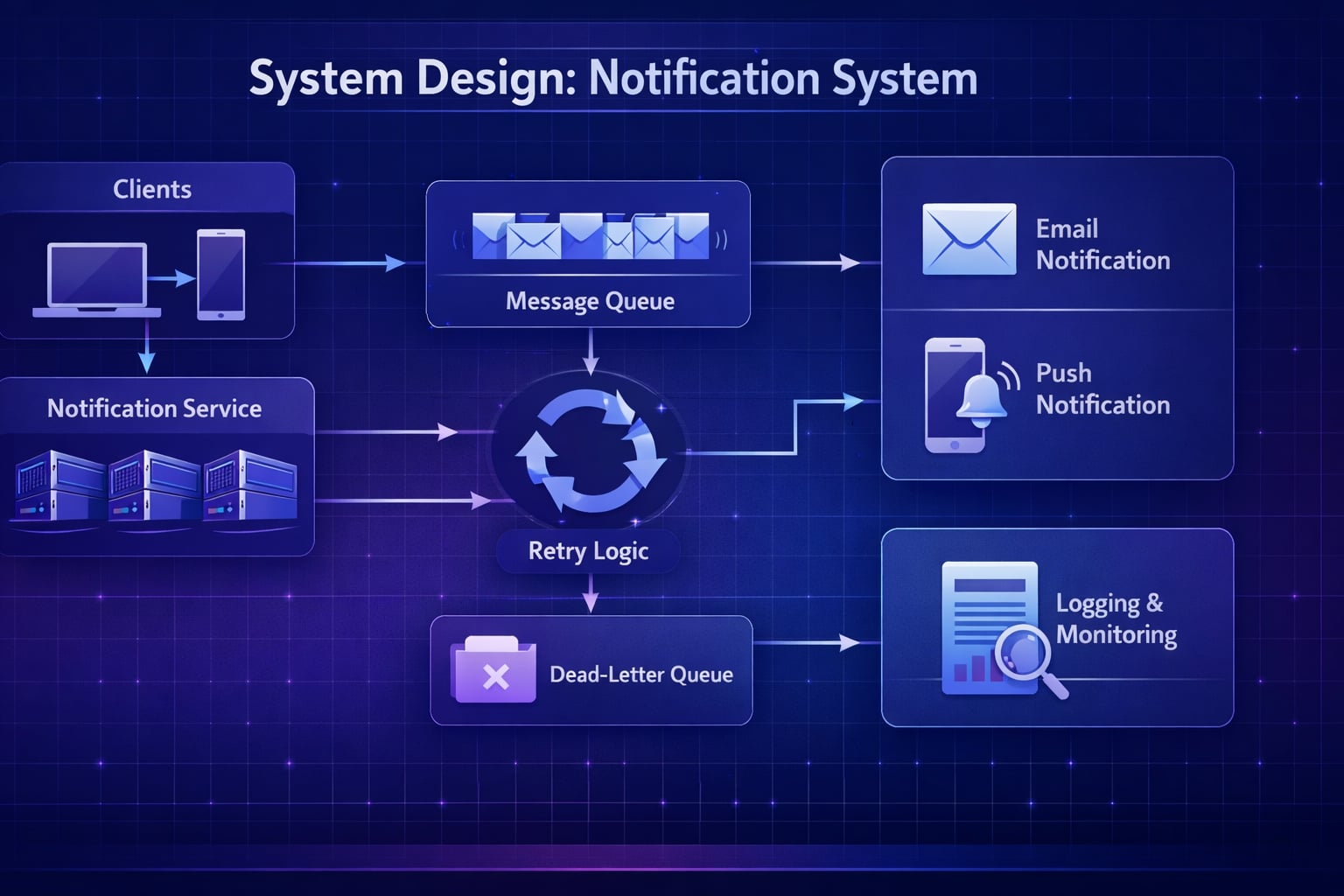
This post walks you through designing a basic yet robust notification system in a system design interview. We’ll cover everything from initial requirements to scaling for millions of users, focusing on email and push notifications for events like password resets or comment replies.
Need a quick revision before interviews? Read the companion cheat sheet: System Design Interview: Notification System Design Interview CheatSheet.
Table of Contents
Open Table of Contents
- Interview Framework: How to Approach This Problem
- Step 1: Clarifying Requirements
- Step 2: Core Assumptions and Constraints
- Step 3: High-Level Architecture
- Step 4: The Hardest Problem - Reliable Delivery & Retry
- Step 5: Choosing Delivery Channels & External Services
- Step 6: Database Design and Storage
- Step 7: Scaling the System
- Step 8: Security and Permissions
- Step 9: Handling Edge Cases
- Step 10: Performance Optimizations
- Real-World Implementations
- Common Interview Follow-Up Questions
- Q: How would you add SMS notifications?
- Q: What if a provider like SendGrid is down for an hour?
- Q: How would you ensure the order of notifications?
- Q: How would you implement idempotency to prevent duplicate notifications?
- Q: How do you prevent notification fatigue while keeping important alerts reliable?
- Conclusion
- References
- YouTube Videos
Interview Framework: How to Approach This Problem
When an interviewer asks you to design a notification system, they’re testing your ability to build a reliable, scalable, and decoupled architecture. Here’s a structured approach to impress them:
- Clarify requirements (5 min) - Don’t assume. Ask about channels, volume, and delivery guarantees.
- State assumptions (2 min) - Define the scale (e.g., 1M users, 400k notifications/day) and latency targets.
- High-level design (10 min) - Sketch the main components. A message queue is non-negotiable here.
- Deep dive (20 min) - Focus on the hardest problem: reliable delivery. Discuss retry logic, backoff strategies, and dead-letter queues.
- Scale and optimize (10 min) - Identify bottlenecks (e.g., queue overload, database writes) and propose solutions.
- Edge cases (3 min) - Show thoroughness by considering failures, invalid inputs, and user preferences.
Key mindset: Think out loud. Explain the “why” behind your decisions and discuss trade-offs. For example, “I’m choosing a message queue here to decouple the event producers from the notification workers. This makes the system more resilient; if the notification service is down, we don’t lose events.”
Step 1: Clarifying Requirements
“Before I design anything, I need to understand the exact requirements. Let me ask a few clarifying questions.”
Questions to Ask the Interviewer
- Channels: Which notification channels must we support? (e.g., Email, Push, SMS?) Let’s start with Email and Push.
- Triggers: What specific events trigger these notifications? (e.g., Password Reset, Comment Reply, New Follower).
- Timeliness: Should notifications be sent instantly, or is some delay acceptable? For password resets, it must be near-instant. For comment replies, a minute is fine.
- Delivery Guarantees: What level of reliability is needed? At-least-once delivery is critical. We can’t lose a password reset email.
- User Preferences: Do users need to control which notifications they receive on which channel? Yes, this is a key feature.
- Scale: What is the expected scale? How many users and how many notifications per day? Let’s assume 1 million users sending 400,000 notifications/day.
- Compliance: Are there any legal requirements to consider, like GDPR or CAN-SPAM for emails? Yes, we must support unsubscribes.
Functional Requirements
Based on the conversation, here are our core features:
- Send notifications via Email and Push channels.
- Support multiple event types (Password Reset, Comment Reply).
- Allow users to manage their notification preferences.
- Automatically retry sending failed notifications.
- Provide a mechanism for users to unsubscribe from marketing emails (CAN-SPAM compliance).
- Log the status of every notification for debugging and auditing.
Non-Functional Requirements
- Reliability: At-least-once delivery. No notifications should be lost. Aim for a 99.9% delivery success rate.
- Scalability: The system must handle traffic spikes, such as during a site-wide announcement. It should scale to millions of users.
- Latency: Transactional notifications (password resets) should be delivered in under 10 seconds. Other notifications within 1 minute.
- Durability: Notification data and logs should be safely stored and not lost.
Step 2: Core Assumptions and Constraints
“Great, now I’ll make some explicit assumptions about scale to guide my design.”
Traffic Assumptions
- Total Users: 1 million
- Daily Active Users (DAU): 200,000 (20% of total)
- Average Notifications per DAU: 2
- Total Notifications per Day: 400,000
- Peak Traffic: Assume peak is 5x the average. 400,000 / (24 * 60) ≈ 277 notifications/minute. Peak ≈ 1,400 notifications/minute.
Scale Calculations
Storage Estimation (for logs):
- Assume each log entry is 250 bytes.
- 400,000 notifications/day * 250 bytes/notification = 100 MB/day.
- Per Year: 100 MB * 365 = ~36.5 GB. This is manageable for a standard database.
Bandwidth Estimation (at peak):
- Assume average notification payload is 2 KB.
- 1,400 notifications/min * 2 KB/notification = 2.8 MB/min. This is very low bandwidth.
Technology Constraints
- Message Queue: We must use a message queue (like RabbitMQ, AWS SQS, or Kafka) to decouple services. This is the cornerstone of a reliable notification system.
- External Services: We will rely on third-party services for the actual delivery, like SendGrid for email and Firebase Cloud Messaging (FCM) for push notifications. We are not building an SMTP server.
- Database: A relational database like PostgreSQL is suitable for storing logs and user preferences due to its reliability and query capabilities.
Step 3: High-Level Architecture
“Let me start with a high-level architecture. The core of this design is a decoupled system using a message queue.”
System Flow Diagram
flowchart TD
    Client(Client Layer) --> Producer[Event Producer<br/>User Service]
    Producer --> Queue[Message Queue<br/>RabbitMQ/Kafka]
    Queue --> Worker[Notification Worker]

    Worker --> LogDB[(Log DB)]
    Worker --> DLQ[(Dead Letter Queue)]
    Worker --> Email[Email Service<br/>SendGrid]
    Worker --> Push[Push Service<br/>FCM/APNS]

    Email --> User((User))
    Push --> User

    classDef service fill:#e1f5fe,stroke:#01579b,stroke-width:2px,color:#000000;
    classDef storage fill:#fff3e0,stroke:#e65100,stroke-width:2px,color:#000000;
    classDef client fill:#f3e5f5,stroke:#4a148c,stroke-width:2px,rx:10,ry:10,color:#000000;
    classDef infrastructure fill:#f5f5f5,stroke:#616161,stroke-width:2px,color:#000000;

    class Client,User client;
    class Producer,Worker,Email,Push service;
    class LogDB,DLQ storage;
    class Queue infrastructure;
Data Flow
- Event Occurs: A service (e.g.,
AuthService) triggers an event likePasswordReset. - Event Producer: The service acts as a producer, creating a message with details like
userId,eventType, andpayload. - Message Queue: The producer sends this message to a message queue (e.g., an SQS queue named
notification_jobs). - Notification Worker: A pool of workers consumes messages from the queue. For each message, it: a. Fetches the user’s notification preferences from the database. b. Determines the right channel (Email, Push, or both). c. Calls the appropriate external service (SendGrid for email, FCM for push).
- Logging: The worker logs the status (
SENT,FAILED) to anotification_logstable in the database. - Failure Handling: If delivery fails, the worker can retry or move the message to a Dead Letter Queue (DLQ) for manual inspection.
Why This Architecture?
- Decoupling: The services that produce events don’t need to know anything about how notifications are sent. They just fire an event and move on.
- Reliability: If the
NotificationWorkeris down, messages pile up in the queue and are processed when it comes back online. No events are lost. - Scalability: If there’s a surge in notifications, we can simply scale up the number of
NotificationWorkerinstances to process the queue faster.
Step 4: The Hardest Problem - Reliable Delivery & Retry
“The most critical part of this system is ensuring reliable delivery. Let’s discuss how to handle failures.”
Problem Statement
External services are not 100% reliable.
- An email provider’s API might be down.
- A push notification service might be experiencing high latency.
- A user might have provided an invalid email address.
We need a robust retry mechanism.
Approaches
Approach 1: Fire-and-Forget (Not an option)
- Send the notification once. If it fails, do nothing.
- Problem: Unacceptable for transactional notifications. We would lose password reset emails.
- Verdict: ❌ Not a viable solution.
Approach 2: Synchronous Retry
- If sending fails, immediately retry in a loop within the same worker process.
- Problem: This blocks the worker. If a third-party service is down for minutes, the worker will be stuck retrying and won’t process other notifications from the queue.
- Verdict: ❌ Poorly scalable and not resilient.
Approach 3: Asynchronous Retry with Exponential Backoff (The Correct Approach)
- If sending fails, re-queue the message with a delay. Increase the delay for each subsequent failure.
- How it works:
- Worker tries to send a notification. It fails.
- The worker sends the message back to the queue but with a
delayproperty (e.g., 1 minute). - After 1 minute, the message becomes visible again. Another worker picks it up.
- If it fails again, re-queue with a longer delay (e.g., 5 minutes, then 15 minutes). This is exponential backoff.
- After a certain number of retries (e.g., 5), move the message to a Dead Letter Queue (DLQ).
- Verdict: ✅ This is the industry-standard, resilient, and scalable approach.
Implementation Example (Pseudocode):
// Pseudocode for a notification worker
async function processNotification(message) {
  try {
    await sendViaProvider(message);
    logStatus(message.id, "SUCCESS");
  } catch (error) {
    if (message.retryCount < MAX_RETRIES) {
      // Re-queue with exponential backoff
      const delay = calculateBackoff(message.retryCount);
      requeueMessage(message, delay);
    } else {
      // Move to Dead Letter Queue
      moveToDLQ(message);
      logStatus(message.id, "FAILED_PERMANENTLY");
    }
  }
}
Step 5: Choosing Delivery Channels & External Services
We won’t build our own email or push infrastructure. We’ll use third-party APIs.
- Email: Use a transactional email service like AWS SES, SendGrid, or Postmark.
- Why? They handle the complexities of email deliverability, such as IP reputation, DKIM/SPF records, and unsubscribe links. Building this ourselves is a massive undertaking.
- Push Notifications: Use Firebase Cloud Messaging (FCM) for Android/Web and Apple Push Notification Service (APNs) for iOS.
- Why? These are the native, required platforms for their respective operating systems. We can create a simple abstraction layer in our
NotificationWorkerto handle both.
- Why? These are the native, required platforms for their respective operating systems. We can create a simple abstraction layer in our
Step 6: Database Design and Storage
We need to store two main things: user preferences and notification logs.
Data Classification
- Hot Data: User preferences (read frequently by workers). This is a good candidate for caching.
- Warm Data: Recent notification logs (last 30 days), queried for debugging.
- Cold Data: Logs older than 30 days can be archived to cheaper storage like Amazon S3.
Schema Design
A relational database like PostgreSQL is a good choice.
user_notification_preferences table:
CREATE TABLE user_notification_preferences (
  user_id INT PRIMARY KEY,
  email_enabled BOOLEAN DEFAULT TRUE,
  push_enabled BOOLEAN DEFAULT TRUE,
  -- Add columns for specific event types if needed
  -- e.g., comment_reply_email_enabled BOOLEAN
  updated_at TIMESTAMP
);
notification_logs table:
CREATE TABLE notification_logs (
  id UUID PRIMARY KEY,
  user_id INT NOT NULL,
  event_type VARCHAR(50) NOT NULL,
  channel VARCHAR(20) NOT NULL, -- 'EMAIL' or 'PUSH'
  status VARCHAR(20) NOT NULL, -- 'PENDING', 'SENT', 'FAILED'
  created_at TIMESTAMP NOT NULL,
  retry_count INT DEFAULT 0,
  error_message TEXT
);- Why
UUIDforid? This allows us to generate the ID on the client side, which helps with idempotency.
Storage Tier Strategy
- Hot: User preferences can be cached in Redis for fast lookups by the workers.
- Warm: The PostgreSQL database holds recent logs.
- Cold: A background job can run monthly to move logs older than 30 days from PostgreSQL to Amazon S3 for long-term, low-cost storage.
Step 7: Scaling the System
“Our current design is scalable, but let’s identify potential bottlenecks as we grow to millions of users.”
Bottlenecks & Solutions
-
Message Queue Overload:
- Problem: A massive event (e.g., a site-wide announcement) could flood the queue.
- Solution:
- Multiple Queues: Use separate queues for high-priority (transactional) and low-priority (marketing) notifications.
- Auto-scaling Workers: Use a container orchestration system like Kubernetes to automatically scale the number of
NotificationWorkerpods based on queue depth.
-
Throttling by External Services:
- Problem: Email and push providers have rate limits. Sending too many requests too quickly will result in errors.
- Solution: Implement rate limiting in the
NotificationWorker. Before calling an external API, check a Redis-based counter to ensure we are within the provider’s limits.
-
Database Write Load:
- Problem: Logging every notification status creates a high volume of writes to the database.
- Solution:
- Batch Writes: Instead of writing one log entry at a time, the worker can batch them in memory and write 100 at a time.
- Async Logging: For non-critical logs, write to a separate, high-throughput logging queue first, and have another set of workers handle the database writes.
Capacity Planning
- Peak Load: 1,400 notifications/minute.
- Worker Capacity: Assume one worker can process 100 notifications/minute.
- Required Workers: 1400 / 100 = 14 workers.
- With Redundancy: To be safe, we should run at least 2x this number, so ~28-30 workers during peak times.
Step 8: Security and Permissions
“Security is crucial. Here’s how we’ll secure the system.”
- Authentication: Event producers must be authenticated and authorized to publish messages to the queue. This can be done using IAM roles (in AWS) or service-to-service tokens.
- Input Validation: The
NotificationWorkermust validate all incoming messages to prevent malformed data from crashing the system. - Preventing Abuse: Implement rate limiting on the event producer side. A single user should not be able to trigger thousands of notifications (e.g., by repeatedly triggering a password reset).
- PII Protection: Be careful not to log Personally Identifiable Information (PII) in plain text. For example, don’t log the user’s email address in the
notification_logstable; useuser_idinstead.
Permission Model:
// Example permissions for services
const PERMISSIONS = {
  AUTH_SERVICE: ["produce:password_reset_event"],
  COMMENT_SERVICE: ["produce:comment_reply_event"],
  NOTIFICATION_WORKER: ["consume:notification_jobs"],
};
Step 9: Handling Edge Cases
“A robust system handles edge cases gracefully. Here are a few to consider.”
- Invalid Email Address or Push Token:
- Scenario: A user signs up with a typo in their email.
- Approach: Our email service (like SendGrid) will notify us of a “bounce.” We should listen for these webhooks, mark the user’s email as invalid in our database, and stop sending them emails.
- Duplicate Notifications:
- Scenario: A network error causes a producer to send the same event twice.
- Approach: Idempotency. The producer should generate a unique ID (idempotency key) for each event. The
NotificationWorkercan use a Redis cache to keep track of recently processed event IDs. If it sees an ID it has already processed, it ignores the duplicate.
- User Unsubscribes:
- Scenario: A user clicks “unsubscribe” from an email.
- Approach: The link should lead to a page that updates their preferences in the
user_notification_preferencestable. TheNotificationWorkermust check these preferences before sending any notification.
Step 10: Performance Optimizations
“Here are a few optimizations to improve latency and reduce cost.”
- Batching: For non-urgent notifications (e.g., “You have 5 new likes”), we can batch them. Instead of sending 5 separate push notifications, a background job can run every 5 minutes, aggregate them, and send a single push: “You have 5 new likes.”
- Caching User Preferences: The
NotificationWorkerwill read user preferences for every single notification. Caching this data in Redis with a short TTL (Time to Live) will significantly reduce database load. - Connection Pooling: The
NotificationWorkershould maintain a persistent pool of connections to the database and external services to avoid the overhead of establishing new connections for each message.
Real-World Implementations
Slack Notification System
- What they use: A distributed message queue (similar to Kafka) and a real-time delivery system.
- Key Innovations: They use a complex system to batch notifications intelligently. If you get 10 mentions in a minute, you get one push notification, not ten. They also have sophisticated user-level controls for notification silencing.
Netflix Email Delivery
- What they use: AWS Simple Email Service (SES) at a massive scale.
- Key Innovations: They have a dedicated “Messaging Engineering” team that focuses on deliverability, A/B testing subject lines, and personalizing email content at scale. They treat email as a core product feature.
Common Interview Follow-Up Questions
Q: How would you add SMS notifications?
Answer: “I’d keep the same event pipeline and add SMS as another delivery adapter:
- Add
SMSas a channel type in templates and user preferences. - Normalize payloads so workers can render channel-specific content.
- Add quiet hours and country-specific compliance checks (for example opt-in rules).
- Track per-provider delivery receipts for observability and retries.
This reuses existing architecture and avoids branching business logic per channel.”
Q: What if a provider like SendGrid is down for an hour?
Answer: “I’d handle this with automated failover:
- Detect elevated 5xx/timeouts via rolling error-rate SLOs.
- Trip a circuit breaker for the failing provider.
- Route new traffic to a secondary provider and keep retrying failed jobs with backoff.
- Replay dead-letter queue items after provider recovery.
Trade-off: Multi-provider integration costs more engineering time, but protects delivery SLOs during outages.”
Q: How would you ensure the order of notifications?
Answer: “I would enforce ordering only where business logic requires it:
- Partition messages by
userIdorconversationId. - Use FIFO queues for these partitions and standard queues for everything else.
- Include monotonic sequence numbers to detect out-of-order delivery.
- Drop or defer stale sequence numbers at the worker.
Trade-off: FIFO lowers throughput, so we scope it to order-sensitive notification types.”
Q: How would you implement idempotency to prevent duplicate notifications?
Answer: “I would make deduplication explicit:
- Create an idempotency key from
(eventType, userId, objectId, timeBucket). - Write this key to Redis with
SETNXbefore send. - If key exists, skip send and mark as duplicate in logs.
- Keep a longer-lived dedup table in storage for audit-critical events.
This prevents both queue retries and producer retries from creating duplicate sends.”
Q: How do you prevent notification fatigue while keeping important alerts reliable?
Answer: “I’d introduce user-centric throttling and prioritization:
- Classify notifications as critical, important, or promotional.
- Never batch critical alerts, but digest low-priority events into hourly/daily summaries.
- Enforce per-user and per-channel rate limits.
- Let users configure preferences and honor quiet hours.
Trade-off: Digests reduce noise and unsubscribe risk, but may slightly delay non-urgent engagement events.”
Conclusion
Key Takeaways:
- Decouple Everything: The core principle is to use a message queue to decouple event producers from notification consumers.
- Embrace Failure: Assume external services will fail and design a robust retry mechanism with exponential backoff and a dead-letter queue.
- Don’t Reinvent the Wheel: Use third-party services for email (SendGrid, SES) and push (FCM, APNs).
- Think About Scale: Identify and address bottlenecks related to queue depth, database writes, and external API rate limits.
- User is King: Always check user preferences before sending a notification.
Interview Tips:
- Start by clarifying requirements. It shows you’re a thoughtful engineer.
- Draw the high-level architecture first, then dive deep into the most complex parts.
- Always explain the “why” behind your technology choices (e.g., “I’m using a message queue because…”).
- Mention real-world companies (like Slack or Netflix) to show you understand how these systems work in practice.
References
- Designing Notification Systems - AWS Architecture Blog
- Kafka in Facebook Notifications
- Reliable Email Delivery - Netflix Tech Blog
- Firebase Cloud Messaging Docs
- AWS Simple Email Service Docs
- RabbitMQ Reliability Guide
YouTube Videos
- “Notification System Design” - Gaurav Sen [https://www.youtube.com/watch?v=FU4WlwfS3G0]
- “How Facebook Sends Billions of Notifications” - Tech Dummies [https://www.youtube.com/watch?v=bUHFg8CZFws]
- “Reliable Email Delivery” - Netflix Tech Talks [https://www.youtube.com/watch?v=NtMvNh0WFVM]
- “Push Notification Architecture” - ByteByteGo [https://www.youtube.com/watch?v=xDuwrtwYHu8]
- “System Design Interview: Notification System” - Success in Tech [https://www.youtube.com/watch?v=NtMvNh0WFVM]