 ADevGuide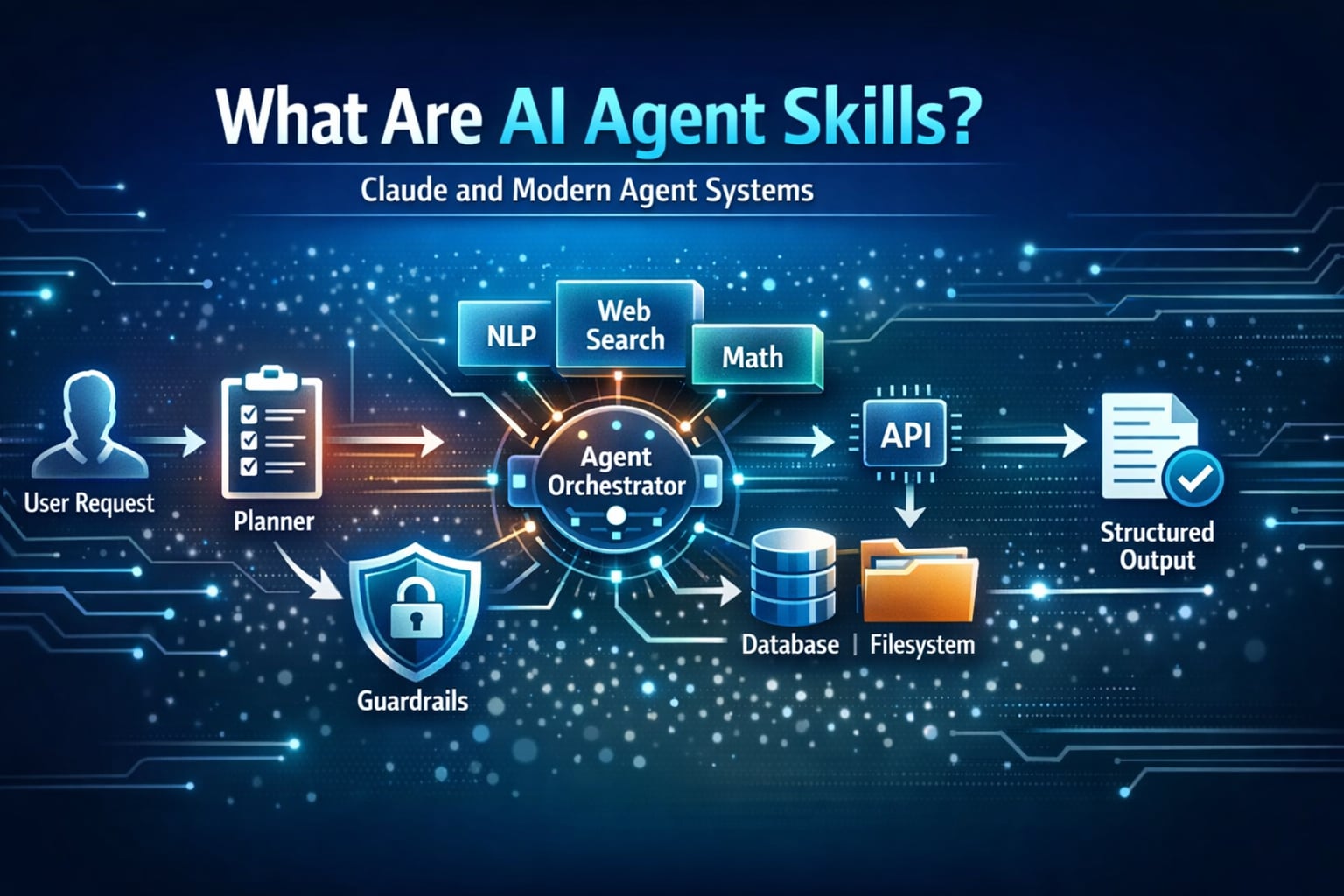
As Claude and newer AI agent platforms become more capable, one concept keeps showing up: Agent Skills. Skills turn one-off prompts into reusable capabilities that can be tested, improved, and shared across teams.
In this guide, you will learn what skills are, how they are used in Claude-style workflows and modern agent frameworks, and how to design skills that are actually safe in production.
If you want background first, start with What is MCP (Model Context Protocol)? Understanding the Differences and Retrieval-Augmented Generation (RAG) for Beginners: A Complete Guide.
Table of Contents
Open Table of Contents
- What Are Agent Skills?
- Why Skills Matter for Modern Agents
- How Skills Work in Claude and Agent Platforms
- Core Parts of a Good Skill
- Skill Lifecycle: Design to Production
- Example Skill: Support Ticket Triage
- Security and Safety Guidelines
- Common Mistakes and How to Avoid Them
- Real-World Examples and Use Cases
- FAQs
- 1. What is the difference between an AI agent skill and a tool?
- 2. Why do mature teams version skills like normal software components?
- 3. How do you evaluate whether a skill is production-ready?
- 4. Where should human-in-the-loop review be mandatory?
- 5. How would you scale from 5 skills to 100 skills without chaos?
- Conclusion
- Related Posts
- References
- YouTube Videos
What Are Agent Skills?
An AI agent skill is a reusable unit of behavior that tells an agent how to handle a specific job.
A skill usually combines:
- Instructions (how to reason)
- Tool usage rules (what it can call)
- Input and output expectations (contract)
- Guardrails (what it must not do)
- Success criteria (how we know it worked)
Think of it this way:
- A prompt is one conversation.
- A skill is a repeatable playbook.
- An agent is the orchestrator that chooses and runs the right skill.
Prompt vs Tool vs Skill vs Agent
| Component | Main Role | Example |
|---|---|---|
| Prompt | Ask for one response | ”Summarize this support ticket.” |
| Tool | Execute an external action | Query database, call API, create Jira issue |
| Skill | Bundle logic + tool policy + output format | ”Triage ticket and propose severity + owner” |
| Agent | Plan and coordinate multi-step work | Runs triage, routes task, sends status update |
Why Skills Matter for Modern Agents
Without skills, AI agents become hard to control. Every task starts from scratch, output quality is inconsistent, and safety rules are repeated manually.
With skills, you get:
- Consistency: Same inputs produce similar quality outputs.
- Speed: Teams reuse proven patterns instead of rewriting prompts.
- Governance: Tool permissions and boundaries are defined once.
- Observability: You can track which skill ran and how it performed.
- Scalability: New use cases are assembled by composing existing skills.
Real-world teams often treat skills as internal products: versioned, reviewed, and benchmarked.
How Skills Work in Claude and Agent Platforms
In Claude-centered workflows, teams often package reusable behavior as skill-like modules using structured instructions, tool boundaries, and role-specific context. In modern agent frameworks, the same idea appears as tool-enabled workflows, reusable agents, or task graphs.
This pattern is closely related to the architecture explained in What is MCP (Model Context Protocol)? Understanding the Differences, where the protocol standardizes how agents access tools.
Typical Runtime Flow
flowchart TD
  A[User Request] --> B[Planner Agent]
  B --> C{Select Skill}
  C --> D[Load Skill Instructions]
  D --> E[Apply Tool Policy]
  E --> F[Execute Steps]
  F --> G[Validate Output]
  G --> H[Final Response]
Common Patterns Across Platforms
- Claude-based agent stacks: Emphasize explicit instructions, clear tool boundaries, and iterative refinement loops.
- LangGraph / workflow graphs: Skills map naturally to graph nodes with deterministic transitions.
- CrewAI / AutoGen multi-agent setups: Skills are role-level capabilities assigned to specialized agents.
- SDK-based agents: Skills are often functions with contracts, metadata, and evaluation hooks.
The naming changes between ecosystems, but the core concept is stable: reusable capability blocks with clear behavior.
For a practical tooling example, see Perforce MCP Server: AI-Powered Version Control for AI Agents, which shows how a structured tool interface helps agents execute reliable developer workflows.
Core Parts of a Good Skill
A production-ready skill should include these five parts.
1. Trigger and Scope
Define when the skill should run and when it should not.
Example:
- Run for inbound support tickets with customer impact.
- Do not run for billing disputes that require legal review.
2. Input Contract
Describe required fields and validation.
{
  "ticketId": "string",
  "customerTier": "free|pro|enterprise",
  "message": "string",
  "attachments": ["url"]
}
3. Reasoning Checklist
Give the agent a short checklist:
- Classify issue type.
- Estimate business impact.
- Decide severity.
- Propose owner and next action.
4. Tool Policy
Document exactly what tools are allowed.
allowedTools:
  - "knowledge_base.search"
  - "ticketing.update"
blockedTools:
  - "billing.refund.execute"
  - "admin.user.delete"
5. Output Contract
Force a predictable structure for downstream automation.
{
  "severity": "P1|P2|P3|P4",
  "category": "incident|bug|question|feature_request",
  "ownerTeam": "string",
  "customerReply": "string",
  "confidence": 0.0
}
Skill Lifecycle: Design to Production
Teams that succeed with AI agents usually treat skills like software components.
-
Design Define objective, constraints, and measurable outcomes.
-
Prototype Create the first prompt + tool policy + output schema.
-
Evaluate Run test cases (easy, normal, adversarial) and score results.
-
Harden Add refusal policy, fallback behavior, and red-team scenarios.
-
Version Publish
v1, track changes, and keep rollback available. -
Monitor Track latency, cost, quality, and safety incidents.
-
Improve Use production feedback to iterate prompts, tools, and thresholds.
Example Skill: Support Ticket Triage
Let us build a practical skill that appears in many Claude and agent workflows.
Skill Goal
Given a raw support message, decide severity, owner team, and first response draft in under 5 seconds.
Decision Flow
flowchart TD
  A[Ticket Arrives] --> B[Classify Type]
  B --> C[Estimate Impact]
  C --> D[Assign Severity]
  D --> E[Route Team]
  E --> F[Draft Customer Reply]
  F --> G[Send for Human Review if Low Confidence]
Example Skill Spec
name: support_ticket_triage
version: 1.2.0
objective: "Classify and route tickets with safe first-draft responses"
inputs:
  - ticketId
  - customerTier
  - message
rules:
  - "Never promise refunds or SLA credits"
  - "Escalate security issues to SecurityOps immediately"
  - "If confidence < 0.75, require human review"
outputs:
  - severity
  - ownerTeam
  - customerReply
  - confidence
Why This Works
- Clear boundaries reduce hallucinated actions.
- Structured output enables workflow automation.
- Confidence thresholds create safe handoff to humans.
Security and Safety Guidelines
Skills are powerful because they can take action. That is also where risk appears.
Minimum Safety Controls
- Least privilege: Allow only required tools.
- Action confirmation: Require human approval for destructive operations.
- Data boundaries: Prevent cross-tenant data leakage.
- Audit logging: Capture input, tool calls, and final output.
- Policy tests: Include prompt-injection and jailbreak scenarios.
Practical Rule
If a skill can change money, permissions, production systems, or customer data, add a human checkpoint before execution.
Common Mistakes and How to Avoid Them
1. Overloaded Skills
Trying to make one skill do everything creates brittle behavior. Split by business capability.
2. Missing Output Schema
Free-form outputs break integrations. Use strict JSON contracts.
3. No Evaluation Set
If you cannot measure quality, you cannot improve it. Keep a regression suite of real examples.
4. Weak Tool Governance
Broad tool access leads to unintended actions. Explicit allowlists are safer.
5. Ignoring Edge Cases
Include tests for ambiguous prompts, conflicting instructions, and low-context requests.
Real-World Examples and Use Cases
1. Customer Support Triage at Scale
Teams in SaaS companies use skills to classify incoming tickets, attach likely root causes, and route work to the right team before a human agent responds.
This is conceptually similar to event-driven designs used in System Design Interview: Notification Service for WhatsApp and Instagram, where correctness and delivery guarantees matter.
Practical impact:
- Faster first response time
- Better escalation quality for P1 incidents
- Lower support backlog during peak traffic
2. Engineering Copilot Workflows
Developer tooling teams use skills for repeatable tasks like dependency update summaries, pull request risk checks, and release note generation.
You can see a related implementation style in Perforce MCP Server: AI-Powered Version Control for AI Agents, where agent actions are constrained through explicit operations.
Practical impact:
- More consistent PR reviews
- Reduced context-switching for engineers
- Better traceability because outputs follow a strict schema
3. Security Operations Automation
Security teams can use skills to triage alerts, correlate logs, and draft incident timelines while enforcing strict no-action rules for destructive operations.
For local-first operations with stronger privacy controls, review What is OpenClaw? The Complete Personal AI Assistant Platform Guide.
Practical impact:
- Faster alert triage with human approval gates
- Improved incident documentation quality
- Lower chance of unsafe automated actions
FAQs
1. What is the difference between an AI agent skill and a tool?
A tool is an external capability, like querying a database or creating a ticket. A skill is the policy and reasoning layer that decides when and how to use tools for a specific goal.
In interviews, a strong answer explains that tools are execution primitives, while skills are reusable decision workflows built on top of those primitives.
2. Why do mature teams version skills like normal software components?
Versioning prevents silent behavior drift. If triage_skill v1.3 introduces an aggressive escalation rule, teams need rollback and auditability.
This is critical in production because even small prompt changes can alter routing, cost, and customer experience.
3. How do you evaluate whether a skill is production-ready?
Use a structured test set with known expected outcomes:
- Functional accuracy (correct category/severity)
- Safety compliance (no prohibited actions)
- Latency and cost thresholds
- Stability across prompt variations
A skill is production-ready when it passes quality and safety gates consistently, not when one demo looks good.
4. Where should human-in-the-loop review be mandatory?
Human approval should be mandatory for high-risk decisions: refunds, account lockouts, permission changes, legal responses, security incidents, or production operations.
A practical design is confidence-based routing plus policy-based hard checks. Even high confidence should not bypass policy-critical approvals.
5. How would you scale from 5 skills to 100 skills without chaos?
Use a skills registry with metadata (owner, version, domain, risk level), shared schemas, standardized evaluation, and clear deprecation policy.
Also separate planning from execution. A planner chooses skills, while each skill remains narrow and testable. This keeps complexity manageable as the catalog grows.
Conclusion
Skills are the missing middle layer between prompts and full autonomous systems. They help Claude workflows and modern agent platforms move from experimentation to reliable execution.
If you design each skill with explicit scope, strict tool boundaries, strong output contracts, and measurable quality checks, your agent stack becomes easier to scale and much safer to operate.
Related Posts
- What is MCP (Model Context Protocol)? Understanding the Differences
- Perforce MCP Server: AI-Powered Version Control for AI Agents
- What is OpenClaw? The Complete Personal AI Assistant Platform Guide
- Retrieval-Augmented Generation (RAG) for Beginners: A Complete Guide
- System Design Interview: Notification Service for WhatsApp and Instagram
References
- Anthropic Engineering: Building Effective Agents https://www.anthropic.com/engineering/building-effective-agents
- Anthropic Docs: Claude Code Overview https://docs.anthropic.com/en/docs/claude-code/overview
- Model Context Protocol: Introduction https://modelcontextprotocol.io/introduction
YouTube Videos
- “What are AI Agents?” - IBM Technology https://www.youtube.com/watch?v=F8NKVhkZZWI
- “AutoGen Tutorial: Create Collaborating AI Agent Teams” - AssemblyAI https://www.youtube.com/watch?v=0GyJ3FLHR1o
- “[1hr Talk] Intro to Large Language Models” - Andrej Karpathy https://www.youtube.com/watch?v=zjkBMFhNj_g