 ADevGuide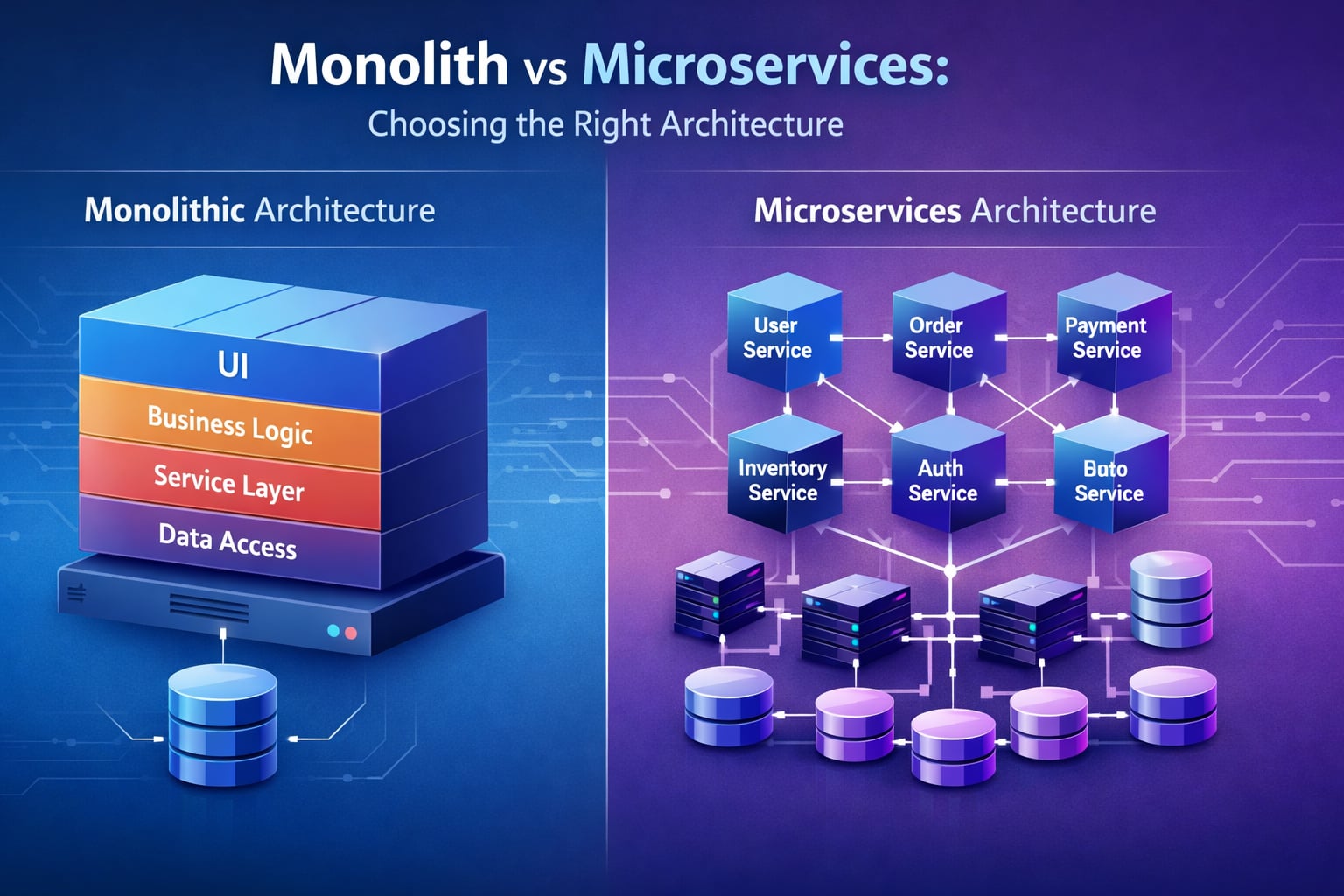
When building a software application, one of the most important architectural decisions you’ll make is choosing between a monolithic architecture and a microservices architecture. This choice affects how you develop, deploy, scale, and maintain your application for years to come.
In this guide, we’ll explore both architectures in depth, examine their advantages and disadvantages, and help you understand when to use each approach with real-world examples from companies like Netflix, Amazon, Shopify, and more.
If you are building your architecture fundamentals, also read What Is Client-Server Architecture? Beginner Guide and Application Server vs Web Server: Key Differences Explained.
Table of Contents
Open Table of Contents
- Quick Definition
- Related Reading in This Series
- What Is a Monolithic Architecture?
- What Is a Microservices Architecture?
- Visual Comparison: Architecture Diagrams
- Monolithic Architecture: Pros and Cons
- Microservices Architecture: Pros and Cons
- Real-World Examples
- When to Choose Monolithic Architecture
- When to Choose Microservices Architecture
- The Migration Path: From Monolith to Microservices
- Common Pitfalls to Avoid
- Interview Questions
- 1. What is the main difference between monolithic and microservices architecture?
- 2. When would you recommend starting with a monolithic architecture instead of microservices?
- 3. What are the main challenges of microservices architecture?
- 4. Explain the Strangler Fig pattern for migrating from monolith to microservices.
- 5. How does Netflix’s microservices architecture improve their availability and scalability?
- 6. What is a “distributed monolith” and why should you avoid it?
- 7. How do you handle distributed transactions across microservices?
- 8. What factors would make you choose a modular monolith over microservices?
- Conclusion
- References
- YouTube Videos
Quick Definition
A monolith is one deployable application where modules share one codebase and usually one database.
Microservices split the same system into independently deployable services, each owning a specific business capability.
The practical trade-off is simple:
- Monolith gives faster early development with lower operational overhead.
- Microservices give stronger team autonomy and scaling control at the cost of distributed-system complexity.
Related Reading in This Series
- What Is Client-Server Architecture? Beginner Guide
- What Is a Web Server? How Nginx and Apache Work
- Application Server vs Web Server: Key Differences Explained
- What Happens When You Type a URL? Step-by-Step Explained
What Is a Monolithic Architecture?
A monolithic architecture is a traditional software design approach where all components of an application are built, deployed, and run as a single unified unit. The entire codebase - user interface, business logic, and data access layer - exists in one tightly coupled application.
Key Characteristics
- Single Codebase: All functionality lives in one repository
- Single Deployment Unit: The entire application deploys together
- Shared Memory: Components communicate through in-process function calls
- Single Database: Typically uses one centralized database
- Tightly Coupled: Components are interdependent
Example: E-Commerce Monolith
Imagine an online store built as a monolith. It contains:
- User authentication module
- Product catalog service
- Shopping cart functionality
- Order processing logic
- Payment gateway integration
- Inventory management
- Email notification system
All these features are packaged into one application. When you deploy, you deploy everything together.
flowchart TD
    App[E-Commerce Monolith]
    Auth[User Auth]
    Catalog[Product Catalog]
    Cart[Cart]
    Orders[Orders]
    Payment[Payment]
    Inventory[Inventory]
    DB[(Single DB)]

    App --> Auth
    App --> Catalog
    App --> Cart
    App --> Orders
    App --> Payment
    App --> Inventory

    Auth --> DB
    Catalog --> DB
    Cart --> DB
    Orders --> DB
    Payment --> DB
    Inventory --> DB

    classDef app fill:#e1f5fe,stroke:#01579b,stroke-width:2px,color:#000000
    classDef data fill:#fff3e0,stroke:#e65100,stroke-width:2px,color:#000000
    class App,Auth,Catalog,Cart,Orders,Payment,Inventory app
    class DB data
What Is a Microservices Architecture?
A microservices architecture breaks down an application into small, independent services that each handle a specific business capability. These services run as separate processes, communicate over networks (usually via HTTP/REST or message queues), and can be developed, deployed, and scaled independently.
Key Characteristics
- Multiple Services: Each service focuses on one business function
- Independent Deployment: Services deploy separately
- Distributed System: Components communicate over the network
- Decentralized Data: Each service often has its own database
- Loosely Coupled: Services are independent and autonomous
Example: E-Commerce Microservices
The same online store, redesigned as microservices:
flowchart TD
    Gateway[API Gateway]
    UserS[User Service]
    ProductS[Product Service]
    CartS[Cart Service]
    OrderS[Order Service]
    PaymentS[Payment Service]
    InventoryS[Inventory Service]

    UserDB[(User DB)]
    ProductDB[(Product DB)]
    CartDB[(Cart DB)]
    OrderDB[(Order DB)]
    PaymentDB[(Payment DB)]
    InventoryDB[(Inventory DB)]

    Gateway --> UserS
    Gateway --> ProductS
    Gateway --> CartS
    Gateway --> OrderS
    Gateway --> PaymentS
    Gateway --> InventoryS

    UserS --> UserDB
    ProductS --> ProductDB
    CartS --> CartDB
    OrderS --> OrderDB
    PaymentS --> PaymentDB
    InventoryS --> InventoryDB

    OrderS -.calls.-> ProductS
    OrderS -.calls.-> CartS

    classDef svc fill:#c8e6c9,stroke:#2e7d32,stroke-width:2px,color:#000000
    classDef data fill:#fff3e0,stroke:#e65100,stroke-width:2px,color:#000000
    class Gateway,UserS,ProductS,CartS,OrderS,PaymentS,InventoryS svc
    class UserDB,ProductDB,CartDB,OrderDB,PaymentDB,InventoryDB data
Each service:
- Has its own codebase
- Manages its own database
- Can be written in different programming languages
- Deploys independently
- Scales independently
Visual Comparison: Architecture Diagrams
Let’s visualize how requests flow through each architecture.
Monolithic Request Flow
flowchart TD
    Client[Client]
    LB[Load Balancer]
    M1[Monolith A]
    M2[Monolith B]
    M3[Monolith C]
    DB[(Shared Database)]

    Client --> LB
    LB --> M1
    LB --> M2
    LB --> M3
    M1 --> DB
    M2 --> DB
    M3 --> DB

    classDef monolith fill:#e1f5fe,stroke:#01579b,stroke-width:2px,color:#000000
    classDef database fill:#fff3e0,stroke:#e65100,stroke-width:2px,color:#000000
    class M1,M2,M3 monolith
    class DB database
Microservices Request Flow
flowchart TD
    Client[Client]
    Gateway[Gateway]

    US[User Service]
    PS[Product Service]
    CS[Cart Service]
    OS[Order Service]

    UserDB[(User DB)]
    ProductDB[(Product DB)]
    CartDB[(Cart DB)]
    OrderDB[(Order DB)]

    Client --> Gateway
    Gateway --> US
    Gateway --> PS
    Gateway --> CS
    Gateway --> OS

    US --> UserDB
    PS --> ProductDB
    CS --> CartDB
    OS --> OrderDB

    OS -.Inter-service call.-> PS
    OS -.Inter-service call.-> CS

    classDef service fill:#c8e6c9,stroke:#2e7d32,stroke-width:2px,color:#000000
    classDef database fill:#fff3e0,stroke:#e65100,stroke-width:2px,color:#000000
    class US,PS,CS,OS service
    class UserDB,ProductDB,CartDB,OrderDB database
Monolithic Architecture: Pros and Cons
Advantages
1. Simplicity in Development
When starting a project, a monolith is straightforward. You have:
- One codebase to manage
- One repository to clone
- One IDE project to open
- Familiar development patterns
Real-World Example: Shopify started as a monolith in 2004. The simplicity allowed rapid feature development in the early days when the team was small.
2. Easier Debugging and Testing
Since everything runs in one process:
- Stack traces are complete and easy to follow
- You can set breakpoints across the entire codebase
- End-to-end testing is straightforward
- No network latency to complicate debugging
3. Simple Deployment
Deployment is a single operation:
# Build
npm run build

# Deploy
scp app.jar production-server:/apps/
systemctl restart myapp
You don’t need to orchestrate multiple services or manage deployment order.
4. Performance
In-process function calls are faster than network calls:
- No serialization/deserialization overhead
- No network latency
- Direct memory access
- ACID transactions are simple
Example: A monolith processing 1000 operations/second might only need one server, while microservices might need multiple services communicating over the network.
5. Easier to Understand
For new developers joining the team:
- Code is in one place
- Business logic flow is traceable
- Dependencies are explicit (imports/requires)
- Architecture is straightforward
Disadvantages
1. Scaling Challenges
You must scale the entire application, even if only one feature needs more resources.
Real-World Problem: If your reporting feature needs more CPU but your checkout process needs more memory, you scale the entire monolith - wasting resources.
2. Deployment Risk
Every deployment is all-or-nothing:
- Small bug fix requires full application restart
- One breaking change can bring down everything
- Rollbacks affect the entire application
- Deployment windows are risky
Example: A bug in the email notification code could crash the entire e-commerce site during Black Friday.
3. Technology Lock-In
Switching technologies is extremely difficult:
- The entire codebase uses the same language/framework
- Upgrading major versions affects everything
- Cannot experiment with new tech easily
Netflix’s Story: Their Java monolith made it hard to experiment with newer languages like Node.js or Go for specific use cases.
4. Code Coupling and Complexity
As the application grows:
- Modules become tightly coupled
- Change impact analysis becomes difficult
- Technical debt accumulates faster
- Onboarding new developers takes longer
Real Numbers: A 500,000-line monolith might take months for a new developer to understand, compared to weeks for a focused microservice.
5. Limited Development Team Scalability
Large teams working on a monolith face:
- Merge conflicts
- Code ownership disputes
- Coordination overhead
- Slower release cycles
Amazon’s Experience: As Amazon grew, their monolith became a bottleneck. Teams had to coordinate every release, slowing innovation.
Microservices Architecture: Pros and Cons
Advantages
1. Independent Scaling
Scale only what you need:
Real-World Example: Netflix
Netflix’s video streaming service scales differently than its recommendation engine:
- Streaming Service: Scaled to hundreds of instances during peak hours (8pm-11pm)
- Recommendation Engine: Steady moderate scaling
- User Profile Service: Lower scaling needs
This granular scaling saves millions in infrastructure costs.
2. Independent Deployment
Deploy services without affecting others:
Example: Update the payment service without touching the product catalog. Deploy 20 times per day if needed.
Amazon’s Approach: Teams deploy independently thousands of times per day. A bug in one service doesn’t block deployments of others.
3. Technology Flexibility
Choose the best tool for each job:
Real-World Stack at Uber:
- Routing Service: Go (for performance)
- Web Backend: Node.js (for async I/O)
- Data Processing: Python (for ML libraries)
- Real-time Tracking: Java (for robust concurrency)
4. Fault Isolation
Services can fail independently:
Example Circuit Breaker Pattern:
// If Payment Service is down, other services continue
if (paymentService.isDown()) {
  return "Payment temporarily unavailable, cart saved";
}
// Rest of the app works fine
Netflix’s Chaos Engineering: They deliberately crash services in production to ensure resilience. The architecture handles failures gracefully.
5. Team Autonomy
Teams own entire services:
Spotify’s Model:
- Search Team: Owns search service end-to-end
- Playlist Team: Owns playlist service
- Each Team: Chooses tech stack, deployment schedule, data models
This autonomy accelerates innovation.
Disadvantages
1. Operational Complexity
Managing distributed systems is hard:
- Need service discovery (Consul, Eureka)
- Require load balancing for each service
- Must handle network failures
- Need distributed logging (ELK stack)
- Require distributed tracing (Jaeger, Zipkin)
Infrastructure Requirements:
Monolith: 1 app server, 1 database, 1 load balancer
Microservices: 10+ services, 10+ databases, service mesh,
               API gateway, monitoring, tracing, logging
2. Network Latency and Reliability
Function calls become network calls:
Performance Impact:
Monolith:
  getUserProfile() -> 0.001ms (in-process call)

Microservices:
  HTTP GET /users/123 -> 50-200ms (network call)
  - DNS lookup: 10ms
  - TCP handshake: 20ms
  - HTTP request/response: 20-170ms
  - Serialization overhead: network packets
3. Data Consistency Challenges
Distributed transactions are complex:
Problem Scenario: When placing an order, you need to:
- Create order record
- Deduct inventory
- Process payment
- Send confirmation email
In a monolith: One database transaction (ACID guarantees)
In microservices: Eventual consistency, saga pattern, compensation logic
Real-World Complexity: Uber’s ride matching involves multiple services. Ensuring consistency required sophisticated patterns like event sourcing and CQRS.
4. Testing Complexity
End-to-end testing is harder:
Challenges:
- Must run multiple services
- Need to mock service dependencies
- Contract testing between services
- Integration tests are slower
- Environment setup is complicated
Example: Testing checkout might require running user, cart, inventory, payment, and order services - each with its own database.
5. Higher Initial Costs
More infrastructure from day one:
Cost Breakdown:
- Monolith: 1 app server ($50/month), 1 database ($20/month)
- Microservices: 5 services ($250/month), 5 databases ($100/month), API gateway ($50/month), monitoring tools ($100/month)
Startup Reality: Premature microservices can drain resources before you validate product-market fit.
Real-World Examples
Netflix: Successful Migration to Microservices
The Journey:
2007: Netflix ran on a monolithic Java application
- Single database
- Vertical scaling
- Deployment took hours
- Crashes affected entire service
2008: Database corruption caused 3-day outage
- Decided to move to the cloud
- Began breaking the monolith
2012: Fully migrated to AWS microservices
- 100+ microservices
- Each team owns services
- Deploy thousands of times per day
Results:
- Uptime: Improved from 99% to 99.99%
- Scale: Handles 200+ million subscribers
- Innovation: Faster feature development
- Cost: Efficient scaling during peak hours
Architecture Today:
- 700+ microservices
- Chaos Monkey tests resilience
- Regional isolation for availability
Amazon: From Monolith to Service-Oriented Architecture
Early 2000s Problem:
- Obidos (monolithic platform) became unmaintainable
- 100+ developers stepping on each other
- Deployments took days
- Feature velocity slowed dramatically
2002 Mandate: Jeff Bezos famously required:
“All teams will henceforth expose their data and functionality through service interfaces.”
Results:
- Team autonomy increased
- AWS was born from this architecture
- Amazon became more agile
- Innovation accelerated
Shopify: Modular Monolith Approach
Strategy: Shopify kept a monolith but made it modular
Shopify’s Core (Ruby on Rails monolith):
- Well-organized modules
- Clear boundaries between components
- Shared codebase benefits
- Easier to understand and debug
Extracted Services:
- Payment processing (needs PCI compliance)
- Image processing (resource-intensive)
- Shipping calculations (scaling needs)
Why This Works:
- Simpler than full microservices
- Leverages Ruby on Rails strengths
- Focused extraction where needed
- Lower operational overhead
Etsy: Staying with Monolith
Decision: Etsy intentionally kept their PHP monolith
Reasoning:
- Team size manageable (hundreds, not thousands)
- Deployment pipeline optimized (50+ deploys/day)
- Strong modularity within monolith
- Avoiding microservices complexity
Key Practices:
- Excellent CI/CD pipeline
- Feature flags for safe releases
- Strong code ownership
- Continuous deployment
Results: Proves monoliths can scale with good engineering practices.
When to Choose Monolithic Architecture
Choose a monolith when:
1. Starting a New Project
Reasons:
- Faster initial development
- Simpler infrastructure
- Lower costs
- Easier to pivot
Example: Y Combinator advice - start with a monolith, even if you know you’ll eventually need microservices.
2. Small Team (Under 10 Developers)
Why:
- Team can coordinate easily
- Communication overhead is low
- Everyone understands the codebase
- No need for service boundaries
3. Simple Domain
When your application:
- Has straightforward business logic
- Doesn’t need independent scaling
- Has predictable traffic patterns
- Serves a focused use case
Example: Internal admin tools, content management systems, small SaaS products.
4. Tight Coupling Is Acceptable
If your features are:
- Highly interdependent
- Share common data models
- Need ACID transactions
- Require synchronized changes
Example: Accounting software where transactions must be atomic.
5. Limited Resources
When you have:
- Small infrastructure budget
- Limited DevOps expertise
- No need for complex orchestration
- Focus on product over architecture
6. Rapid Prototyping Phase
During:
- MVP development
- Product validation
- Market testing
- Early customer discovery
Strategy: Prove the business model first, optimize architecture later.
When to Choose Microservices Architecture
Choose microservices when:
1. Large-Scale Application
Indicators:
- 50+ developers
- Multiple teams
- Complex business domain
- High traffic (millions of users)
Example: E-commerce platforms like Amazon, streaming services like Netflix.
2. Need Independent Scaling
When:
- Different components have different load patterns
- Cost optimization is critical
- Performance requirements vary by feature
Example: Video streaming (high bandwidth) vs. user profiles (low resource needs).
3. Polyglot Requirements
If you need:
- Different languages for different problems
- Best tool for each job
- Technology experimentation
Real Scenario: Machine learning in Python, real-time APIs in Node.js, data processing in Scala.
4. Multiple Teams with Clear Boundaries
When you have:
- Autonomous teams
- Clear domain separation
- Independent release schedules
- Ownership culture
Example: Spotify’s squad model - each squad owns a service.
5. High Availability Requirements
For systems that:
- Cannot tolerate downtime
- Need graceful degradation
- Require fault isolation
- Serve critical functions
Example: Payment processing, healthcare systems, financial trading platforms.
6. Regulatory or Compliance Needs
When:
- Certain data must be isolated (PCI, HIPAA)
- Different components have different compliance requirements
- Audit trails per service
- Security boundaries are critical
Example: Payment data must be isolated from rest of e-commerce platform.
7. Continuous Deployment at Scale
If you want:
- Deploy multiple times per day
- Independent release cycles
- Minimize deployment risk
- A/B testing at service level
Netflix: Deploys thousands of times per day with minimal risk.
The Migration Path: From Monolith to Microservices
Many successful companies started with monoliths and migrated to microservices. Here’s how:
The Strangler Fig Pattern
Named after fig trees that gradually replace their host tree.
Strategy:
- Keep monolith running
- Slowly extract services
- Route traffic to new services
- Retire old code gradually
Example Flow:
flowchart TD
    Start[Monolithic App]
    Step1[Extract Service 1]
    Step2[Route via Proxy]
    Step3[Extract Service 2]
    Step4[Retire Monolith]
    End[Microservices]

    Start --> Step1
    Step1 --> Step2
    Step2 --> Step3
    Step3 --> Step4
    Step4 --> End

    classDef process fill:#c8e6c9,stroke:#2e7d32,stroke-width:2px,color:#000000
    class Step1,Step2,Step3,Step4 process
Step-by-Step Migration
Phase 1: Identify Bounded Contexts
Analyze your monolith:
- Which modules are independent?
- What are natural business boundaries?
- Which features scale differently?
Example: E-commerce boundaries:
- User management
- Product catalog
- Shopping cart
- Order processing
- Payment
- Inventory
Phase 2: Extract Edge Services First
Start with services that:
- Have clear boundaries
- Minimal dependencies
- Well-understood domain
- Lower risk if issues occur
First Extraction Candidates:
- Email notifications
- Image processing
- Reporting
- Search
Phase 3: Build Service Infrastructure
Before extracting core services:
- Set up API gateway
- Implement service discovery
- Configure monitoring and logging
- Establish deployment pipeline
- Create testing strategy
Phase 4: Extract Core Services
Move critical business logic:
- One service at a time
- Maintain backward compatibility
- Run in parallel initially
- Gradually shift traffic
Phase 5: Decommission Monolith Code
As services prove stable:
- Remove corresponding monolith code
- Update routing rules
- Archive old code
- Document the new architecture
Real-World Timeline
Soundcloud’s Migration:
- Year 1: Infrastructure setup, first service extracted
- Year 2: 5 key services extracted
- Year 3: 20 services running
- Year 4: Majority of traffic on microservices
- Year 5: Monolith fully retired
Key Takeaway: Migration takes years, not months. Plan accordingly.
Common Pitfalls to Avoid
1. Premature Microservices
The Mistake: Building microservices before validating the product
Why It Fails:
- Operational complexity distracts from product
- Overhead slows development
- Boundaries might be wrong
- Costs exceed benefits
Better Approach: Start with a well-structured monolith. Extract services when you have:
- Proven product-market fit
- Growing team (10+ developers)
- Clear scaling needs
- Resources for DevOps
2. Wrong Service Boundaries
The Mistake: Breaking services along technical layers instead of business domains
Wrong:
- Frontend Service
- Backend Service
- Database ServiceRight:
- User Service
- Product Service
- Order ServiceImpact: Wrong boundaries lead to tight coupling, defeating microservices benefits.
3. Distributed Monolith
The Mistake: Microservices architecture with monolith coupling
Signs:
- Services that must deploy together
- Shared database across services
- Synchronous calls everywhere
- No service can work independently
Result: Worst of both worlds - microservices complexity without benefits.
4. Ignoring Data Consistency
The Mistake: Assuming ACID transactions work across services
Reality: Distributed systems require:
- Eventual consistency
- Saga pattern for transactions
- Compensation logic
- Idempotency
Learning: Study patterns like Event Sourcing, CQRS, and Saga before pursuing microservices.
5. Inadequate Monitoring
The Mistake: No distributed tracing or centralized logging
Problem: When something breaks:
- Can’t trace requests across services
- No visibility into bottlenecks
- Debugging takes hours/days
- Mean time to recovery increases
Solution: Invest early in:
- Distributed tracing (Jaeger, Zipkin)
- Centralized logging (ELK stack)
- Metrics dashboards (Grafana)
- Alerting (PagerDuty, Opsgenie)
6. Underestimating DevOps Needs
The Mistake: Building microservices without DevOps expertise
Requirements:
- Container orchestration (Kubernetes)
- Service mesh (Istio, Linkerd)
- CI/CD pipelines
- Infrastructure as code
- Monitoring and observability
Reality: Need dedicated DevOps engineers or significant time investment.
Interview Questions
1. What is the main difference between monolithic and microservices architecture?
Answer:
A monolithic architecture is a single unified application where all components (UI, business logic, data access) are tightly coupled and deployed as one unit. All code runs in a single process and typically uses one database.
A microservices architecture breaks the application into small, independent services that each handle a specific business capability. Services run as separate processes, communicate over networks, and can be developed, deployed, and scaled independently.
Key Differences:
- Deployment: Monolith = one unit; Microservices = many independent units
- Scaling: Monolith = scale entire app; Microservices = scale individual services
- Technology: Monolith = one stack; Microservices = polyglot
- Data: Monolith = shared database; Microservices = database per service
2. When would you recommend starting with a monolithic architecture instead of microservices?
Answer:
I recommend starting with a monolith in these scenarios:
1. New Product/Startup:
- The business model isn’t validated yet
- Requirements will change frequently
- Need to move fast and iterate
- Limited resources
2. Small Team (under 10 developers):
- Team can coordinate easily
- Communication overhead is low
- Don’t need autonomous teams yet
3. Limited Domain Complexity:
- Business logic is straightforward
- No clear service boundaries
- Features are tightly coupled
4. Resource Constraints:
- Small infrastructure budget
- No DevOps expertise
- Can’t support operational complexity
Real-World Example: Y Combinator advises startups to begin with monoliths. Even giants like Amazon and Netflix started as monoliths and migrated later when they had clear scaling needs and larger teams.
3. What are the main challenges of microservices architecture?
Answer:
1. Operational Complexity:
- Must manage multiple services, databases, deployments
- Need service discovery, load balancing, API gateways
- Require sophisticated monitoring and tracing
- Infrastructure costs are higher
2. Distributed System Challenges:
- Network calls are slower than function calls (50-200ms vs 0.001ms)
- Network failures must be handled
- Cascading failures can occur
- Debugging across services is harder
3. Data Consistency:
- No simple ACID transactions
- Must implement eventual consistency
- Need patterns like Saga or Event Sourcing
- Handling distributed transactions is complex
4. Testing Complexity:
- End-to-end tests require running multiple services
- Contract testing between services needed
- Environment setup is complicated
- Integration testing is slower
5. Development Overhead:
- More boilerplate code
- Need API contracts
- Deployment coordination
- Higher cognitive load
Real-World Impact: Uber’s microservices grew to over 2,000 services, creating significant operational overhead. They had to invest heavily in tooling just to manage service complexity.
4. Explain the Strangler Fig pattern for migrating from monolith to microservices.
Answer:
The Strangler Fig Pattern is a gradual migration strategy inspired by fig trees that grow around host trees and eventually replace them. Instead of rewriting the entire monolith (risky and expensive), you incrementally extract services while keeping the monolith running.
How It Works:
Step 1: Route traffic through a proxy/API gateway
- All requests go through this layer
- Proxy decides: route to monolith or new service
Step 2: Extract one service at a time
- Identify a bounded context
- Build it as a microservice
- Deploy alongside monolith
Step 3: Redirect traffic gradually
- Route certain requests to the new service
- Monitor for issues
- Keep monolith code as fallback
Step 4: Retire monolith code
- Once service proves stable
- Remove corresponding monolith code
- Repeat for next service
Example:
Week 1: Extract email service -> 10% traffic
Week 2: Monitor, fix bugs -> 50% traffic
Week 3: Full traffic to email service
Week 4: Delete email code from monolith
Month 2: Extract payment service
...continue...Benefits:
- Low risk (can rollback any time)
- No “big bang” rewrite
- Monolith stays functional
- Learn and adapt as you go
Real-World: Soundcloud used this pattern and took 4+ years to fully migrate, extracting services incrementally.
5. How does Netflix’s microservices architecture improve their availability and scalability?
Answer:
Netflix’s microservices architecture enables their high availability and massive scale through several key strategies:
1. Independent Scaling:
- Streaming service: Scales to hundreds of instances during peak hours (8pm-11pm)
- Recommendation engine: Moderate, steady scaling
- User profiles: Lower resource needs
- This granular scaling saves millions in infrastructure costs
2. Fault Isolation:
- If one service fails, others continue working
- Example: If recommendation service crashes, streaming still works
- Users might see “Continue Watching” instead of personalized recommendations, but can still watch shows
- Circuit breakers prevent cascading failures
3. Regional Isolation:
- Services deployed in multiple AWS regions
- If one region has issues, traffic shifts to others
- No single point of failure
4. Chaos Engineering:
- Chaos Monkey randomly kills services in production
- Forces architecture to handle failures gracefully
- Builds resilience into the system
5. Rapid Deployments:
- 700+ microservices
- Deploy thousands of times per day
- No need to coordinate across all teams
- Bug fixes deploy in minutes, not hours
Results:
- Uptime: 99.99% (compared to 99% with their old monolith)
- Scale: Serves 200+ million subscribers globally
- Performance: Efficient resource usage during peak/off-peak
- Innovation: Teams can experiment and deploy independently
Architecture Benefit: During a major outage (e.g., AWS S3 failure in 2017), Netflix’s architecture allowed them to gracefully degrade - some features unavailable, but core streaming continued.
6. What is a “distributed monolith” and why should you avoid it?
Answer:
A distributed monolith is the worst architectural pattern - it combines the complexity of microservices with the tight coupling of a monolith. You get all the disadvantages of both approaches with none of the benefits.
Characteristics:
1. Services that must deploy together:
- Service A won’t work without new version of Service B
- Can’t deploy independently
- Coordinated releases required
2. Shared database:
- Multiple services directly access same database
- No data encapsulation
- Schema changes affect all services
3. Tight coupling via synchronous calls:
User Service -> Product Service -> Cart Service -> Order Service- Chain of synchronous HTTP calls
- If any service is slow, entire chain is slow
- No service can function independently
4. No clear boundaries:
- Business logic scattered across services
- Services know too much about each other
- Changes ripple through multiple services
Why It’s a Problem:
You get microservices disadvantages:
- Operational complexity
- Network latency
- Distributed debugging
- Higher infrastructure costs
But NOT the benefits:
- Can’t scale independently (all must scale together)
- Can’t deploy independently
- No fault isolation
- No technology flexibility
How to Avoid:
Design for Independence:
- Each service owns its data (database per service)
- Communicate asynchronously (events/messages)
- Services can function with degraded behavior if dependencies fail
Respect Bounded Contexts:
- Services model complete business capabilities
- Minimal inter-service dependencies
- Clear API contracts
Test Independence:
- Can you deploy one service without affecting others?
- Can services run in isolation?
- Do services have their own data storage?
Real-World Warning: Many companies attempt microservices and accidentally create distributed monoliths, experiencing the worst of both worlds.
7. How do you handle distributed transactions across microservices?
Answer:
In microservices, traditional ACID transactions don’t work across services. You can’t have a single database transaction spanning multiple service databases. Instead, we use patterns to achieve eventual consistency:
1. Saga Pattern
Break a distributed transaction into a series of local transactions, each with a compensating action.
Example: Order Processing
Order Service -> Create Order (local transaction)
    ->
Inventory Service -> Reserve Items (local transaction)
    ->
Payment Service -> Charge Customer (local transaction)
    ->
Shipping Service -> Create Shipment (local transaction)
If Payment Fails:
- Execute compensation:
- Release reserved inventory
- Cancel order
- Notify customer
Two Types:
Choreography (event-based):
- Each service listens for events and acts
- Publishes new events when done
- Decentralized
Orchestration (coordinator):
- Central orchestrator directs the saga
- Tells each service what to do
- Centralized control
2. Event Sourcing
Store state changes as a sequence of events rather than updating current state.
Benefits:
- Complete audit trail
- Can rebuild state from events
- Easy to implement compensating transactions
- Natural fit for eventual consistency
3. Two-Phase Commit (Avoid in most cases)
Traditional distributed transaction protocol:
- Phase 1: Prepare (all services vote)
- Phase 2: Commit (if all voted yes)
Why Avoid:
- Blocking protocol (waits for all)
- Poor availability
- Not cloud-native
- Goes against microservices principles
4. Best Practices
Design for Idempotency:
// All operations should be safely retryable
function processPayment(orderId, amount, idempotencyKey) {
  if (alreadyProcessed(idempotencyKey)) {
    return existingResult;
  }
  // Process payment...
}
Implement Retries with Backoff:
- Network failures are common
- Retry with exponential backoff
- Set maximum retry limits
Monitor Compensation Actions:
- Track failed transactions
- Alert when compensations execute
- Analyze patterns
Real-World Example: Uber’s ride booking uses Saga pattern - if payment fails after driver assignment, the system compensates by canceling the ride and making the driver available again.
8. What factors would make you choose a modular monolith over microservices?
Answer:
A modular monolith is often the sweet spot - you get many benefits of microservices without the operational complexity. I’d choose this approach when:
1. Medium-Sized Team (10-50 developers):
- Too large for unstructured monolith
- Too small to justify full microservices overhead
- Benefits from modularity
- Can coordinate deployment
2. Clear Module Boundaries Without Need for Independence:
- Distinct business domains exist
- But don’t need independent scaling
- Don’t need independent deployment
- Shared data models make sense
3. Strong Transaction Requirements:
- Need ACID guarantees across multiple domains
- Consistency is more important than availability
- Rollbacks must be atomic
- Financial or regulatory constraints
4. Limited DevOps Resources:
- Small DevOps team
- Focus development on product, not infrastructure
- Want simplicity in operations
- Cost-conscious
5. Stable Domain with Predictable Growth:
- Requirements are well-understood
- Traffic patterns are predictable
- Scaling needs are uniform
- Low risk of exponential growth
Benefits of Modular Monolith:
Better than unstructured monolith:
- Clear boundaries enforce separation
- Code organization improves
- Easier to reason about
- Can extract services later if needed
Simpler than microservices:
- Single deployment
- No network overhead
- ACID transactions
- Easier debugging
Real-World Success: Shopify
Shopify runs a massive modular monolith (Ruby on Rails) serving millions of merchants:
Core Monolith:
- Well-organized modules
- Clear boundaries (Shop, Product, Order, etc.)
- Single deployment
- Shared database with good schema design
Extracted Services (Only When Necessary):
- Payment processing (PCI compliance)
- Image processing (resource-intensive)
- Shipping calculations (third-party integrations)
Results:
- Handles Black Friday traffic (peak: 10,000+ orders/minute)
- Simple operations compared to full microservices
- Fast feature development
- Easy onboarding for new developers
When to Extract Services:
- Module truly needs independent scaling
- Compliance requires isolation
- Technology choice matters (e.g., ML in Python)
- Team ownership is critical
Best Practice: Start with modular monolith. Extract services only when you have a clear, compelling reason.
Conclusion
Choosing between monolithic and microservices architecture isn’t about picking the “better” option - it’s about choosing the right architecture for your current needs and constraints.
Start with a Monolith If:
- You’re building a new product
- You have a small team (under 10)
- Your domain is simple or uncertain
- You need to move fast and iterate
- You have limited resources
Consider Microservices When:
- You have a large team (50+ developers)
- Different components need independent scaling
- You require fault isolation
- Multiple teams need autonomy
- You’re ready for operational complexity
The Modern Approach:
- Start simple: Well-structured monolith
- Add modularity: Clear boundaries within monolith
- Extract strategically: Microservices only where benefits justify costs
- Migrate gradually: Strangler Fig pattern over years, not months
Remember: Companies like Netflix, Amazon, and Uber started with monoliths and successfully migrated to microservices only after they had proven their business model, built large teams, and faced real scaling challenges.
The key lesson: Architecture should evolve with your business, not the other way around. Don’t prematurely optimize for scale you don’t yet have.
For deeper protocol and request-flow context, continue with How the Internet Works: Simple Explanation for Developers and TCP vs UDP Explained Clearly with Real Examples.
References
-
Martin Fowler - Microservices
https://martinfowler.com/articles/microservices.html -
Martin Fowler - Monolith First
https://martinfowler.com/bliki/MonolithFirst.html -
AWS - Monolithic vs Microservices Architecture
https://aws.amazon.com/compare/the-difference-between-monolithic-and-microservices-architecture/ -
Netflix Tech Blog
https://netflixtechblog.com/ -
Shopify Engineering
https://shopify.engineering/
YouTube Videos
- “What are Microservices?” - IBM Technology
https://www.youtube.com/watch?v=CdBtNQZH8a4 - “When To Use Microservices (And When Not To!)” - GOTO Conferences
https://www.youtube.com/watch?v=GBTdnfD6s5Q - “Microservices” - Martin Fowler (GOTO Conferences)
https://www.youtube.com/watch?v=wgdBVIX9ifA