 ADevGuide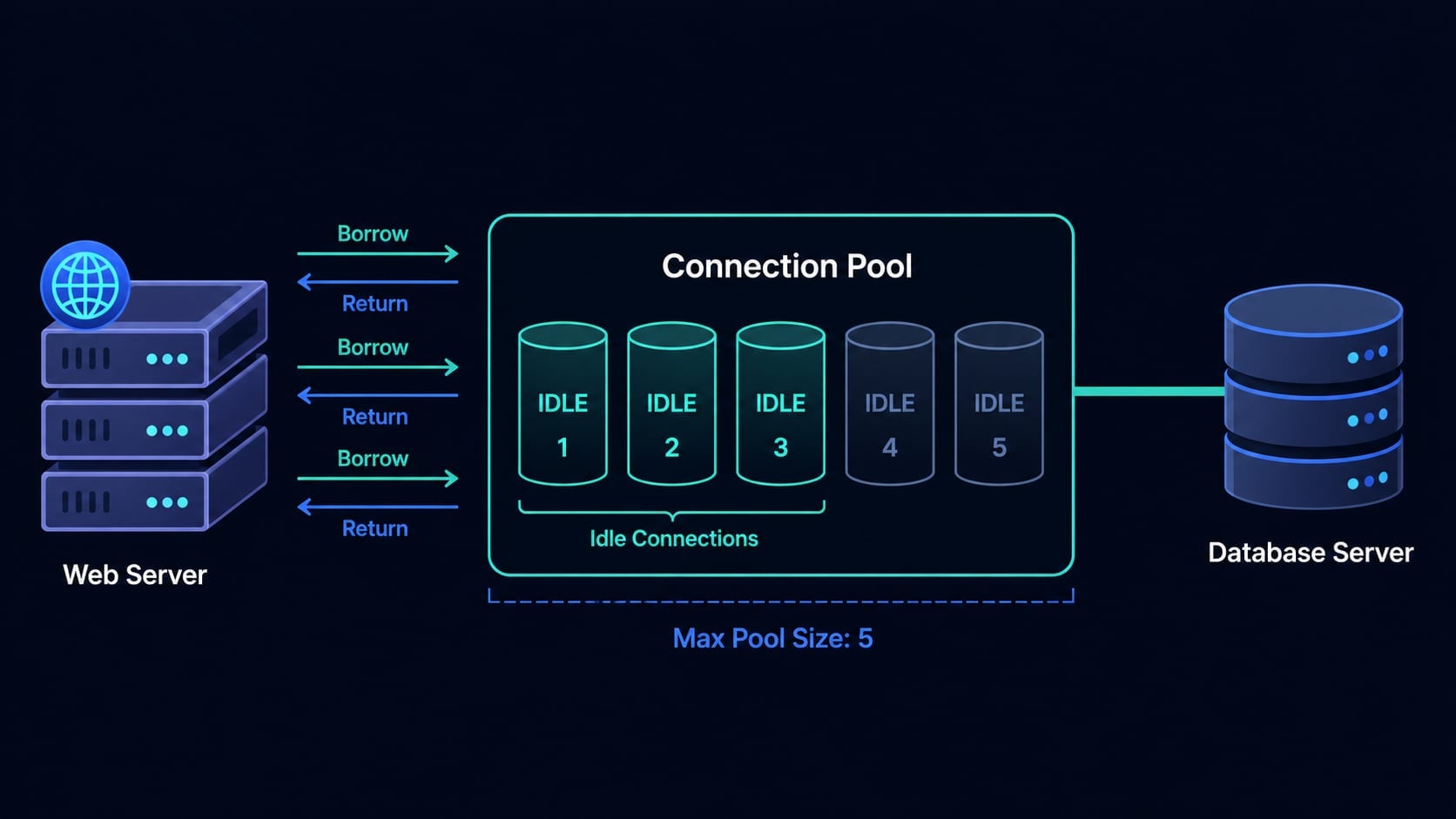
Imagine your web application is handling a hundred requests per second. Each request needs to query the database. Without any optimization, that means opening a hundred database connections per second, each requiring a full TCP handshake, TLS negotiation, authentication, and memory allocation on the database server - and then immediately tearing them all down again.
Opening a database connection typically takes 50 to 100 milliseconds and can consume over a megabyte of memory on the server. Under real traffic, this overhead does not just slow your application down - it can crash your database entirely.
Database connection pooling solves this by reusing a fixed set of pre-opened connections instead of opening and closing one for every request. It is one of the most impactful, non-optional optimizations in backend development, and every production application uses it.
This guide explains exactly what connection pooling is, how it works under the hood, how to configure it, and what happens when things go wrong. If you are not yet familiar with how transactions work, read What Is a Database Transaction? Step-by-Step Guide first, since pooling and transactions interact closely in real applications.
Table of Contents
Open Table of Contents
- The Cost of Opening a Database Connection
- What Is Connection Pooling?
- How a Connection Pool Works
- Connection Lifecycle Diagram
- Pool States: Idle, Active, and Waiting
- Key Configuration Parameters
- Connection Pooling in Practice
- What Happens When the Pool Is Exhausted?
- Connection Leaks
- In-Process Pooling vs External Proxy Pooling
- How to Size Your Pool
- Common Mistakes
- Interview Questions
- 1. What problem does connection pooling solve?
- 2. What happens when all pool connections are in use?
- 3. What is a connection leak and how do you prevent it?
- 4. What is the difference between in-process pooling and external proxy pooling?
- 5. Why shouldn’t you set
maximumPoolSizeas high as possible? - 6. How do transactions interact with a connection pool?
- Conclusion
- References
- YouTube Videos
The Cost of Opening a Database Connection
Before understanding pooling, you need to understand what opening a database connection actually involves. It is not a cheap operation.
When your application connects to the database, several things happen in sequence:
- A TCP socket is opened between your application server and the database host.
- A TLS handshake is performed to establish an encrypted channel.
- Your application sends credentials; the database server authenticates the user and verifies privileges.
- The database server allocates a dedicated process or thread to manage the session, consuming memory for buffers, sort areas, and connection metadata.
- The connection is finally ready to accept queries.
Each of these steps adds latency and resource consumption. PostgreSQL allocates roughly 1 to 2 MB of memory per connection just for session overhead. MySQL requires its own per-connection thread. At 500 concurrent connections, that is a gigabyte of memory doing nothing except holding sessions open.
Establishing the connection itself takes 50 to 100 ms on a local network - and more over a cloud network. A query that runs in 2 ms is meaningless if the connection to run it takes 80 ms to establish.
The real problem emerges under load. Consider a web application receiving 300 concurrent HTTP requests. Without pooling:
- 300 connections are opened simultaneously.
- The database’s
max_connectionssetting (PostgreSQL defaults to 100, MySQL to 151) is immediately exceeded. - The database starts rejecting connections with errors like
FATAL: sorry, too many clients already. - Even if the limit is not hit, 300 connection setups at 80 ms each create a wall of latency.
The solution is to stop treating connections as disposable.
What Is Connection Pooling?
Connection pooling maintains a cache of open database connections that are reused across requests rather than opened and closed each time.
Instead of your application opening a connection, running a query, and closing the connection, it borrows an already-open connection from the pool, runs the query, and returns the connection to the pool. The connection stays alive and ready for the next request.
The analogy that makes this click: think of a pool as a taxi fleet. Without pooling, every passenger builds a car to get somewhere, then scraps it at the destination. With pooling, a fleet of taxis circulates continuously - passengers just get in, get out, and the taxi moves on to the next fare. The fleet is small, busy, and nothing is wasted building and scrapping cars.
The database server sees a small, stable group of long-lived connections rather than a chaotic flood of connections being created and destroyed with every web request.
How a Connection Pool Works
Here is the step-by-step lifecycle of a connection inside a pool:
1. Pool initialization. When your application starts, the pool opens a minimum number of connections (the minPoolSize setting) and holds them open, ready to use.
2. Request arrives. An incoming HTTP request needs a database query. Instead of opening a connection, it asks the pool for one.
3. Borrow. If an idle connection is available in the pool, the pool hands it to the request immediately - no TCP handshake, no authentication, no delay. If all connections are in use and the pool has not reached its maximum size, a new connection is opened and handed out.
4. Use. The request runs its SQL queries using the borrowed connection. From the application’s perspective, it behaves exactly like a fresh connection.
5. Return. When the request finishes, it returns the connection to the pool. The connection is not closed - it is marked idle and placed back in the available queue, ready for the next request.
6. Health validation. The pool periodically sends a lightweight ping (like SELECT 1) to idle connections to verify they are still alive. Stale or broken connections are discarded and replaced with fresh ones.
7. Pool teardown. When the application shuts down, all connections in the pool are cleanly closed.
Connection Lifecycle Diagram
flowchart TD
    A[Application Request] --> B{Idle connection\navailable?}
    B -- Yes --> C[Borrow from pool]
    B -- No --> D{Pool below\nmax size?}
    D -- Yes --> E[Open new\nDB connection]
    D -- No --> F[Wait in queue]
    E --> C
    F --> G{Timeout?}
    G -- No --> B
    G -- Yes --> H[Return error\nto caller]
    C --> I[Execute SQL]
    I --> J[Return connection\nto pool]
    J --> K[Connection marked idle]
Pool States: Idle, Active, and Waiting
At any moment, each connection in the pool is in one of three states:
Idle - the connection is open and available. No request is currently using it. The pool keeps it alive with periodic health pings so it is ready the instant it is needed.
Active - the connection has been borrowed by a request and is currently executing queries. It cannot be given to another request until it is returned.
Waiting - when all connections are active and the pool is at its maximum size, new requests queue up and wait. If a connection is returned before the timeout expires, the waiting request gets it. If not, the request receives an error.
flowchart TD
    Idle -->|Request borrows| Active
    Active -->|Request returns| Idle
    Active -->|Pool full, new request| Waiting
    Waiting -->|Connection returned| Active
    Waiting -->|Timeout| Error
Monitoring the ratio of idle vs. active connections, and the depth of the waiting queue, is the primary way to tell whether your pool is sized correctly.
Key Configuration Parameters
Every connection pool library exposes a similar set of knobs. Understanding what each one controls is essential for tuning in production.
| Parameter | What it controls | Typical value |
|---|---|---|
minimumIdle / minPoolSize | Connections kept open even when the application is idle | 2-10 |
maximumPoolSize / maxPoolSize | Total connections allowed (idle + active combined) | 10-20 |
connectionTimeout | How long a request waits for a connection before receiving an error | 30 seconds |
idleTimeout | How long an idle connection lives before being closed to free resources | 10 minutes |
maxLifetime | The maximum age of any connection, after which it is closed and replaced | 30 minutes |
keepaliveTime | How often idle connections are pinged to verify they are still alive | 30 seconds |
A few important notes on these values:
maxLifetime exists because databases and network equipment often silently kill connections that have been open too long. By proactively cycling connections before that happens, the pool prevents your application from suddenly receiving “connection was already closed” errors during peak traffic.
idleTimeout must always be set lower than any firewall or load balancer timeout in front of your database. If a firewall silently drops connections idle for more than 5 minutes, set idleTimeout to 3 or 4 minutes so the pool retires them first.
maximumPoolSize is the most commonly misconfigured setting. More connections is not always better - see the How to Size Your Pool section below.
Connection Pooling in Practice
Different languages and frameworks have their own preferred pool implementations, but they all expose the same concepts.
HikariCP - Java and Spring Boot
HikariCP is the default connection pool in Spring Boot and is widely considered the fastest and most reliable Java pool. Configuring it in application.properties:
spring.datasource.hikari.minimum-idle=5
spring.datasource.hikari.maximum-pool-size=20
spring.datasource.hikari.connection-timeout=30000
spring.datasource.hikari.idle-timeout=600000
spring.datasource.hikari.max-lifetime=1800000
spring.datasource.hikari.keepalive-time=30000
Because HikariCP is the Spring Boot default, simply adding a datasource dependency is enough to get a pool. The above properties let you tune its behavior without any extra code.
pg-pool - Node.js
The pg library for PostgreSQL includes a built-in pool:
import { Pool } from 'pg';

const pool = new Pool({
  host: 'localhost',
  database: 'myapp',
  user: 'appuser',
  password: 'secret',
  max: 20,                    // maximumPoolSize
  idleTimeoutMillis: 30000,
  connectionTimeoutMillis: 2000,
});

// The pool handles borrow and return automatically
async function getUserById(id) {
  const result = await pool.query(
    'SELECT * FROM users WHERE id = $1',
    [id]
  );
  return result.rows[0];
}
Notice that pool.query() borrows a connection, runs the query, and returns the connection automatically. You never call pool.connect() for simple queries. When you do need a transaction - which requires holding one connection across multiple statements - you call pool.connect() and then client.release() manually:
const client = await pool.connect();
try {
  await client.query('BEGIN');
  await client.query('UPDATE accounts SET balance = balance - 100 WHERE id = $1', [senderId]);
  await client.query('UPDATE accounts SET balance = balance + 100 WHERE id = $1', [receiverId]);
  await client.query('COMMIT');
} catch (e) {
  await client.query('ROLLBACK');
  throw e;
} finally {
  client.release();  // always return the connection, even on error
}
The finally block calling client.release() is critical. If you forget it, the connection is never returned to the pool and eventually the pool is exhausted - a connection leak.
SQLAlchemy - Python
SQLAlchemy’s engine has a built-in connection pool:
from sqlalchemy import create_engine, text

engine = create_engine(
    "postgresql+psycopg2://appuser:secret@localhost/myapp",
    pool_size=10,        # minimumIdle equivalent
    max_overflow=10,     # additional connections beyond pool_size
    pool_timeout=30,     # connectionTimeout in seconds
    pool_recycle=1800,   # maxLifetime in seconds
    pool_pre_ping=True,  # validates connection before borrowing (keepalive)
)

# Connection is automatically borrowed and returned using context manager
with engine.connect() as conn:
    result = conn.execute(text("SELECT * FROM users WHERE id = :id"), {"id": user_id})
    return result.fetchone()
pool_pre_ping=True is SQLAlchemy’s equivalent of keepaliveTime - it sends a lightweight ping before handing out a connection, preventing “connection was closed” errors from stale pool connections.
What Happens When the Pool Is Exhausted?
When all connections are active and the pool has reached maximumPoolSize, the next request that needs a connection must wait. The request sits in a queue until either:
- A connection is returned by another request, or
- The
connectionTimeoutwindow expires.
If the timeout expires, the caller receives an exception. In HikariCP this looks like:
HikariPool-1 - Connection is not available, request timed out after 30000ms.In a web application, this usually surfaces as a 500 error or a slow response to the user.
Pool exhaustion is almost always a symptom of one of two problems. Either the maximumPoolSize is genuinely too small for the current traffic level - in which case increasing it (carefully) and scaling the database is the right response. Or there is a connection leak - borrowed connections that are never returned.
Connection Leaks
A connection leak occurs when application code borrows a connection from the pool but fails to return it. Over time, leaked connections accumulate until the pool is full and all new requests time out.
Leaks almost always happen because of missing error handling:
# BAD  -  if an exception is raised, conn.close() never runs
conn = pool.get_connection()
result = conn.execute("SELECT ...")  # raises an exception
conn.close()  # this line is never reached  -  connection is leaked
# GOOD - context manager guarantees the connection is returned
with pool.get_connection() as conn:
result = conn.execute("SELECT ...")
# connection is returned here even if an exception was raisedIn Java, the equivalent is try-with-resources:
// GOOD  -  connection is returned when the try block exits, even on exception
try (Connection conn = dataSource.getConnection()) {
    PreparedStatement stmt = conn.prepareStatement("SELECT ...");
    ResultSet rs = stmt.executeQuery();
    // process results
}
// conn.close() is called automatically here, returning it to the pool
HikariCP has a useful leakDetectionThreshold setting. If a borrowed connection is not returned within that time window, HikariCP logs a warning with the stack trace of where the connection was borrowed. This is invaluable for tracking down leaks in production:
spring.datasource.hikari.leak-detection-threshold=5000In-Process Pooling vs External Proxy Pooling
There are two architecturally different places where pooling can live.
In-process pooling runs inside your application process. HikariCP, pg-pool, and SQLAlchemy’s engine are all examples. Each instance of your application maintains its own pool of connections to the database.
This works well for a single-instance application. The problem arises at scale: if you run 50 application replicas in Kubernetes and each has a pool with maxPoolSize=20, your database is receiving up to 1,000 simultaneous connections - even at low traffic. Most databases start struggling well before that.
External proxy pooling runs as a separate service between your application and the database. All application replicas connect to the proxy, and the proxy maintains a smaller, shared set of real database connections. Applications can open thousands of connections to the proxy cheaply, while the proxy multiplexes them onto a small number of real database connections.
The most widely used external pool for PostgreSQL is PgBouncer. It operates in three modes:
- Session mode - one database connection per client connection, held for the entire client session. Least efficient.
- Transaction mode - one database connection per transaction. Released back to the pool when the transaction ends. Most efficient for typical web workloads.
- Statement mode - one database connection per SQL statement. Only safe for queries that do not use multi-statement transactions.
flowchart TD
    subgraph Kubernetes Pods
        A1[App Pod 1\n20 connections] --> P
        A2[App Pod 2\n20 connections] --> P
        A3[App Pod 3\n20 connections] --> P
    end
    P[PgBouncer\nProxy Pool\n60 inbound → 15 DB connections] --> DB[(PostgreSQL\nmax_connections=100)]
In containerized deployments, combining in-process pooling with PgBouncer is a common and effective pattern: keep in-process pools small (5-10 connections), and let PgBouncer aggregate them into a manageable number of real connections.
How to Size Your Pool
The single most common mistake with connection pools is making them too large. A common belief is that more connections equals more throughput. The opposite is often true beyond a certain point.
The reason: the database itself is bounded by CPU cores. If your PostgreSQL server has 8 cores, it can run at most 8 queries in parallel. Having 200 active connections does not give you 200x parallelism - it gives you 8 queries running and 192 waiting, plus the overhead of context-switching between 200 sessions.
The HikariCP team’s formula (from Postgres wiki) for starting pool size:
connections = (core_count * 2) + effective_spindle_countFor a 4-core database server with SSD storage (effective_spindle_count = 1):
connections = (4 * 2) + 1 = 9That seems surprisingly small, but it is a starting point backed by benchmarks. The right approach is to start conservative, put your application under realistic load, watch the pool’s wait metrics, and increase maximumPoolSize in small increments until wait times are acceptable.
Most pool libraries expose metrics you can connect to Prometheus or Datadog:
- Active connections - how many connections are in use right now.
- Idle connections - how many are sitting unused.
- Pending threads - how many requests are waiting for a connection.
- Connection acquisition time - how long requests wait on average to get a connection.
If pending threads is consistently above zero, your pool is undersized or your queries are too slow. If idle connections vastly outnumber active ones, your pool is oversized and wasting memory on the database server.
Common Mistakes
Opening a new pool per request.
Creating a new Pool or DataSource object inside a request handler defeats the entire purpose of pooling. Pool objects should be created once at application startup and shared across all requests for the lifetime of the application.
Not configuring maxLifetime.
Without a maxLifetime, connections can live indefinitely. Firewalls, load balancers, and database servers will silently drop long-lived connections. The first time a request uses one of these dropped connections, it receives a cryptic error. Always set maxLifetime to a value shorter than any network timeout in your infrastructure.
Running external HTTP calls inside a borrowed connection.
If you borrow a connection, start a transaction, then make an HTTP request to an external API mid-transaction, and the API is slow, your connection is held for the entire duration of that API call. Other requests waiting for a connection are blocked. Never make network calls to external services while holding a database connection.
Setting maximumPoolSize too high.
More connections hurts past a threshold. Start at 10-20, benchmark under realistic load, and increase only if wait time metrics show you need more.
Ignoring the idleTimeout vs. firewall timeout relationship.
If a firewall or cloud NAT silently drops idle connections after 4 minutes, an idleTimeout of 10 minutes means the pool will try to use stale connections and get errors. Set idleTimeout below the lowest timeout in any network device between your app and the database.
Interview Questions
1. What problem does connection pooling solve?
Opening a database connection requires a full TCP handshake, TLS negotiation, authentication, and server-side memory allocation - a process that takes 50 to 100 milliseconds and consumes significant resources. In a high-traffic application, creating and destroying a connection for every request is too slow and too expensive. Connection pooling eliminates this overhead by maintaining a set of open, reusable connections. Requests borrow a connection, use it, and return it - the connection is never closed between requests.
2. What happens when all pool connections are in use?
When all connections are borrowed and the pool has reached its maximumPoolSize, new requests are queued and wait for a connection to be returned. If a connection is not returned within the connectionTimeout window, the waiting request receives an exception. In a web application, this typically manifests as a 500 error or timeout to the end user. This is the signal that either the pool is undersized for the current traffic, or there is a connection leak somewhere in the code.
3. What is a connection leak and how do you prevent it?
A connection leak is a borrowed connection that is never returned to the pool - usually because the code that borrowed it raised an exception before reaching the return statement. Over time, leaks exhaust the pool and cause all requests to time out. The prevention is always using resource-management constructs: try-with-resources in Java, with statements in Python, and try/finally with client.release() in Node.js. These guarantee the connection is returned regardless of whether an exception is raised.
4. What is the difference between in-process pooling and external proxy pooling?
In-process pooling (HikariCP, pg-pool, SQLAlchemy) runs inside each application instance. Each replica maintains its own set of real database connections. This scales well for a small number of replicas but can result in thousands of real database connections in a highly replicated deployment. External proxy pooling (PgBouncer, ProxySQL) runs as a separate service. All application replicas connect cheaply to the proxy, which multiplexes many inbound connections onto a small number of real database connections. External proxies are preferred in Kubernetes and other containerized environments where many replicas are common.
5. Why shouldn’t you set maximumPoolSize as high as possible?
The database server is bounded by the number of CPU cores it has. Running more queries in parallel than there are CPU cores creates context-switching overhead and increases memory pressure from session state. Benchmarks consistently show that past a relatively small pool size, additional connections reduce throughput rather than increase it. The HikariCP team’s recommended formula is (core_count * 2) + effective_spindle_count. Start there, measure wait time and throughput under load, and increase the size incrementally if the data justifies it.
6. How do transactions interact with a connection pool?
A transaction must execute all of its statements on the same connection. When your application starts a transaction, it borrows one connection from the pool and must hold it for the entire duration - across every INSERT, UPDATE, and SELECT inside that transaction - until it calls COMMIT or ROLLBACK. This has an important implication: long-running transactions hold a pool connection the entire time, reducing the number of connections available to other requests. This is one reason why keeping transactions as short as possible matters not just for locking but also for pool availability.
Conclusion
Database connection pooling is a foundational technique for any backend application that talks to a database. Without it, connection overhead dominates latency, and any meaningful traffic can exhaust the database server entirely.
The key ideas to carry with you:
- Opening a database connection takes 50-100 ms and allocates significant server-side memory. At scale, doing this per request is not viable.
- A connection pool pre-opens a fixed set of connections and hands them out for reuse. The overhead of connection setup is paid once at startup, not per request.
- Always return connections to the pool - use
try-with-resources,withblocks, andfinallyclauses to guarantee return even on exceptions. - Pool size is not “bigger is better.” Start conservative with
(core_count * 2) + 1, measure under load, and tune from evidence. - In containerized or multi-replica deployments, combine in-process pooling with an external proxy like PgBouncer to keep real database connections manageable.
The next topic in this series covers how ORMs work internally - how Object-Relational Mappers like Hibernate and SQLAlchemy translate objects and method calls into SQL, and what the performance tradeoffs look like under the hood.
For more on the transactional guarantees that pooled connections enable, see What Is a Database Transaction? Step-by-Step Guide.
References
- What is connection pooling, and why should you care? - CockroachLabs
https://www.cockroachlabs.com/blog/what-is-connection-pooling/ - Connection pooling in database management - Prisma Data Guide
https://www.prisma.io/dataguide/database-tools/connection-pooling - Improve database performance with connection pooling - Stack Overflow Blog
https://stackoverflow.blog/2020/10/14/improve-database-performance-with-connection-pooling/ - HikariCP - GitHub
https://github.com/brettwooldridge/HikariCP - PgBouncer - Usage and Configuration
https://www.pgbouncer.org/usage.html - About Pool Sizing - HikariCP Wiki
https://github.com/brettwooldridge/HikariCP/wiki/About-Pool-Sizing
YouTube Videos
- “Database Connection Pooling Explained: Boost App Scalability!“
https://www.youtube.com/watch?v=toWx754nHX4 - “Database Connection Pooling: Why It Matters? Essential OS-Level Insights”
https://www.youtube.com/watch?v=Vq34xPYZwXg - “Database Connections and Connection Pooling”
https://www.youtube.com/watch?v=jDk95_C5I1s