 ADevGuide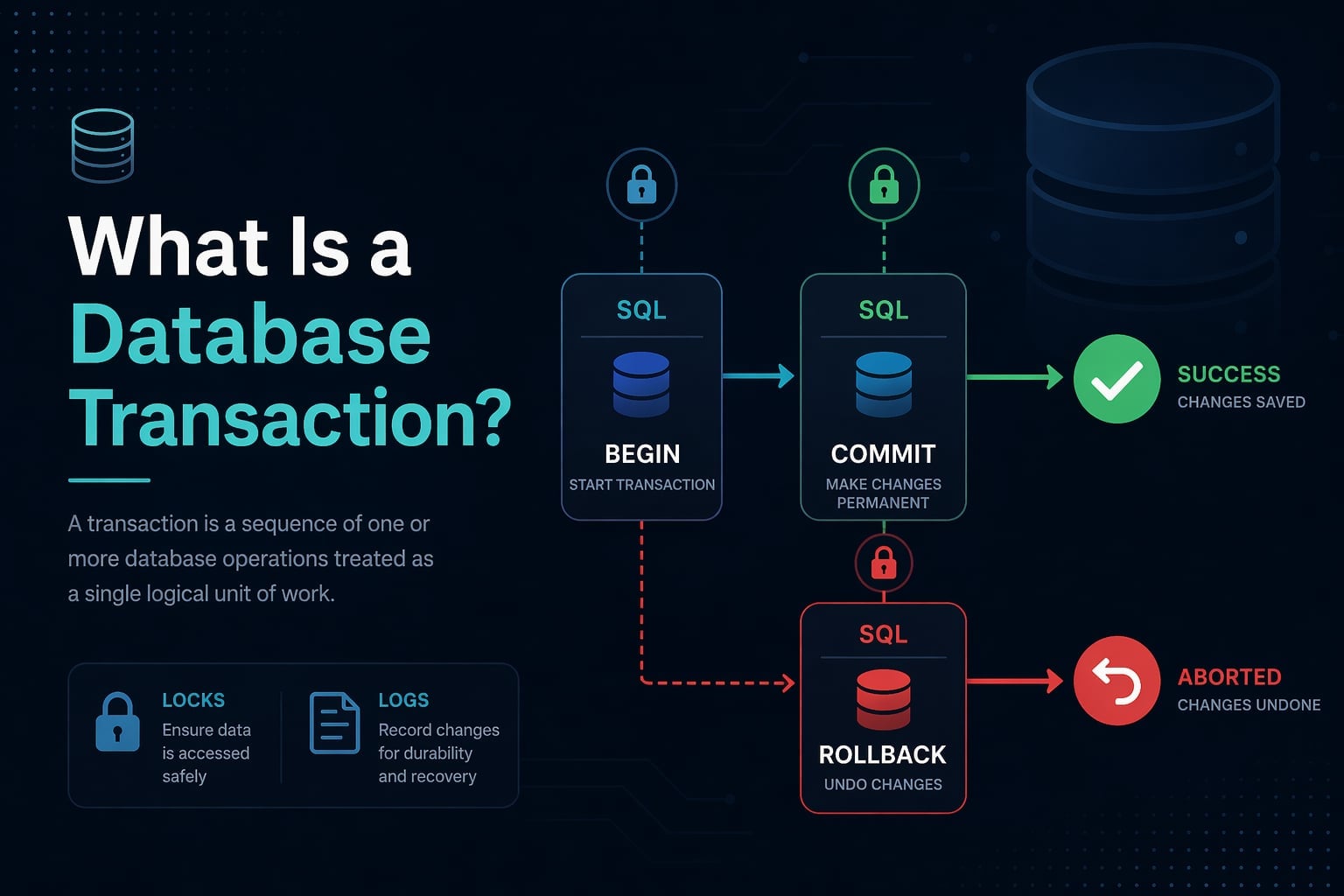
Imagine you are buying concert tickets online. The system needs to reserve your seat, charge your credit card, and send you a confirmation email. What happens if the charge succeeds but the seat reservation fails? You have been billed for a seat that was never booked.
A database transaction prevents this. It wraps a set of database operations into a single all-or-nothing unit so that partial failures are impossible from the outside world’s perspective.
This guide explains what a transaction is, how it works under the hood, and how to write correct transaction code in SQL. If you are not yet familiar with ACID properties, read ACID Properties Explained in Simple Terms first - transactions are the mechanism that enforces ACID guarantees.
Table of Contents
Open Table of Contents
- What Is a Database Transaction?
- The Transaction Lifecycle
- BEGIN, COMMIT, and ROLLBACK
- Implicit vs Explicit Transactions
- Transaction States
- Savepoints: Partial Rollbacks
- Nested Transactions
- How Transactions Work Internally
- Transactions Across Multiple Tables
- When to Use Transactions
- Common Mistakes
- Interview Questions
- 1. What is a database transaction and why do we need it?
- 2. What is the difference between COMMIT and ROLLBACK?
- 3. What is a savepoint and when would you use it?
- 4. What is the difference between implicit and explicit transactions?
- 5. What happens if you don’t call COMMIT or ROLLBACK?
- 6. How do transactions relate to ACID properties?
- 7. Can a transaction span multiple database servers?
- Conclusion
- References
- YouTube Videos
What Is a Database Transaction?
A database transaction is a sequence of one or more SQL operations treated as a single logical unit of work. The database guarantees that either all operations in the transaction succeed, or none of them are applied.
The textbook example is a bank transfer:
BEGIN;

UPDATE accounts SET balance = balance - 500 WHERE id = 1;  -- debit Alice
UPDATE accounts SET balance = balance + 500 WHERE id = 2;  -- credit Bob

COMMIT;
Both UPDATE statements are part of one transaction. If the server crashes between the two statements, the database rolls back the debit automatically on recovery. Alice’s money is never lost.
Why Transactions Exist
Without transactions, any multi-step operation is vulnerable to:
- Partial writes - some steps succeed, others fail, leaving data in a broken state.
- Race conditions - two users modify the same row simultaneously and overwrite each other’s changes.
- Data loss on crash - in-progress changes are applied to the database before they are confirmed complete.
Transactions solve all three problems through the ACID properties.
The Transaction Lifecycle
Every transaction goes through a predictable lifecycle:
flowchart TD
    A[BEGIN] --> B[Execute SQL Statements]
    B --> C{Any Error?}
    C -- No --> D[COMMIT\nChanges saved permanently]
    C -- Yes --> E[ROLLBACK\nAll changes undone]
    D --> F[Transaction Ended]
E --> F- BEGIN - Opens a transaction block. The database starts tracking every change you make.
- Execute statements - You run
INSERT,UPDATE,DELETE, orSELECTqueries inside the transaction. - COMMIT - If everything succeeded, you commit. The changes become permanent and visible to other connections.
- ROLLBACK - If something went wrong, you roll back. Every change made inside this transaction is undone as if it never happened.
BEGIN, COMMIT, and ROLLBACK
BEGIN (or START TRANSACTION)
Opens a transaction. Syntax varies slightly by database:
-- PostgreSQL, SQLite
BEGIN;

-- MySQL
START TRANSACTION;

-- SQL Server
BEGIN TRANSACTION;
After BEGIN, every statement you run is part of the transaction until you COMMIT or ROLLBACK.
COMMIT
Saves all changes made during the transaction:
BEGIN;

INSERT INTO orders (user_id, product_id, quantity) VALUES (42, 101, 2);
UPDATE inventory SET stock = stock - 2 WHERE product_id = 101;

COMMIT;  -- Both changes are now permanently saved
After COMMIT:
- Changes are visible to other database connections.
- The changes are written to durable storage (disk).
- The transaction is closed.
ROLLBACK
Undoes all changes made since BEGIN:
BEGIN;

UPDATE accounts SET balance = balance - 500 WHERE id = 1;
-- Something went wrong  -  cancel everything
ROLLBACK;  -- The debit is undone, balance restored
After ROLLBACK:
- The database is in exactly the same state it was before
BEGIN. - No partial changes remain.
Handling Errors in Application Code
In real applications, you wrap transactions in error-handling logic:
# Python with psycopg2 (PostgreSQL)
try:
    conn.autocommit = False
    cursor.execute("UPDATE accounts SET balance = balance - 500 WHERE id = 1")
    cursor.execute("UPDATE accounts SET balance = balance + 500 WHERE id = 2")
    conn.commit()
except Exception as e:
    conn.rollback()
    raise e
// Node.js with pg (PostgreSQL)
const client = await pool.connect();
try {
await client.query("BEGIN");
await client.query("UPDATE accounts SET balance = balance - 500 WHERE id = 1");
await client.query("UPDATE accounts SET balance = balance + 500 WHERE id = 2");
await client.query("COMMIT");
} catch (e) {
await client.query("ROLLBACK");
throw e;
} finally {
client.release();
}Implicit vs Explicit Transactions
Explicit Transactions
You manually control the transaction with BEGIN, COMMIT, and ROLLBACK. This is what all the examples above show.
Implicit Transactions (Autocommit)
Most databases default to autocommit mode: every individual SQL statement is automatically wrapped in its own transaction and committed immediately.
-- In autocommit mode, this single statement is its own transaction:
UPDATE accounts SET balance = balance - 500 WHERE id = 1;
-- Automatically committed  -  no BEGIN or COMMIT needed
Autocommit is convenient for simple queries. The problem: if you need two statements to succeed or fail together, autocommit will commit the first one before the second even runs.
-- BAD  -  autocommit mode, two separate transactions:
UPDATE accounts SET balance = balance - 500 WHERE id = 1;  -- committed immediately
UPDATE accounts SET balance = balance + 500 WHERE id = 2;  -- separate transaction
-- If the server crashes between these two lines, Alice loses $500
Always use an explicit BEGIN when you need multiple statements to behave atomically.
Checking and Changing Autocommit
-- MySQL: check autocommit setting
SHOW VARIABLES LIKE 'autocommit';

-- MySQL: disable autocommit for the session
SET autocommit = 0;

-- PostgreSQL: autocommit is always on by default at the protocol level
-- Use explicit BEGIN to start a multi-statement transaction
Transaction States
A transaction moves through well-defined states during its lifetime:
flowchart TD
    A[Active\nStatements executing] --> B[Partially Committed\nLast statement done]
    B --> C{Validation OK?}
    C -- Yes --> D[Committed\nChanges permanent]
    C -- No --> E[Failed\nError occurred]
    A --> E
    E --> F[Aborted\nRollback complete]
    D --> G[End]
F --> G| State | Meaning |
|---|---|
| Active | The transaction has started and statements are executing |
| Partially Committed | The last statement executed but the commit has not been written to disk yet |
| Committed | Changes are durable and visible to all connections |
| Failed | An error occurred - a rollback is required |
| Aborted | The rollback completed successfully - database is back to previous state |
The database itself transitions between these states. You do not control them directly - you control BEGIN, COMMIT, and ROLLBACK, and the database manages the state machine internally.
Savepoints: Partial Rollbacks
A savepoint marks a named point inside a transaction that you can roll back to without aborting the entire transaction.
BEGIN;

INSERT INTO orders (user_id, total) VALUES (42, 100.00);

SAVEPOINT after_order;  -- mark this point

INSERT INTO order_items (order_id, product_id, qty) VALUES (1, 101, 2);
-- Suppose this insert fails due to a constraint violation

ROLLBACK TO SAVEPOINT after_order;  -- undo only the failed insert
-- The order row is still there  -  only the item insert was undone

INSERT INTO order_items (order_id, product_id, qty) VALUES (1, 102, 1);  -- try a different product

COMMIT;  -- commit the order + the corrected item
Savepoint Commands
| Command | What it does |
|---|---|
SAVEPOINT name | Creates a named savepoint at the current point in the transaction |
ROLLBACK TO SAVEPOINT name | Undoes all changes since the savepoint - but keeps the transaction open |
RELEASE SAVEPOINT name | Discards the savepoint (no rollback) - frees resources |
When to Use Savepoints
Savepoints are useful for:
- Partial error recovery - retry a specific operation without abandoning the whole transaction.
- Batch processing - process rows in chunks and only roll back failed chunks.
- Complex business logic - attempt an optional step and gracefully skip it if it fails.
Savepoints are supported in PostgreSQL, MySQL, SQL Server, Oracle, and SQLite.
Nested Transactions
True nested transactions - where an inner transaction can commit independently of its outer transaction - are not widely supported in standard SQL databases.
What most databases offer instead is simulated nesting via savepoints:
BEGIN;                          -- outer transaction

  INSERT INTO audit_log ...;

  SAVEPOINT inner_start;        -- "start" of inner transaction

    UPDATE accounts SET ...;
    UPDATE inventory SET ...;

  -- If inner operations fail:
  ROLLBACK TO SAVEPOINT inner_start;

  -- Or if they succeed:
  RELEASE SAVEPOINT inner_start;

COMMIT;                         -- outer transaction commits
ORMs and database libraries often use this pattern internally when you nest transactions in application code.
flowchart TD
    OT[Outer BEGIN] --> S[SAVEPOINT inner_start]
    S --> IO[Inner Operations]
    IO --> C{Success?}
    C -- Yes --> RS[RELEASE SAVEPOINT]
    C -- No --> RB[ROLLBACK TO SAVEPOINT]
    RS --> OC[Outer COMMIT]
    RB --> OC
How Transactions Work Internally
Write-Ahead Log (WAL)
The key mechanism behind transactions is the write-ahead log (WAL). Before any data is changed on disk, the database writes the intended change to a sequential log file.
WAL entry: [txn_id=101] UPDATE accounts SET balance=1500 WHERE id=1On a crash, the database replays committed WAL entries to restore committed state, and ignores (rolls back) entries for transactions that never committed. This is how both atomicity and durability are achieved.
MVCC (Multi-Version Concurrency Control)
Most modern databases (PostgreSQL, MySQL InnoDB) use MVCC to allow transactions to run concurrently without blocking each other:
- When you start a transaction, you get a consistent snapshot of the database as it existed at that moment.
- Other transactions writing to the same rows do not block your reads - you simply see the version of the row that existed when your snapshot was taken.
- Your writes create new versions of rows, invisible to other transactions until you commit.
flowchart TD
    T1[Transaction A\nSnapshot at t=100] --> R1[Reads row v1]
    T2[Transaction B\nUpdates row] --> W1[Creates row v2]
    W1 --> C[Commits at t=101]
    T1 --> R2[Still reads row v1\nuntil A commits]
This is why a long-running read transaction in PostgreSQL can hold onto an old snapshot - it keeps reading a version of the data from when it started, even while writes are happening concurrently.
Transactions Across Multiple Tables
Transactions work across any number of tables in the same database. This is one of their most powerful uses: keeping related tables in sync.
BEGIN;

-- Create a new user
INSERT INTO users (email, name) VALUES ('alice@example.com', 'Alice');

-- Get the new user's ID
-- (In application code you'd capture the returned ID from the INSERT)

-- Create their default settings row
INSERT INTO user_settings (user_id, theme, notifications)
VALUES (LASTVAL(), 'light', true);  -- PostgreSQL: LASTVAL() gets last generated ID

-- Create their empty subscription record
INSERT INTO subscriptions (user_id, plan, status)
VALUES (LASTVAL(), 'free', 'active');

COMMIT;
If any of the three inserts fails, all three are rolled back. The user, settings, and subscription are always created together - or not at all.
When to Use Transactions
Use explicit transactions whenever:
- Multiple writes must succeed or fail together - transfers, order creation, user registration.
- You read then write based on that read - check inventory, then deduct stock.
- You need a consistent snapshot for a multi-query report - financial totals that must reflect the same point in time.
- You are doing bulk data migrations - wrap in a transaction so you can
ROLLBACKif something looks wrong before committing.
Do NOT over-use transactions for:
- Single-statement operations - a single
UPDATEis already atomic in autocommit mode. - Long-running operations - transactions hold locks and snapshots; a transaction open for minutes can block other writers and consume significant memory.
- Read-only queries - a single
SELECTdoes not need a transaction unless you need a consistent snapshot across multiple selects.
Common Mistakes
Forgetting to commit.
If your application opens a transaction and does not explicitly commit, some databases will hold the transaction open indefinitely (until the connection closes), which blocks other operations.
Catching exceptions without rolling back.
Swallowing an exception after a failed statement and continuing to issue queries inside the same transaction will fail - most databases put the transaction into a “failed” state after an error, and any further statements are rejected until you roll back.
# BAD  -  catching exception and continuing without rollback
try:
    cursor.execute("UPDATE accounts SET balance = balance - 500 WHERE id = 1")
except Exception:
    pass  # silently ignores the error
cursor.execute("UPDATE accounts SET balance = balance + 500 WHERE id = 2")  # may fail
conn.commit()  # commits nothing or raises another error

# GOOD  -  rollback on any error
try:
    cursor.execute("UPDATE accounts SET balance = balance - 500 WHERE id = 1")
    cursor.execute("UPDATE accounts SET balance = balance + 500 WHERE id = 2")
    conn.commit()
except Exception:
    conn.rollback()
    raise
Long-running transactions.
A transaction open for a long time holds row-level locks (in some isolation levels) and a snapshot of old data. This can cause bloat in PostgreSQL and blocking in MySQL. Keep transactions as short as possible - do your business logic outside the transaction and only open it for the actual writes.
Doing network calls inside a transaction.
If you open a transaction, then make an HTTP request to an external API, and the API is slow, your transaction sits open for seconds or minutes. Other readers or writers waiting on those rows are blocked. Only run database operations inside a transaction - keep external calls outside.
Interview Questions
1. What is a database transaction and why do we need it?
A transaction is a group of database operations treated as a single all-or-nothing unit. We need transactions to prevent partial writes - if only some operations in a multi-step process succeed, the data is left in a corrupted, inconsistent state. Transactions guarantee that either all operations complete or none do, protecting data integrity even when failures occur.
2. What is the difference between COMMIT and ROLLBACK?
COMMIT finalizes the transaction - all changes are written to durable storage and become visible to other connections. ROLLBACK cancels the transaction - all changes made since BEGIN are undone and the database returns to its previous state. COMMIT means “I am done and everything looks correct.” ROLLBACK means “something went wrong - undo all of it.”
3. What is a savepoint and when would you use it?
A savepoint is a named marker inside an open transaction. You can ROLLBACK TO SAVEPOINT to undo changes back to that point without aborting the entire transaction. You would use it when a transaction has multiple independent steps and you want to retry or skip a specific step on failure without losing all the work done before that step.
4. What is the difference between implicit and explicit transactions?
In autocommit mode (implicit), every SQL statement is automatically committed as its own transaction immediately after execution. In explicit mode, you manually control the transaction boundaries with BEGIN, COMMIT, and ROLLBACK. Explicit transactions are required whenever two or more statements must succeed or fail together.
5. What happens if you don’t call COMMIT or ROLLBACK?
In most databases, if the connection closes normally without a commit, the transaction is automatically rolled back. If a crash occurs, the WAL-based recovery process rolls back any uncommitted transactions during restart. Leaving a transaction open and idle is a common performance mistake - it holds locks and snapshot memory until the transaction ends.
6. How do transactions relate to ACID properties?
Transactions are the mechanism that enforces ACID guarantees:
- Atomicity is enforced because a transaction either commits fully or rolls back fully.
- Consistency is enforced because the database validates constraints before committing.
- Isolation is enforced by the transaction isolation level, controlling what one transaction can see from another.
- Durability is enforced because committed transactions are written to the WAL and flushed to disk before
COMMITreturns.
7. Can a transaction span multiple database servers?
Not with a standard single-database transaction. Spanning multiple databases or servers requires a distributed transaction using a protocol like Two-Phase Commit (2PC). 2PC coordinates a prepare phase (all nodes agree they can commit) and a commit phase (all nodes actually commit). This is significantly more complex and many modern systems avoid it entirely by designing around single-database boundaries or using eventual consistency instead.
Conclusion
A database transaction is the fundamental unit of reliable data change:
- BEGIN opens the transaction - changes are tracked but not committed.
- COMMIT makes all changes permanent and visible to other connections.
- ROLLBACK undoes all changes as if the transaction never happened.
- SAVEPOINT lets you create partial rollback points inside a transaction for fine-grained error recovery.
Transactions are the mechanism behind every ACID guarantee. Every time you move money, create an order, or register a user, a correctly-used transaction is what ensures your data stays consistent.
The next topic in this series covers database connection pooling - why opening a new database connection for every request is expensive, and how connection pools solve that problem.
For more context on what transactions protect against, see ACID Properties Explained in Simple Terms.
References
- Transaction in DBMS - GeeksforGeeks
https://www.geeksforgeeks.org/dbms/transaction-in-dbms/ - Understanding SQL Transactions - DataCamp
https://www.datacamp.com/tutorial/sql-transactions - Database Transactions 101: The Essential Guide - DbVisualizer
https://www.dbvis.com/thetable/database-transactions-101-the-essential-guide/ - Database Transactions - PlanetScale
https://planetscale.com/blog/database-transactions - A Guide to Database Transactions - ByteByteGo
https://blog.bytebytego.com/p/a-guide-to-database-transactions - Database transaction - Wikipedia
https://en.wikipedia.org/wiki/Database_transaction
YouTube Videos
- “Database Transactions | ACID Properties | Complete Guide” - Techno TJ
https://www.youtube.com/watch?v=eYQwKi7P8MM - “Database Transactions Explained (Commit and Rollback)” - Socratica
https://www.youtube.com/watch?v=P80Js_qClUE - “SQL Transactions - Commit and Rollback” - kudvenkat
https://www.youtube.com/watch?v=shktgZ8-grU