 ADevGuide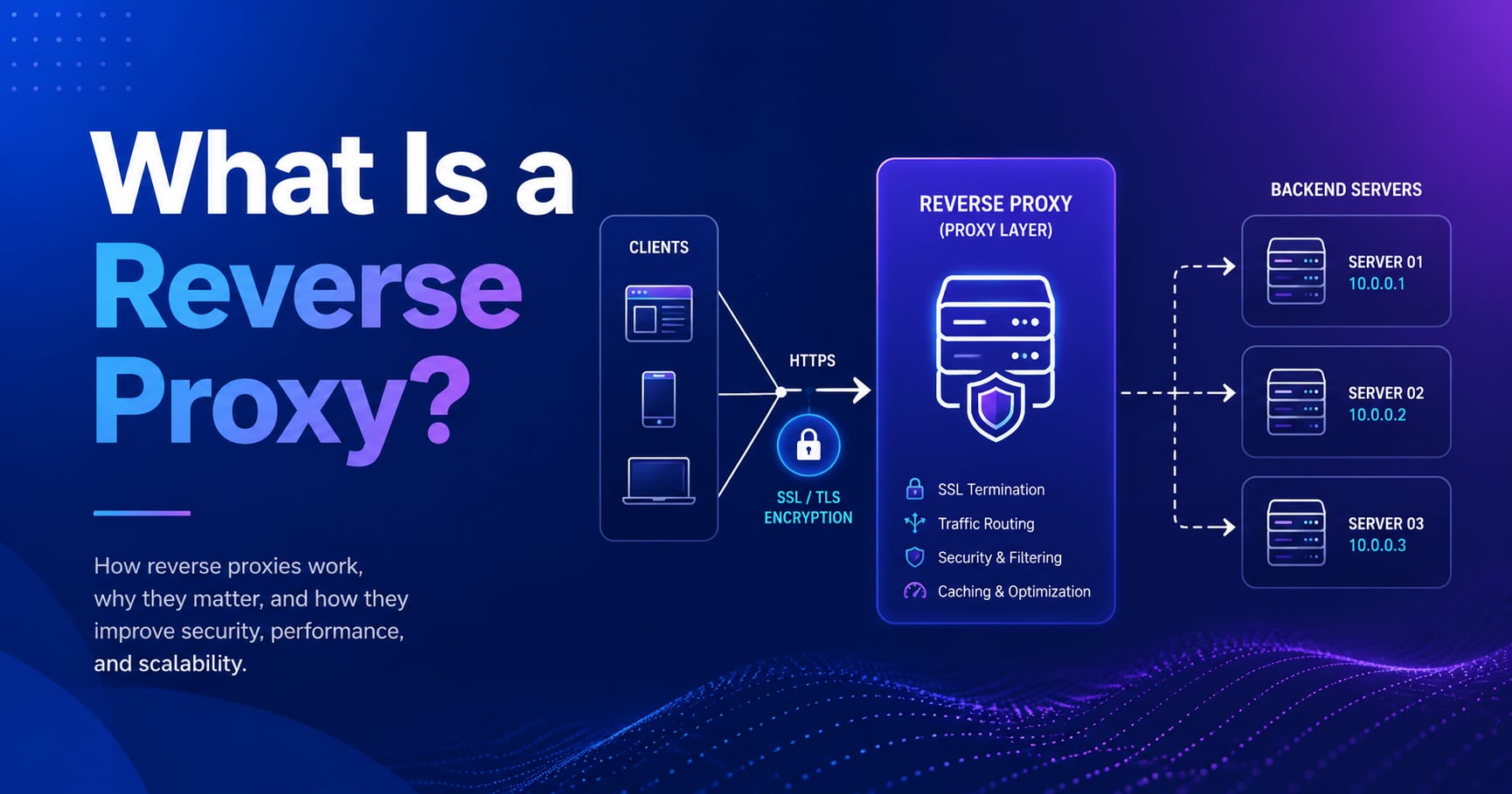
Every request you send to GitHub, Cloudflare, or Netflix passes through a reverse proxy before it ever touches the application server. You don’t see it, the URL doesn’t change, and the behavior appears identical - that invisibility is by design.
A reverse proxy is a server that sits in front of one or more backend servers and forwards client requests to them. From the client’s perspective, it looks like one server. From the backend’s perspective, it sees only the proxy - not the actual client. That single architectural decision unlocks load balancing, SSL termination, caching, and a narrowed attack surface, all without changing the backend application.
This guide explains what a reverse proxy is, how it routes a request step by step, how it compares to a forward proxy, and the situations where it makes a real practical difference.
This post is part of the System Design Foundations series. If you’re new to the series, start with What Is Load Balancing and How It Works - a reverse proxy and a load balancer are closely related and often run on the same process.
For the broader topic map, see the System Design tag.
Table of Contents
Open Table of Contents
- What Is a Reverse Proxy?
- Reverse Proxy vs Forward Proxy: The Key Difference
- How a Reverse Proxy Routes a Request (Step by Step)
- What a Reverse Proxy Actually Does
- Nginx as a Reverse Proxy: A Practical Example
- When You Actually Need a Reverse Proxy
- Real-World Examples
- Common Mistakes
- Interview Questions
- 1. What is a reverse proxy and how does it differ from a load balancer?
- 2. Why would you terminate TLS at the reverse proxy instead of the backend?
- 3. How does a reverse proxy hide the origin server?
- 4. What is the difference between a forward proxy and a reverse proxy?
- 5. What happens to the client IP when a request passes through a reverse proxy?
- 6. Can a reverse proxy improve performance even without load balancing across multiple backends?
- Conclusion
- References
- YouTube Videos
What Is a Reverse Proxy?
A reverse proxy is a server positioned between external clients and one or more backend servers. It accepts incoming requests, decides which backend should handle each one, forwards the request, receives the response, and returns it to the client.
The client never communicates with the backend directly. It only ever sees the reverse proxy’s address.
flowchart TD
    C[Client / Browser] --> RP[Reverse Proxy]
    RP --> B1[Backend Server 1]
    RP --> B2[Backend Server 2]
    RP --> B3[Backend Server 3]
    B1 --> RP
    B2 --> RP
    B3 --> RP
    RP --> C

    classDef proxy fill:#e1f5fe,stroke:#01579b,stroke-width:2px,color:#000000;
    classDef backend fill:#fff3e0,stroke:#e65100,stroke-width:2px,color:#000000;
    classDef client fill:#e8f5e9,stroke:#2e7d32,stroke-width:2px,color:#000000;
    class RP proxy;
    class B1,B2,B3 backend;
    class C client;
This is different from a load balancer in name only - in practice, most reverse proxies also distribute load, and most load balancers also act as a reverse proxy. Nginx, HAProxy, Envoy, and Caddy are all reverse proxies that include load balancing as one of their features.
The clearest mental model: the reverse proxy is the single public face of your backend infrastructure. Everything behind it is invisible to the outside world.
Reverse Proxy vs Forward Proxy: The Key Difference
The word “reverse” exists to distinguish this from a forward proxy, and the distinction matters.
A forward proxy sits in front of clients. Clients route their outbound requests through it, and it contacts the destination server on their behalf. Corporate networks use forward proxies so IT can log, filter, or block outbound web traffic. A VPN is conceptually a forward proxy.
A reverse proxy sits in front of servers. Clients contact it as if it were the server, and it routes requests inbound to the appropriate backend.
| Forward Proxy | Reverse Proxy | |
|---|---|---|
| Who it protects | The client | The server |
| Who configures it | The client / network team | The server operator |
| Visibility | Hides the client from the server | Hides the server from the client |
| Common use | Outbound filtering, VPN, anonymity | Load balancing, SSL termination, caching |
The practical implication: if you run a web application and you’re setting up Nginx on the same machine or in front of your app server, you’re configuring a reverse proxy. The clients (your users’ browsers) don’t configure anything - they just talk to the one address you’ve published.
How a Reverse Proxy Routes a Request (Step by Step)
Here is what happens between a user clicking a link and the browser rendering the page, when a reverse proxy is in the path:
flowchart TD
    U[User Browser] --> DNS[DNS Lookup]
    DNS -->|Returns reverse proxy IP| U
    U --> RP[Reverse Proxy]
    RP --> TLS[TLS Termination]
    TLS --> ROUTE{Routing logic}
    ROUTE -->|Path-based or round-robin| B1[Backend App Server]
    ROUTE -->|Static asset| CACHE[Local Cache]
    B1 --> RESP[Response]
    CACHE --> RESP
    RESP --> RP
    RP -->|Compresses, sets headers| U

    classDef proxy fill:#e1f5fe,stroke:#01579b,stroke-width:2px,color:#000000;
    classDef backend fill:#fff3e0,stroke:#e65100,stroke-width:2px,color:#000000;
    classDef client fill:#e8f5e9,stroke:#2e7d32,stroke-width:2px,color:#000000;
    class RP,TLS,ROUTE,RESP proxy;
    class B1 backend;
    class CACHE backend;
class U,DNS client;- DNS resolution - The domain name resolves to the reverse proxy’s IP, not directly to any backend. The client has no idea backend servers exist.
- TCP + TLS - The client opens a TCP connection and completes a TLS handshake with the reverse proxy. The proxy, not the backend, holds the SSL certificate.
- Request forwarding - The proxy inspects the request (path, headers, method) and decides which backend should handle it, based on routing rules you’ve configured.
- Backend processing - The chosen backend runs the application logic, queries the database, and returns a response to the proxy.
- Response transformation - The proxy can modify the response: compress the body, add security headers, strip internal headers that shouldn’t leave the network, or cache the result.
- Delivery to client - The final response reaches the client, which only ever knew about the proxy’s address.
The backend server receives a request where the client’s IP is replaced by the proxy’s IP. If the backend needs the real client IP (for rate limiting, logging, or geolocation), the proxy must pass it through a header - typically X-Forwarded-For or X-Real-IP.
What a Reverse Proxy Actually Does
The basic job is routing. But the reason reverse proxies are standard infrastructure for any production deployment is the features they add at the routing layer, for free.
Load Balancing
If you have multiple backend instances, the reverse proxy distributes incoming requests across them. The simplest algorithm is round-robin - request 1 goes to server A, request 2 to server B, request 3 to server C, then back to A. More sophisticated policies include least-connections (always route to the backend with the fewest active connections) and IP-hash (always route the same client IP to the same backend, which is how sticky sessions work without the backend knowing).
This is covered in depth in What Is Load Balancing and How It Works. The short version: from a reverse proxy’s perspective, load balancing is just a routing rule about which backend gets each request.
SSL/TLS Termination
Handling TLS at the proxy is the standard pattern for a reason. Your backend servers speak plain HTTP on a private network. The proxy handles the TLS handshake, decrypts the request, and sends plaintext to the backend. When the backend responds, the proxy encrypts the response and sends it back over HTTPS.
This is called SSL termination (or TLS termination). It means:
- You only need one SSL certificate, managed in one place.
- Backend servers don’t need to do expensive TLS computations - that work happens once at the proxy.
- Updating certificates (rotation, renewal) happens without touching backend deployments.
Some configurations use SSL passthrough instead, where the proxy forwards the encrypted stream directly without decrypting. This is less common and mainly used when the backend must handle encryption itself (e.g., mutual TLS authentication).
Caching
A reverse proxy can cache responses and serve repeated requests without touching the backend at all. This works on the same principle as a CDN edge server - the proxy stores a copy of cacheable responses and returns them for matching subsequent requests.
The difference from a CDN is geography: a reverse proxy cache is co-located with your infrastructure, not distributed globally. It’s useful for absorbing repeated identical requests (like a public homepage that 10,000 simultaneous users all request after a news link goes viral) but it doesn’t reduce network latency between your servers and users in distant countries.
Security and Origin Hiding
Because the reverse proxy is the only publicly routable address, your backend servers can live on a private network with no public IPs at all. An attacker who discovers one backend host’s address finds a non-routable address - they can’t reach it directly. This isn’t a substitute for proper network security, but it meaningfully reduces the attack surface.
The proxy is also the right place to enforce a range of security policies:
- Rate limiting: limit how many requests a single IP can make per second before being throttled or blocked.
- IP allowlisting / blocklisting: block known malicious IP ranges at the proxy before they touch the app.
- Request filtering: reject requests with malformed headers, unusual methods, or paths that match known attack patterns.
- Response header hygiene: strip headers the backend emits that reveal internal details (e.g.,
X-Powered-By: Express), and add security headers the backend doesn’t include (e.g.,Strict-Transport-Security).
Compression
Compressing response bodies (using gzip or Brotli) at the proxy saves bandwidth and speeds up delivery. The backend returns uncompressed content, the proxy compresses it, and the client decompresses it. Centralizing this at the proxy means backend code doesn’t need to handle compression, and you can tune compression settings in one place.
Nginx as a Reverse Proxy: A Practical Example
Nginx is the most widely deployed reverse proxy. Here is a minimal, production-representative configuration that proxies HTTP requests to two backend app servers:
upstream app_backends {
    server 10.0.0.1:3000;
    server 10.0.0.2:3000;
    # Default is round-robin; add 'least_conn;' for least-connections policy
}

server {
    listen 443 ssl;
    server_name example.com;

    ssl_certificate     /etc/ssl/example.com.crt;
    ssl_certificate_key /etc/ssl/example.com.key;

    location / {
        proxy_pass         http://app_backends;
        proxy_set_header   Host              $host;
        proxy_set_header   X-Real-IP         $remote_addr;
        proxy_set_header   X-Forwarded-For   $proxy_add_x_forwarded_for;
        proxy_set_header   X-Forwarded-Proto $scheme;

        # Add security headers that the backend doesn't produce
        add_header Strict-Transport-Security "max-age=31536000; includeSubDomains" always;
        add_header X-Content-Type-Options "nosniff" always;
    }

    location /static/ {
        root /var/www;
        expires 1y;
        add_header Cache-Control "public, immutable";
    }
}
A few things worth noting in this config:
upstream app_backendsdefines the pool of backend servers. Nginx distributes requests across them in round-robin by default.proxy_set_header X-Real-IPpasses the client’s real IP to the backend, which would otherwise only see the proxy’s internal address.proxy_set_header X-Forwarded-Prototells the backend whether the original request came in over HTTP or HTTPS - useful if the backend generates redirect URLs.- The
/static/block serves files directly from disk without hitting the backend at all. Static asset serving is the classic “do it at the proxy” optimization.
When You Actually Need a Reverse Proxy
A reverse proxy is standard for any production deployment that runs more than one backend instance or expects public internet traffic. More specifically, you want one when:
- You’re running multiple backend instances and need something to distribute traffic across them. Without a reverse proxy, you’d have to put the load balancer IP in DNS directly, and there’s no good place to do TLS, header rewriting, or caching.
- You need TLS without every backend managing certificates. Even for a single-backend deploy, terminating TLS at Nginx and letting the backend speak plain HTTP on localhost is simpler and more operationally maintainable.
- You want to separate concerns: let the reverse proxy handle static files, compression, rate limiting, and security headers, so backend app code can stay focused on business logic.
- You’re deploying microservices and need a single entry point that routes requests to different services based on path or hostname (e.g.,
/api/orders→ orders service,/api/users→ users service).
In containerized environments, this role is often played by a Kubernetes Ingress controller, which is itself a reverse proxy (typically Nginx or Envoy) configured through Kubernetes resources rather than a config file directly.
Real-World Examples
Cloudflare at the Edge
Every site behind Cloudflare is running behind Cloudflare’s reverse proxy network. Cloudflare’s edge servers accept client connections, terminate TLS, serve cached responses, apply WAF rules, and forward cache misses to your origin. Your origin server speaks plain HTTP to Cloudflare’s edge on a private or semi-private connection. From the client’s side, it all looks like a single server - Cloudflare’s proxy.
GitHub’s Frontend Infrastructure
GitHub uses Nginx and later moved to custom proxy infrastructure to route requests across multiple backend services. When you browse a repository, the proxy routes the request to the right service (repo rendering, blame views, raw file serving) based on the URL path, while the client sees one consistent github.com address. This is path-based routing at scale - a fundamental reverse proxy feature.
Nginx in a Typical Node.js Deployment
A canonical deployment pattern for a Node.js app: the app runs on port 3000 on localhost, and Nginx runs on port 443 handling TLS and routing. The Node process never needs to handle certificates, compression, or static file serving. Nginx handles all of that in compiled C code that is dramatically faster than doing it in a Node.js application.
Common Mistakes
1. Forgetting to forward the real client IP
When a backend application does IP-based rate limiting, logging, or fraud detection, it needs the original client IP - not the proxy’s internal address. If X-Real-IP or X-Forwarded-For isn’t set in the proxy config, every backend request appears to come from the proxy itself. The rate limiter then throttles the proxy instead of individual clients, which is useless.
2. Leaving the backend publicly reachable
The whole security benefit of hiding backends behind a proxy disappears if those backends are also reachable directly from the internet. Backend servers should be on a private network or have firewall rules that only allow connections from the proxy’s IP. Checking this is a common oversight in cloud deployments where Security Groups or VPC rules are added incrementally.
3. Misconfigured X-Forwarded-Proto causing redirect loops
If the backend redirects HTTP → HTTPS based on the incoming scheme, and the proxy sends requests as http:// without setting X-Forwarded-Proto: https, the backend will redirect every request back to HTTPS. The proxy re-terminates TLS and forwards as http:// again, creating an infinite loop. Setting proxy_set_header X-Forwarded-Proto $scheme in Nginx fixes this.
4. Terminating TLS at both the proxy and the backend
Some teams configure TLS termination at the proxy and also configure the backend to accept only HTTPS - meaning the backend tries to upgrade the connection the proxy already decrypted. The result is SSL handshake failures or silent connection drops. Decide where TLS terminates and be explicit: proxy does TLS, backend does plaintext. If end-to-end encryption is required, use passthrough or re-encrypt.
Interview Questions
1. What is a reverse proxy and how does it differ from a load balancer?
A reverse proxy is a server that sits in front of backends and forwards client requests on their behalf - the client only sees the proxy. A load balancer is a specific function that distributes requests across multiple backend instances. In practice, the two are almost always the same software: Nginx, HAProxy, and Envoy are all reverse proxies that include load balancing as one feature. The conceptual distinction is that a reverse proxy could serve a single backend (for TLS termination or caching alone), while a load balancer implies multiple backends. Most production setups need both behaviors, so they tend to run together.
2. Why would you terminate TLS at the reverse proxy instead of the backend?
TLS termination at the proxy centralizes certificate management into one place - you renew one certificate, not one per backend instance. It also offloads cryptographic work from your application servers, which can scale independently of TLS capacity. The backend communicates in plaintext on a private network, where encryption is not needed. A secondary benefit is that the proxy can inspect and modify the HTTP request - compression, header rewriting, routing - which isn’t possible with encrypted traffic. If the backend is a third-party service that requires mutual TLS, you’d use passthrough or re-encrypt, but for most application backends, terminating at the proxy is the right choice.
3. How does a reverse proxy hide the origin server?
The reverse proxy’s IP is the only one published in DNS. Backend servers run on private IPs or in a network segment where inbound connections are firewalled to accept traffic only from the proxy. A client that tries to connect directly to a backend IP - even if they somehow discover it - reaches a dead end. This shrinks the attack surface meaningfully: you only need to harden and monitor one publicly-facing address, and any DDoS or scanning traffic hits the proxy’s capacity instead of the backend directly.
4. What is the difference between a forward proxy and a reverse proxy?
A forward proxy acts on behalf of clients: the client routes outbound requests through it, and the destination server sees the proxy’s IP instead of the client’s. It’s used for outbound filtering, anonymity, or caching in corporate networks. A reverse proxy acts on behalf of servers: clients send requests to it, and it routes inbound traffic to the appropriate backend. The server’s origin is hidden from the client. The key distinction is who the proxy represents - the client (forward) or the server (reverse).
5. What happens to the client IP when a request passes through a reverse proxy?
By default, the backend sees the proxy’s IP as the source of the connection. The original client IP is lost unless the proxy explicitly adds it as a header. The standard header is X-Forwarded-For, which contains the client’s real IP (and optionally the IP of any intermediate proxies). Some configurations use X-Real-IP for a cleaner single-IP value. The backend application must be configured to read from these headers instead of the connection’s source IP, and it must only trust those headers when the request comes from a trusted proxy - otherwise a malicious client can spoof the header value.
6. Can a reverse proxy improve performance even without load balancing across multiple backends?
Yes. Even with a single backend, a reverse proxy improves performance in several ways. It can cache responses and serve repeated requests without touching the backend at all. It can serve static files directly from disk, which is faster than going through the application runtime. It can compress responses before sending them to clients, saving bandwidth without the backend doing any work. It terminates TLS close to the application, removing crypto overhead from app code. And it can handle slow clients - the proxy buffers the response and delivers it slowly to the client while the backend finishes quickly and moves on to the next request.
Conclusion
- A reverse proxy sits in front of backend servers and forwards client requests to them - clients only see the proxy’s address, never the backends directly.
- The distinction from a forward proxy is direction: forward proxies represent clients for outbound requests; reverse proxies represent servers for inbound requests.
- SSL/TLS termination at the proxy means one certificate, managed once, with backends speaking plain HTTP on a private network.
- Load balancing, caching, compression, rate limiting, and security header management all happen at the proxy - not in application code - which keeps backend logic focused on business logic.
- The origin-hiding property is a real security benefit: backends on a private network have no public IP, and the proxy absorbs attack traffic before it reaches them.
- Common mistakes are almost all configuration errors: forgetting
X-Forwarded-For, leaving backends publicly reachable, or misconfiguringX-Forwarded-Protocausing redirect loops.
The next topic in this series covers High Availability Explained for Beginners - a system can have a reverse proxy and still go down if that proxy is a single point of failure. High availability is how you design around that.
For more on how a reverse proxy fits into the broader architecture, What Is Load Balancing and How It Works and What Is a CDN? How Content Delivery Networks Work are the closest follow-on reads.
References
-
What is a reverse proxy? - Cloudflare Learning Center
https://www.cloudflare.com/learning/cdn/glossary/reverse-proxy/ -
Nginx reverse proxy documentation - Nginx.org
https://docs.nginx.com/nginx/admin-guide/web-server/reverse-proxy/ -
Reverse proxy - Wikipedia
https://en.wikipedia.org/wiki/Reverse_proxy
YouTube Videos
-
“Proxy vs. Reverse Proxy (Explained by Example)“
https://www.youtube.com/watch?v=ozhe__GdWC8 -
“Proxy vs Reverse Proxy vs Load Balancer | Simply Explained”
https://www.youtube.com/watch?v=xo5V9g9joFs -
“What is a Reverse Proxy? (vs. Forward Proxy) | Proxy servers explained”
https://www.youtube.com/watch?v=b_O501x_F68