 ADevGuide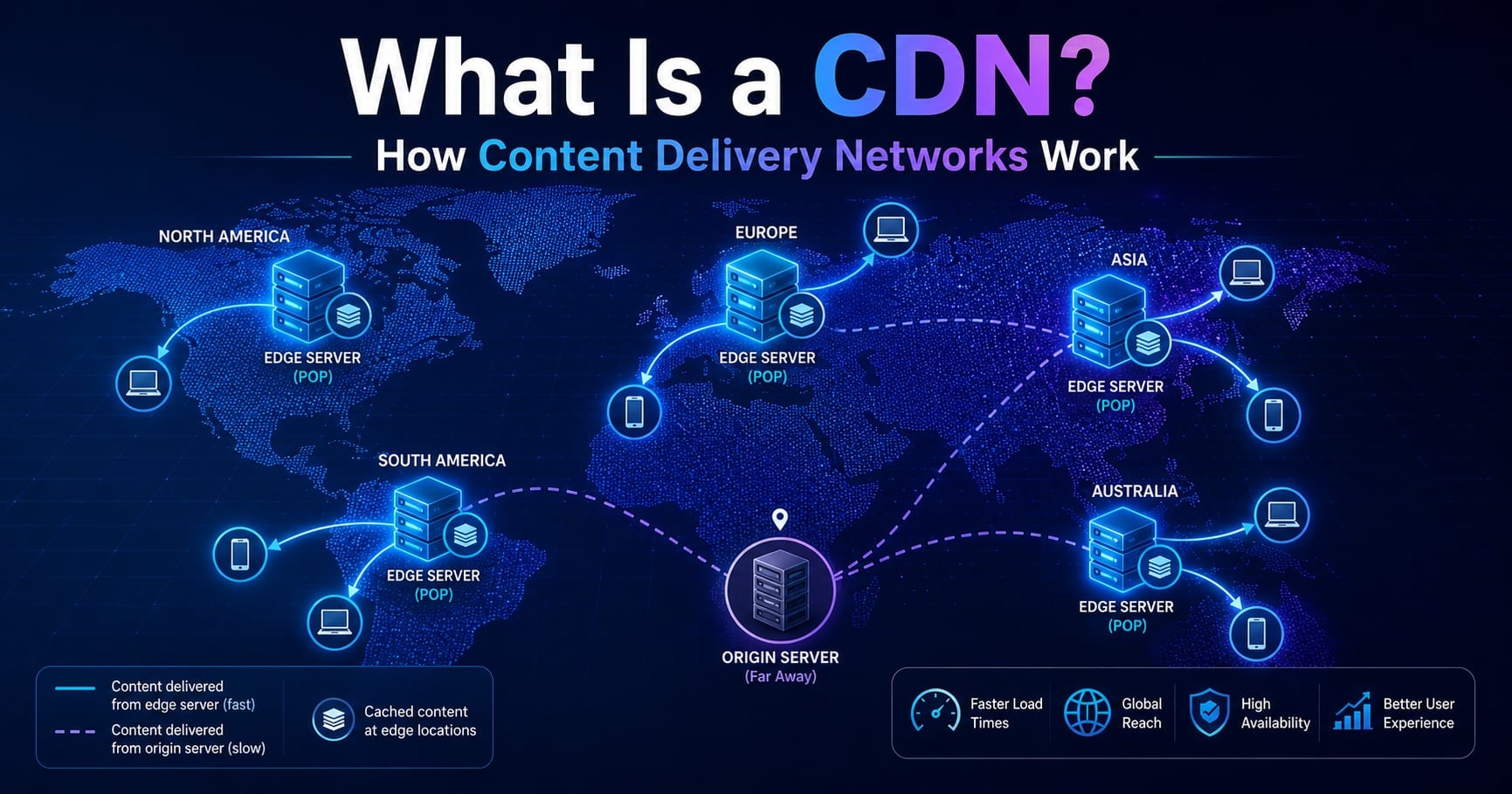
A user in Sydney loads your site and waits four seconds for the hero image. Your servers are in Virginia. The image is 800 KB. The internet between them is the slow part - not your code, not your database, not your framework.
A Content Delivery Network (CDN) is the standard fix for this problem. Instead of every request crossing the planet back to your origin, a copy of your content is cached on a server geographically close to the user.
This guide explains what a CDN actually is, how it routes a request behind the scenes, what it can and can’t cache, and the trade-offs you should understand before turning one on.
If you’re new to caching in general, start with What Is Caching? Why It Improves Performance and In-Memory Cache vs Distributed Cache Explained first.
For the broader roadmap, see the System Design Foundations series (pillar) and the System Design tag (category).
Closely related foundation posts:
- What Is Load Balancing and How It Works
- How DNS Works: Complete Beginner Explanation
- What Happens When You Type a URL? Step-by-Step Explained
Table of Contents
Open Table of Contents
- What Is a CDN?
- The Core Idea: Move Content Closer to the User
- How a CDN Routes a Request (Step by Step)
- Origin Server vs Edge Server
- What CDNs Cache (and What They Don’t)
- Cache Keys, TTLs, and Purging
- Why CDNs Matter Beyond Speed
- A Practical Example: Setting Cache Headers
- Real-World Examples
- Common Mistakes
- Interview Questions
- 1. What is a CDN and why does it improve performance?
- 2. How does a CDN decide which edge server serves a user?
- 3. What is the difference between an origin server and an edge server?
- 4. What kinds of content should not be cached on a CDN?
- 5. How do you invalidate stale content on a CDN?
- 6. How does a CDN help with traffic spikes and DDoS?
- Conclusion
- References
- YouTube Videos
What Is a CDN?
A Content Delivery Network (CDN) is a globally distributed network of servers that caches and delivers content from a location physically close to each user.
The servers in a CDN are usually called:
- edge servers (the cache nodes that sit close to users)
- PoPs (Points of Presence - the data centers where edge servers are clustered)
Instead of every request traveling all the way to your origin (your AWS region, your Kubernetes cluster, your bare-metal box in one country), the CDN intercepts the request at the nearest PoP and answers it from cache when it can.
That’s it. The rest of this post is the details that make it actually work.
The Core Idea: Move Content Closer to the User
The fundamental constraint a CDN attacks is distance.
A round trip from Sydney to Virginia is roughly 200 ms on the network alone - before TLS, before a database query, before any rendering. You can’t optimize that away with better code; the speed of light in fiber is the limit.
The CDN fix is simple: keep a copy of the response at a PoP that’s only a few milliseconds from the user.
The first user in Sydney still pays the full cross-ocean round trip - that’s a cache miss, and the edge has to fetch from the origin. But the next 10,000 users in Sydney pay the local-PoP latency - that’s a cache hit, and they never touch the origin at all.
That ratio is what makes CDNs feel almost magical when configured correctly.
How a CDN Routes a Request (Step by Step)
When a user types your URL, the CDN gets involved before your origin sees anything.
flowchart TD
    U[User Browser] --> DNS[DNS Resolver]
    DNS -->|Returns nearest PoP IP| U
    U --> EDGE[Edge Server / PoP]
    EDGE --> CHECK{Cache hit?}
    CHECK -->|Hit| RESP[Return cached response]
    CHECK -->|Miss| ORIGIN[Origin Server]
    ORIGIN --> STORE[Edge stores response] --> RESP

    classDef step fill:#e1f5fe,stroke:#01579b,stroke-width:2px,color:#000000;
    classDef origin fill:#fff3e0,stroke:#e65100,stroke-width:2px,color:#000000;
    class U,DNS,EDGE,CHECK,RESP,STORE step;
    class ORIGIN origin;
The simplified flow:
- The user asks DNS for
cdn.example.com. - The CDN’s DNS (often using anycast routing) returns the IP of the nearest healthy PoP.
- The browser opens a connection to that PoP - a few milliseconds away, not across an ocean.
- The edge server checks its local cache. If it has a fresh copy, it returns it immediately.
- On a miss, the edge fetches from the origin (sometimes through intermediate “shield” caches), stores the response, and returns it.
For most large CDNs, that nearest-PoP selection is done with anycast - the same IP is announced from many locations, and BGP routes the user’s packets to the closest one.
If you want to revisit how DNS plays into this, How DNS Works is a good companion read.
Origin Server vs Edge Server
This is the single most important mental model when working with a CDN.
- Origin server: your application - where the truth lives. It runs your code, queries your database, generates dynamic responses.
- Edge server: the CDN’s cache node. It does not run your business logic by default. It serves what was cached or fetches from the origin on a miss.
The relationship matters because:
- The origin must still handle 100% of traffic on a cold cache (right after a deploy, a purge, or a new viral page). If your origin can’t survive that, the CDN doesn’t save you.
- Cache hits hide your origin entirely. Bugs, slowness, or downtime on the origin won’t reach users - until the cache expires.
- Anything that isn’t cacheable (logged-in user dashboards, POSTs, real-time data) goes through to the origin every time.
Some CDNs (Cloudflare Workers, AWS Lambda@Edge, Fastly Compute@Edge) blur this line by letting you run small bits of code on edge servers themselves. That’s powerful, but it’s a separate feature on top of the basic CDN model.
What CDNs Cache (and What They Don’t)
Not everything is a good fit for caching at the edge.
Great fits for CDN caching
- static assets: JS, CSS, fonts, images, videos
- public HTML pages that don’t depend on the logged-in user
- API responses that are the same for everyone (a public price list, a public product catalog)
- downloadable files (installers, datasets)
Bad fits (or require careful handling)
- per-user personalized HTML (your dashboard, your inbox)
- responses with
Set-Cookiefor unique sessions - write requests (POST/PUT/PATCH/DELETE) - usually bypass the CDN entirely
- responses keyed on private headers like
Authorization
The general rule: the more a response varies per user, the harder it is to cache safely. Modern CDNs let you customize the cache key (e.g., key on country, device type, or specific cookie names) but the trade-off is hit ratio. Every dimension you add to the key creates more variants and lowers the chance of a hit.
Cache Keys, TTLs, and Purging
These three concepts decide how a CDN actually behaves in production.
Cache key
The cache key is what the CDN uses to decide “is this request the same as one I’ve already cached?” By default it’s something like the URL plus the host header.
If your /products?page=1 and /products?page=2 should be cached separately, query strings need to be in the key. If a Spanish user and an English user need different HTML on the same URL, the Accept-Language header (or a cookie) needs to be in the key.
Get this wrong and you either leak personalized data to other users, or your hit ratio collapses because every request looks unique.
TTL (time to live)
A TTL says how long a cached response is fresh before the edge has to revalidate or refetch.
You usually control TTLs with HTTP headers (Cache-Control, Expires) or via the CDN’s UI/config. Picking a TTL is a trade-off: longer means higher hit ratio and lower origin load, shorter means faster propagation of changes.
Purging / invalidation
When you deploy a new version of an asset or correct a bug in cached HTML, you need a way to evict stale entries. Most CDNs offer:
- purge by URL (clear one specific path)
- purge by tag/surrogate key (clear all responses tagged with
product:123) - full purge (clear everything - last resort, very expensive)
The pragmatic pattern is versioned URLs for static assets (/static/app.7f3a9c.js) so a new deploy creates a new URL automatically. You never need to purge - old URLs simply stop being requested. This is the same idea as versioned cache keys discussed in What Is Caching? Why It Improves Performance.
Why CDNs Matter Beyond Speed
Latency is the headline benefit, but a CDN earns its keep in three more ways.
1. Origin load reduction
A high cache hit ratio means your origin handles a small fraction of the actual traffic. For a popular static-asset site, the origin might serve 1-5% of requests; the rest are absorbed at the edge. That’s the difference between needing 50 backend servers and needing 5.
2. DDoS and traffic-spike absorption
Edge networks are massive - a major CDN has terabits of capacity per second across hundreds of PoPs. When a viral spike or a layer-7 DDoS hits, the edge soaks it up before it ever reaches your origin. Most CDNs also bundle WAF, rate limiting, and bot mitigation at the edge.
3. TLS termination and protocol upgrades
The edge typically terminates TLS, speaks HTTP/2 or HTTP/3 to the user, and uses keep-alive connections back to your origin. You get modern transport features without changing your application server, and TLS handshakes happen close to the user (which matters - handshakes are round-trip-bound).
A Practical Example: Setting Cache Headers
The CDN obeys whatever your origin tells it (most of the time). The cleanest way to control caching is HTTP Cache-Control headers.
# A static JS bundle that includes a content hash in its filename.
# Safe to cache forever  -  a new deploy creates a new filename.
GET /static/app.7f3a9c.js
Cache-Control: public, max-age=31536000, immutable

# An HTML page that changes occasionally and is the same for everyone.
# Edge caches for 5 minutes, then revalidates with the origin.
GET /blog/index.html
Cache-Control: public, max-age=300, stale-while-revalidate=86400

# A logged-in user dashboard. Must never be cached at the edge.
GET /me/dashboard
Cache-Control: private, no-store
Three things to notice:
publicallows shared caches (CDN, proxies) to store the response.privatemeans only the user’s browser may cache it.immutabletells caches the body will never change for this URL. Combined with content-hashed filenames, this is the gold-standard pattern for static assets.stale-while-revalidatelets the edge return a slightly stale response immediately and refresh in the background. It’s how you keep p99 latency low without giving up freshness entirely.
If you set headers correctly, you usually don’t need to fight the CDN’s UI - it just works.
Real-World Examples
Netflix: video delivery via Open Connect
Netflix runs its own CDN called Open Connect, with appliances placed inside ISP networks. The streaming bytes don’t traverse the public internet to reach you - they come from a server inside your ISP. That’s the same CDN principle, taken to an extreme: the edge is inside the last-mile network.
Cloudflare and Fastly: shielding the origin
Public-facing sites sitting behind Cloudflare or Fastly often serve 80-95% of requests directly from the edge. The origin sees only cache misses, purge fetches, and uncacheable requests. When traffic spikes 50× during a launch, the origin doesn’t notice because the edge absorbs the read traffic.
AWS CloudFront in front of S3
A common pattern for static sites and JavaScript apps: the build output lands in S3, CloudFront sits in front, and every static asset is served from a PoP near the user. S3 essentially never gets hit for the same file twice. This is also why the SPA + S3 + CloudFront shape shows up everywhere - it’s cheap, fast, and globally distributed by default.
Common Mistakes
1. Caching personalized responses by accident
If your origin returns a Set-Cookie with a session ID and the response is cached, the next user gets the previous user’s session. This is the worst class of CDN bug - silent, hard to detect, security-impacting. Make personalized routes Cache-Control: private, no-store and verify it.
2. Forgetting that a cold cache hits the origin hard
After a full purge, a region’s PoPs all have empty caches. Every request becomes a miss for a few seconds. If your origin is sized for “what we see normally,” it can fall over the moment you purge. Use staged purges or warm the cache before you deploy.
3. Putting too many fields in the cache key
Adding User-Agent to the cache key feels safe - until you realize there are tens of thousands of unique user-agent strings and your hit ratio drops to nearly zero. Only add fields that actually change the response.
4. Treating the CDN as your origin
A CDN cache is not durable storage. PoPs evict under memory pressure, fail over, get purged, get reloaded after a config change. The origin must still be able to serve every request alone. The CDN makes you faster and protects you from spikes; it does not replace your backend.
Interview Questions
1. What is a CDN and why does it improve performance?
A CDN is a globally distributed network of edge servers that cache content close to the user. It improves performance primarily by reducing the physical distance a response has to travel, which directly reduces network latency and TLS handshake time. It also reduces origin load because most requests are answered from the edge cache, which means your origin can be smaller, cheaper, and more resilient. The improvement is most dramatic for static assets and globally-scattered users - the further apart your users and your origin, the bigger the win.
2. How does a CDN decide which edge server serves a user?
Most modern CDNs use anycast routing combined with DNS. The CDN announces the same IP from many PoPs around the world, and BGP routes a user’s packets to the closest one based on network topology. DNS-based steering can further refine this by returning the nearest PoP’s IP based on the resolver’s location. The result is that the user transparently connects to a nearby PoP without changing anything in the application or the URL.
3. What is the difference between an origin server and an edge server?
The origin server is your application - where business logic runs and where the source of truth lives. The edge server is the CDN’s cache node, geographically close to the user, that returns cached responses or proxies misses to the origin. The edge typically does not run your full application code, although modern CDNs allow you to deploy small functions to the edge for lightweight transformations. The clearest way to think about it is: origin owns truth and computation; edge owns delivery and caching.
4. What kinds of content should not be cached on a CDN?
Anything that varies per user is a poor fit for default CDN caching: logged-in dashboards, personalized recommendations, shopping carts, pages that depend on session cookies. Write requests (POST, PUT, DELETE) generally bypass the CDN cache entirely. You can sometimes cache personalized content if you carefully include user identity (or a hashed token) in the cache key, but this lowers hit ratio and makes invalidation harder. The safe default is to mark personalized routes Cache-Control: private, no-store and only opt specific routes into edge caching.
5. How do you invalidate stale content on a CDN?
The cleanest pattern is versioned URLs for static assets, where a content hash is part of the filename - a new deploy produces new URLs and old ones simply stop being requested. For HTML and API responses, you use TTLs combined with explicit purges. Most CDNs support purge-by-URL and purge-by-tag, where you tag responses with surrogate keys and clear them as a group when the underlying data changes. Full cache purges work but should be a last resort because they create a thundering herd against the origin.
6. How does a CDN help with traffic spikes and DDoS?
A CDN sits in front of your origin with massive aggregate capacity - major CDNs have terabits per second across hundreds of PoPs. Cacheable spike traffic is absorbed at the edge and never reaches your origin, so a viral page or product launch doesn’t translate into proportional load on your backend. For attack traffic, the edge can apply rate limits, WAF rules, and bot mitigation before the request ever crosses into your network. The origin is hidden behind the CDN, which dramatically shrinks the attack surface.
Conclusion
- A CDN is a globally distributed network of edge servers that caches content close to users, reducing latency and origin load.
- The first request to a region pays a cache miss; subsequent requests are cache hits served from the nearest PoP at a few milliseconds.
- CDNs are great for static assets and shared public responses - and risky for anything personalized unless cache keys and headers are designed carefully.
- Cache key, TTL, and purge strategy are the three controls you tune most often. Versioned URLs for static assets remove most purging headaches.
- Beyond speed, CDNs reduce origin load, absorb DDoS and traffic spikes, and terminate TLS close to the user.
- The CDN is not a replacement for your origin. The origin must still survive a cold cache; the CDN makes the steady state cheap and fast.
The next topic in this series covers What Is a Reverse Proxy? Simple Explanation - which is closely related to how CDNs route traffic and is often the building block of a self-hosted edge layer.
If you want to revisit how caching interacts with scaling and routing, What Is Load Balancing and How It Works and In-Memory Cache vs Distributed Cache Explained connect well with this topic.
References
-
What is a content delivery network (CDN)? - Cloudflare Learning Center
https://www.cloudflare.com/learning/cdn/what-is-a-cdn/ -
What is a CDN? Content Delivery Network Explained - AWS
https://aws.amazon.com/what-is/cdn/ -
What is a Content Delivery Network (CDN)? - Akamai
https://www.akamai.com/glossary/what-is-a-cdn -
HTTP caching - MDN Web Docs
https://developer.mozilla.org/en-US/docs/Web/HTTP/Caching
YouTube Videos
-
“CDN Architecture Explained: How Content Delivery Networks Work”
https://www.youtube.com/watch?v=OtMVyKirvDg -
“What is Content Delivery Network (CDN) | How CDN Works”
https://www.youtube.com/watch?v=DiYRqIYP5CE -
“What Is CDN? | CDN Explained | Content Delivery Network | Simplilearn”
https://www.youtube.com/watch?v=OvzvhWj7bj0