 ADevGuide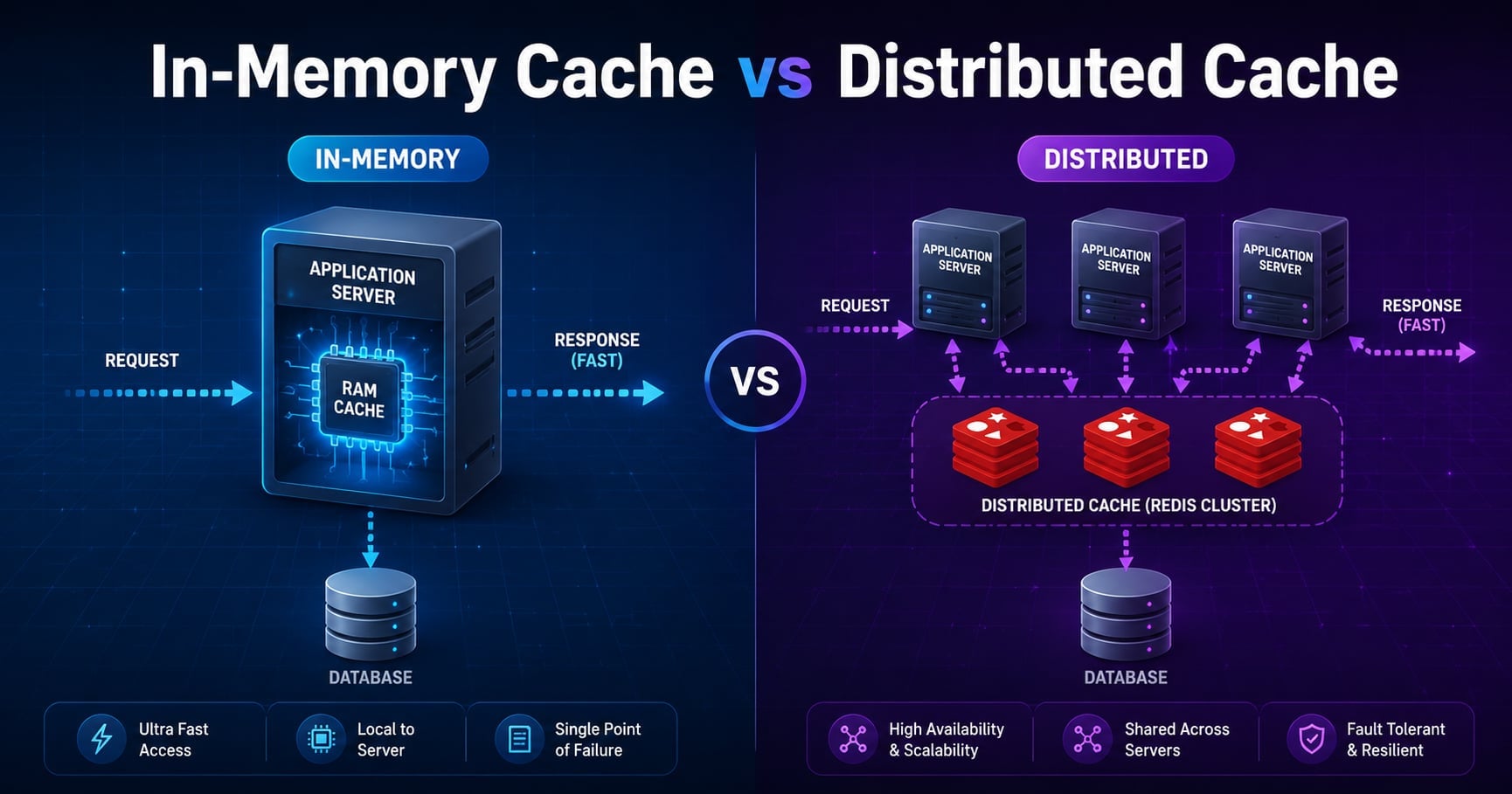
You add caching to one app server and everything is fast. Then you scale to four app servers behind a load balancer, and suddenly users see the same product page change every refresh, prices look stale on some nodes but fresh on others, and your “we have a cache” claim quietly stops being true.
That confusion almost always comes down to one decision: is your cache in-memory (local to one process) or distributed (shared across all processes)?
This guide explains the difference, when each one is the right call, and how teams combine both in real systems.
If you’re new to caching, start with What Is Caching? Why It Improves Performance first, then continue here.
For the broader roadmap, see the System Design Foundations series (pillar) and the System Design tag (category).
Closely related foundation posts:
- What Is Load Balancing and How It Works
- What Are Sticky Sessions in Load Balancing? (Session Affinity)
- Horizontal vs Vertical Scaling Explained
Table of Contents
Open Table of Contents
- What Is an In-Memory Cache?
- What Is a Distributed Cache?
- In-Memory Cache vs Distributed Cache: Side-by-Side
- How They Look in an Architecture Diagram
- The Consistency Problem with Local Caches
- When to Use an In-Memory Cache
- When to Use a Distributed Cache
- Two-Level Caching: Using Both Together
- A Practical Code Example (Local + Redis)
- Real-World Examples
- Common Mistakes
- Interview Questions
- 1. What is the difference between an in-memory cache and a distributed cache?
- 2. When would you choose an in-memory cache over Redis?
- 3. Why do distributed caches matter for horizontal scaling?
- 4. How does two-level caching work and when is it worth the complexity?
- 5. How do you handle invalidation in a distributed cache?
- 6. What can go wrong if a cache node fails?
- Conclusion
- References
- YouTube Videos
What Is an In-Memory Cache?
An in-memory cache stores values in the heap of the application process itself. There is no network call. The cache lives and dies with the process.
Typical examples:
- a
Map,LRU, orTtlCacheinside your Node/Java/Go/Python service - Caffeine in Java
MemoryCachein .NET- Guava cache (older Java codebases)
The defining property is locality: the cache is part of this application instance and nothing else can read or write it directly.
That gives you two huge wins and one big trap:
- Wins: nanosecond-scale reads, no serialization, no network.
- Trap: every replica of your service has its own copy. They drift apart.
What Is a Distributed Cache?
A distributed cache is a separate service (often a cluster) that all your app instances talk to over the network. Every server sees the same keyspace.
The most common implementations are:
- Redis (single-node, replicated, or clustered)
- Memcached
- Hazelcast / Ignite (more in JVM ecosystems)
- managed offerings like Amazon ElastiCache, Azure Cache for Redis, Google Memorystore
Reads and writes are network calls, usually sub-millisecond on the same VPC, but they are not free. In return you get one shared source of cached truth that survives any individual app restart.
In-Memory Cache vs Distributed Cache: Side-by-Side
| Dimension | In-Memory Cache | Distributed Cache |
|---|---|---|
| Location | Inside the app process | Separate service over the network |
| Latency | Nanoseconds, no I/O | ~0.5-2 ms typical (same network) |
| Capacity | Limited to one machine’s RAM | Scales horizontally across nodes |
| Sharing across replicas | No, each replica is isolated | Yes, all replicas see the same data |
| Survives app restart | No | Yes (within the cache’s own durability) |
| Operational overhead | Almost none | You have to run/operate the cluster |
| Typical use | Hot path computations, per-process state | Sessions, shared lookups, rate limits |
The high-level rule of thumb: local is faster, distributed is more correct under scale.
How They Look in an Architecture Diagram
flowchart TD
    U[User] --> LB[Load Balancer]
    LB --> A1[App Server 1
Local Cache]
    LB --> A2[App Server 2
Local Cache]
    LB --> A3[App Server 3
Local Cache]

    A1 --> DC[(Distributed Cache
Redis Cluster)]
    A2 --> DC
    A3 --> DC

    DC --> DB[(Database)]
    A1 -.fallback.-> DB
    A2 -.fallback.-> DB
    A3 -.fallback.-> DB

    classDef app fill:#e1f5fe,stroke:#01579b,stroke-width:2px,color:#000000;
    classDef store fill:#fff3e0,stroke:#e65100,stroke-width:2px,color:#000000;
    class A1,A2,A3 app;
    class DC,DB store;
Each app server has a small local cache for the things it reads constantly. Behind that, all servers share a Redis cluster so they agree on values like sessions, feature flags, or computed user data.
The Consistency Problem with Local Caches
This is the single biggest reason teams reach for a distributed cache.
Imagine a price changes from $19.99 to $24.99:
- App Server 1 reads the new price from the database and caches
$24.99locally. - App Server 2 still has
$19.99cached and won’t notice for another 60 seconds. - A user refreshing the page hits the load balancer and bounces between servers, seeing two prices.
A distributed cache fixes this because all servers read and write the same key. Local caches don’t, unless you build invalidation messaging (e.g., pub/sub) yourself.
This is also why teams sometimes use sticky sessions - to pin a user to one server so its local cache stays consistent for that user. It works, but it’s a workaround, not a fix.
When to Use an In-Memory Cache
Reach for in-memory caching when:
- The data is read-heavy and slow-changing, like config flags, lookup tables, parsed schemas.
- A small amount of staleness is acceptable (seconds to a minute).
- The cost of a cache miss is low (you can recompute or refetch quickly).
- You’re optimizing the hot path and even a 1 ms network call would matter (very high QPS code).
- You want to avoid adding a new piece of infrastructure right now.
Concrete examples:
- caching parsed feature flag rules per process
- caching JIT-compiled regex or templates
- caching tokenized auth claims for the lifetime of a request batch
- caching a rarely-changing list of supported countries
When to Use a Distributed Cache
Reach for a distributed cache when:
- You run multiple app servers and they need a consistent view.
- The cached data is user-scoped (sessions, carts, rate-limit counters) and the user can land on any server.
- The data is expensive to recompute (full search results, aggregated dashboards).
- You need the cache to survive deploys and restarts.
- You need to scale cache capacity beyond a single machine’s RAM.
Concrete examples:
- session storage shared across replicas
- API rate-limit counters
- precomputed home feeds for hot users
- product detail pages that change rarely but are expensive to assemble
If you want the deeper interview-style version of this, see System Design Interview: Distributed Cache Like Redis/Memcached.
Two-Level Caching: Using Both Together
Mature systems often combine both layers. This is sometimes called L1/L2 caching or near caching.
flowchart TD
    R[Request] --> L1{Local cache hit?}
    L1 -->|Yes| OUT[Return value]
    L1 -->|No| L2{Distributed cache hit?}
    L2 -->|Yes| FILL1[Fill local cache] --> OUT
    L2 -->|No| DB[Query database] --> FILL2[Fill both caches] --> OUT

    classDef step fill:#e8f5e9,stroke:#1b5e20,stroke-width:2px,color:#000000;
    class R,L1,L2,OUT,FILL1,FILL2,DB step;
The idea:
- L1 (local in-memory) absorbs the bulk of repeated reads inside a single process.
- L2 (Redis/Memcached) catches everything L1 missed and keeps replicas roughly in sync.
- The database is only touched when both miss.
The catch: when something changes, you now have two places to invalidate. Many teams handle that with a Redis pub/sub channel that tells every app instance “drop key X from your local cache.”
Use two-level caching when the L1 hit ratio is high and the data is mostly read-heavy. Don’t use it as the default - it doubles your invalidation surface area.
A Practical Code Example (Local + Redis)
This is a small two-tier read pattern you can adapt. The local cache is just a TTL Map; the distributed cache is Redis.
import Redis from "ioredis";

const redis = new Redis();

// Tier 1: process-local cache
const local = new Map<string, { value: string; expiresAt: number }>();

const LOCAL_TTL_MS = 5_000;     // short, to limit drift between replicas
const REDIS_TTL_S  = 60;        // longer, since it's shared truth

async function getProductPrice(productId: string): Promise<string> {
  const key = `price:${productId}`;
  const now = Date.now();

  // 1) Local cache (fastest, but per-process)
  const hit = local.get(key);
  if (hit && hit.expiresAt > now) return hit.value;

  // 2) Distributed cache (shared across replicas)
  const fromRedis = await redis.get(key);
  if (fromRedis) {
    // Refill local so subsequent reads on this node are free
    local.set(key, { value: fromRedis, expiresAt: now + LOCAL_TTL_MS });
    return fromRedis;
  }

  // 3) Database (source of truth)
  const fromDb = await loadPriceFromDatabase(productId);

  // Fill both caches. Keep local TTL short so other replicas don't stay stale long.
  await redis.setex(key, REDIS_TTL_S, fromDb);
  local.set(key, { value: fromDb, expiresAt: now + LOCAL_TTL_MS });

  return fromDb;
}

async function loadPriceFromDatabase(productId: string): Promise<string> {
  // Replace with your real DB call.
  return "24.99";
}
Two things matter here:
- The local TTL is intentionally short (5s). That bounds how stale any single replica can get even if Redis already has the new value.
- The Redis TTL is longer (60s). Redis is the shared truth, so it can hold the value longer and protect the database from stampedes.
This is the simplest version of the pattern. Production systems usually add invalidation events (e.g., Redis pub/sub) so any replica can immediately drop a key when the underlying data changes.
Real-World Examples
Sessions and rate limits in a horizontally-scaled API
Sessions and rate-limit counters cannot live in process memory once you have more than one app server. A user request can land on any replica, and rate limits stop working if each replica has its own counter. Teams almost always put this state in Redis precisely because every replica needs the same view.
Feature flag evaluation with a local cache
Feature flag SDKs (LaunchDarkly, Unleash, Flagsmith, OpenFeature implementations) typically pull rules into the app process and evaluate them locally. That’s an in-memory cache by design - flag evaluations need to be free and synchronous, and a few seconds of staleness is fine because rule rollouts aren’t real-time-critical.
CDNs as a “distributed cache” at the edge
A CDN like Cloudflare or Fastly is effectively a globally distributed cache for HTTP responses. Each edge location is a node, and the keyspace is the URL plus headers. The same trade-offs apply: shared truth, network hop, careful key design to avoid leaking personalized data.
Common Mistakes
1. Using only a local cache behind a load balancer
This is the classic “works on my single-node test, breaks on staging” bug. Different replicas see different values, and you get nondeterministic behavior depending on which app server the request lands on.
2. Putting everything in Redis “just to be safe”
Redis is fast, but a network call still costs ~0.5-2 ms. If you put truly hot, deterministic computations behind Redis, you end up paying network latency on the hottest path of your system. Some things genuinely belong in process memory.
3. Forgetting to invalidate the local tier
When you switch to two-level caching, every write needs to invalidate both tiers. The most common bug is updating Redis correctly and forgetting that every replica still has a stale local copy until its TTL expires.
4. Treating the cache as durable storage
Both local and distributed caches can lose data - local on a restart, distributed on eviction or failover. If losing a key would cause data loss or a correctness bug, that data belongs in your database, not in a cache.
Interview Questions
1. What is the difference between an in-memory cache and a distributed cache?
An in-memory cache lives inside a single application process and is reachable only by that process, which makes it extremely fast but invisible to other replicas. A distributed cache is a separate service (commonly Redis or Memcached) that every replica calls over the network, so all replicas see the same keys and values. The trade-off is that the in-memory cache is faster but can drift across replicas, while the distributed cache is consistent across the fleet but adds a network hop and operational overhead.
2. When would you choose an in-memory cache over Redis?
I’d choose an in-memory cache when the data is read-heavy and slow to change, when each process can independently compute or refresh it cheaply, and when even a sub-millisecond network call would hurt performance on the hot path. Examples include feature flag rules, parsed configuration, lookup tables, and per-process compiled regex. The key requirement is that drift between replicas is acceptable, usually because TTLs are short or the data rarely changes.
3. Why do distributed caches matter for horizontal scaling?
Once you scale beyond a single app server, anything stored only in process memory is invisible to the other replicas. Sessions, rate-limit counters, and personalization state all break in subtle ways under round-robin load balancing because each replica makes decisions on its own slice of the data. A distributed cache fixes this by giving every replica a single shared keyspace, which is what allows you to truly run the application stateless and scale horizontally.
4. How does two-level caching work and when is it worth the complexity?
Two-level caching uses a small local cache as L1 and a distributed cache as L2. The application checks L1 first, then L2, and only goes to the database if both miss. It’s worth the extra invalidation logic when you have a high local hit rate on data that changes infrequently and where shaving off the network call to Redis materially improves p99 latency. If your data changes often, the cost of keeping both tiers in sync usually outweighs the latency win.
5. How do you handle invalidation in a distributed cache?
The simplest pattern is TTL-only: set a reasonable expiry and accept that staleness window. For stronger consistency, the application explicitly deletes or updates keys after writes, so the next read repopulates from the source of truth. In two-tier setups, you typically publish an invalidation event on a channel (Redis pub/sub or a message bus) so every replica can drop the key from its local L1 cache without waiting for TTL.
6. What can go wrong if a cache node fails?
If you’ve architected the cache as a true cache, a node failure should degrade performance but not correctness - requests fall through to the database while the cache is down. The danger is when teams unconsciously start treating the cache as the source of truth: storing data only there, or relying on cached values for security-sensitive checks. The other failure mode is thundering herd: when the cache comes back empty, every miss hits the database at once. Mitigations include request coalescing, jittered TTLs, and pre-warming for known hot keys.
Conclusion
- An in-memory cache lives inside one process: nanosecond reads, no network, but every replica is isolated.
- A distributed cache is a shared service every replica reads from: consistent across the fleet, at the cost of a network hop.
- Use in-memory for slow-changing, read-heavy, hot-path data where drift between replicas is acceptable.
- Use distributed for shared state like sessions, rate limits, and anything user-scoped behind a load balancer.
- Mature systems often combine both as two-level caching (L1 local + L2 distributed) and add an invalidation channel to keep them coherent.
- Treat both as caches, not as databases - assume any node can disappear, and make sure your system still works when it does.
The next topic in this series covers What Is a CDN? How Content Delivery Networks Work - which is essentially distributed caching at the network edge.
If you want to revisit how caching fits into request routing, What Is Load Balancing and How It Works and What Are Sticky Sessions in Load Balancing? (Session Affinity) connect the same dots from the load balancer’s side.
References
-
Distributed caching in ASP.NET Core - Microsoft Learn
https://learn.microsoft.com/en-us/aspnet/core/performance/caching/distributed -
What is a Distributed Cache? - Hazelcast
https://hazelcast.com/foundations/caching/distributed-cache/ -
Distributed Caching - Redis Glossary
https://redis.io/glossary/distributed-caching/ -
Database Caching Strategies Using Redis - AWS Whitepaper
https://docs.aws.amazon.com/whitepapers/latest/database-caching-strategies-using-redis/caching-patterns.html
YouTube Videos
-
“In-Memory or Distributed Cache: In .NET 9 You Can Have Both”
https://www.youtube.com/watch?v=7DSNFwsYR8E -
“Caching Explained in Simple Words | Browser, CDN, Redis & DB”
https://www.youtube.com/watch?v=MIsEOHgB_Ic -
“Don’t Make This Mistake: In-Memory vs Distributed Cache”
https://www.youtube.com/shorts/Uz9Q3p5tYXo