 ADevGuide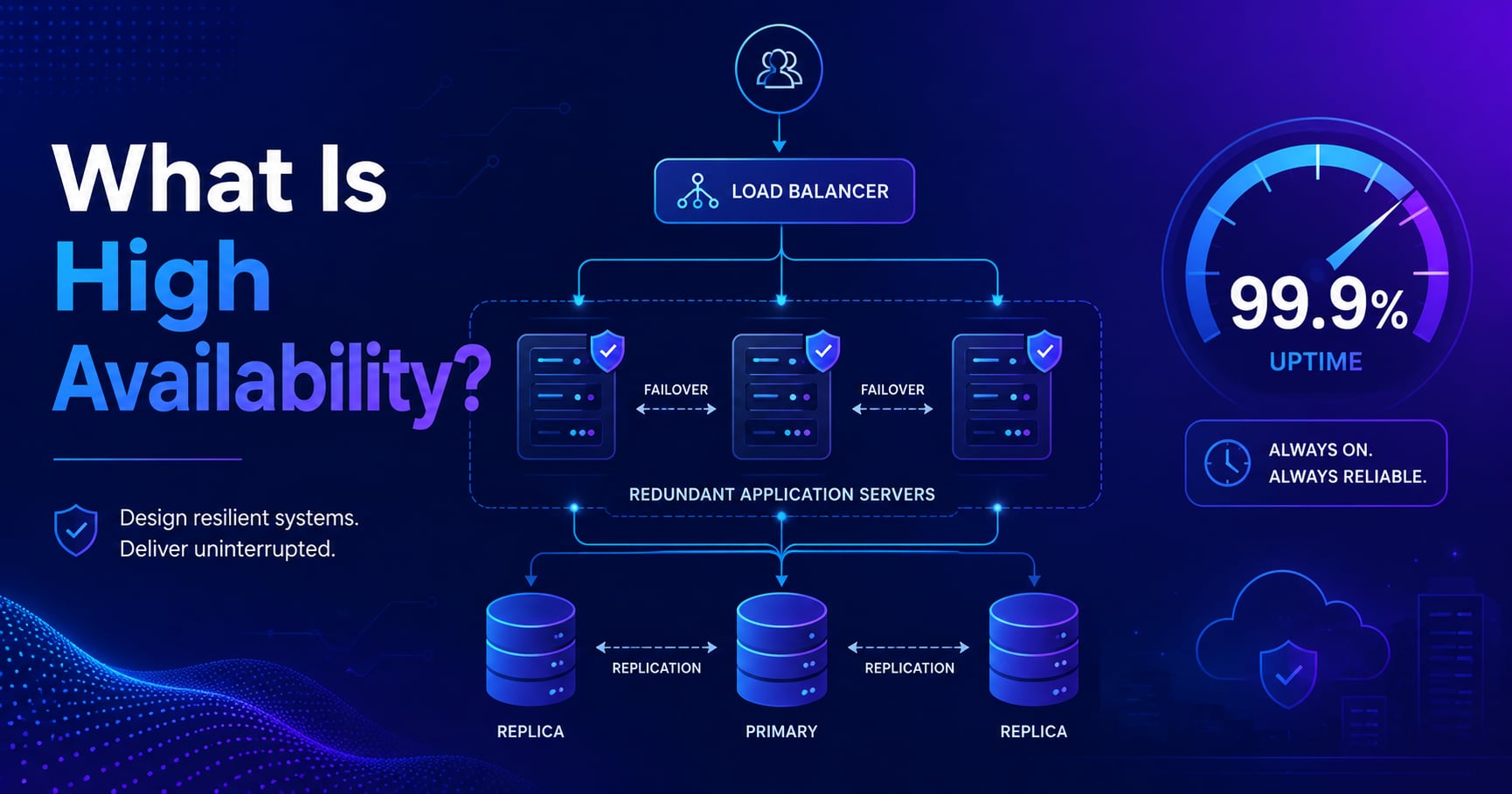
It’s 11 PM on Black Friday. Your payment service crashes. Every minute of downtime costs tens of thousands in lost sales and erodes the customer trust you spent years building.
That’s not a hypothetical - it’s the scenario that drives every serious engineering team to design for high availability from the start, not as an afterthought.
This guide explains what high availability actually means, why the famous “nines” (99.9%, 99.99%) matter in practice, and the core patterns - redundancy, failover, and health checks - that make systems keep running even when individual parts fail.
If you’re following the learning path, start with What Is Scalability? A Beginner’s Guide and What Is Load Balancing and How It Works first.
For the full roadmap, the System Design Foundations series is the pillar page and System Design is the category page.
Table of Contents
Open Table of Contents
- What Is High Availability? (Definition)
- The “Nines” - What Uptime Percentages Actually Mean
- Redundancy: Removing Single Points of Failure
- Failover: Detecting Failures and Recovering Automatically
- Active-Active vs Active-Passive
- How Load Balancers Enable High Availability
- HA vs Fault Tolerance vs Disaster Recovery
- Real-World Examples
- Interview Questions
- 1. What is high availability and how is it different from fault tolerance?
- 2. What are the “nines” and why do they matter in system design?
- 3. What is a single point of failure and how do you identify and remove one?
- 4. What’s the difference between active-active and active-passive configurations?
- 5. How do health checks enable automatic failover?
- 6. What is the difference between high availability and disaster recovery?
- Conclusion
- References
- YouTube Videos
What Is High Availability? (Definition)
High availability (HA) means designing a system so it continues to operate correctly even when individual components fail. The goal isn’t to prevent all failures - failures are inevitable in distributed systems - it’s to ensure that no single failure causes the entire system to go down.
You measure high availability as a percentage of time the system is operational. A service that’s up 99.9% of the time over a year is down for about 8.77 hours total - all of them unplanned and potentially expensive. That gap between “mostly up” and “always up” is what high availability engineering is about.
High availability requires deliberate design choices across every layer of a system: compute, networking, storage, and routing. You can’t bolt it on after the fact. A system without HA design doesn’t degrade gracefully - it crashes completely when the first critical component fails.
The “Nines” - What Uptime Percentages Actually Mean
In conversations about reliability, you’ll hear teams talk about “the nines” - shorthand for uptime targets expressed as percentages. Here’s what those numbers actually translate to in downtime per year:
| Availability | Downtime per year | Common term |
|---|---|---|
| 99% | ~3.65 days | Two nines |
| 99.9% | ~8.77 hours | Three nines |
| 99.99% | ~52.6 minutes | Four nines |
| 99.999% | ~5.26 minutes | Five nines |
Three nines (99.9%) is roughly the baseline for web services that take availability seriously. Four nines (99.99%) requires significant investment in redundancy, automation, and incident response. Five nines is typically reserved for financial systems, emergency services, or telecoms - it means your system can’t afford to be down for more than 5 minutes in an entire year.
The point of these numbers isn’t vanity - they’re a forcing function. When your SLA says “99.99% uptime” and you sign a contract with customers based on that, you need a system architecture that can actually deliver it. A single server with no redundancy can’t give you four nines regardless of how good the hardware is.
Redundancy: Removing Single Points of Failure
A single point of failure (SPOF) is any component whose failure causes the entire system to fail. A single app server, a single database, a single network switch - these are all SPOFs unless you have a backup.
Redundancy means having multiple components that can do the same job, so when one fails, others continue working. The load balancer routes traffic to healthy instances; failed instances are removed from the pool automatically.
Here’s what a redundant web service architecture looks like:
flowchart TD
    U[User Requests] --> LB[Load Balancer
Health Checks]
    LB --> A1[App Server 1]
    LB --> A2[App Server 2]
    LB --> A3[App Server 3]
    A1 --> DB[(Primary Database)]
    A2 --> DB
    A3 --> DB
    DB -->|Continuous replication| RDB[(Replica Database)]

    classDef server fill:#e1f5fe,stroke:#01579b,stroke-width:2px,color:#000000;
    classDef db fill:#f3e5f5,stroke:#6a1b9a,stroke-width:2px,color:#000000;
    classDef lb fill:#e8f5e9,stroke:#1b5e20,stroke-width:2px,color:#000000;
    class A1,A2,A3 server;
    class DB,RDB db;
    class LB lb;
If App Server 2 crashes, the load balancer detects it via health checks and stops sending traffic to it. Servers 1 and 3 handle the load - users may not notice anything happened.
Redundancy applies at every layer, not just application servers:
- Compute: multiple app servers in different availability zones
- Networking: multiple network paths, dual-homed connections
- Storage: primary database with one or more replicas
- Load balancers: even the load balancer itself needs a backup (active-passive pair or a cloud-managed LB with built-in redundancy)
The principle is the same everywhere: remove every component that, if it failed, would take down the whole system.
Failover: Detecting Failures and Recovering Automatically
Redundancy gives you backup capacity. Failover is the process of actually using it - detecting that something failed and routing around it automatically.
Failover has two distinct parts: detection (knowing something is wrong) and switching (routing traffic away from the failed component to healthy ones).
Detection: Health Checks
Health checks are periodic probes that verify a component is working, not just that its process is running. A server can be up but returning errors, running out of memory, or stuck in a deadlock. A good health check catches all of these by sending a test request (usually an HTTP GET to a /health endpoint) and checking for a valid response within a timeout window.
flowchart TD
    HC[Health Check
runs every 10s] --> F{Server responds?}
    F -->|Healthy response| OK[Keep in rotation]
    F -->|Timeout or error| TH[Failure threshold check]
    TH -->|3 consecutive failures| RM[Remove from pool]
    RM --> AL[Alert on-call engineer]
    RM --> REC[Monitor for recovery]
    REC --> RECHK[Health check passes again]
    RECHK --> ADD[Add back to pool]

    classDef check fill:#e1f5fe,stroke:#01579b,stroke-width:2px,color:#000000;
    classDef action fill:#e8f5e9,stroke:#1b5e20,stroke-width:2px,color:#000000;
    classDef alert fill:#fff3e0,stroke:#e65100,stroke-width:2px,color:#000000;
    class HC,F,RECHK check;
    class OK,ADD action;
    class TH,RM,AL,REC alert;
The failure threshold (3 consecutive failures above) prevents flapping - where a server briefly fails a single check but is otherwise fine, causing unnecessary routing changes. Most load balancers let you configure both the check interval and the threshold independently.
Switching: Automatic Routing
Once a failure is detected, the system routes around it - usually within seconds. The speed of this switching determines how much of your availability budget the failure consumes. A failover that takes 60 seconds means every user who hit that server during those 60 seconds got an error.
Active-Active vs Active-Passive
There are two main patterns for how redundant components are used:
flowchart TD
    subgraph AA[Active-Active]
        LBA[Load Balancer] --> S1[Server 1 Active]
        LBA --> S2[Server 2 Active]
    end
    subgraph AP[Active-Passive]
        LBP[Load Balancer] --> P[Primary Active]
        P -.->|Failover trigger| B[Standby Passive]
    end

    classDef server fill:#e1f5fe,stroke:#01579b,stroke-width:2px,color:#000000;
    classDef passive fill:#f5f5f5,stroke:#9e9e9e,stroke-width:2px,color:#000000;
    classDef lb fill:#e8f5e9,stroke:#1b5e20,stroke-width:2px,color:#000000;
    class S1,S2,P server;
    class B passive;
class LBA,LBP lb;Active-Active: all instances serve real traffic simultaneously. When one fails, the load balancer redistributes its traffic to the surviving instances, with no cold-start overhead. This makes better use of your hardware - you’re not paying for idle standby capacity - and failover is usually faster because surviving instances are already warm. The trade-off is that each instance must handle the extra load when a peer fails, which means you need spare capacity headroom built into the cluster.
Active-Passive: one instance handles all traffic while the other waits in a ready state. When the primary fails, the passive instance takes over. This is simpler to implement and reason about, and it avoids the complexity of multiple active instances potentially processing conflicting writes. The downside is that you’re paying for capacity you’re not normally using, and the passive instance may have a brief cold-start delay during failover.
Which to use? Active-Active is usually preferred for stateless services (API servers, microservices) because instances don’t share mutable state - any server can handle any request. Active-Passive is often used for stateful components like databases, where running two concurrent active writers would require complex conflict resolution logic.
How Load Balancers Enable High Availability
The load balancer is the critical HA component in most web architectures. It sits in front of your app servers, continuously checks their health, and routes traffic accordingly. Without it, you’d need a separate mechanism to detect failed servers and redirect clients.
For a deep dive into how load balancers work - including load balancing algorithms, session stickiness, and layer 4 vs layer 7 routing - see What Is Load Balancing and How It Works.
A reverse proxy like Nginx or HAProxy can also act as a load balancer and HA component, absorbing server failures transparently before they reach the client.
One important caveat: the load balancer itself can become a SPOF. In production, you need redundant load balancers too - either an active-passive pair managed by a heartbeat protocol (like keepalived with a shared virtual IP), or a cloud-managed load balancer that has built-in redundancy across multiple physical nodes.
HA vs Fault Tolerance vs Disaster Recovery
These three terms are related but not the same thing, and the distinction matters for architecture decisions.
High Availability focuses on keeping a system operational despite individual component failures. It tolerates brief interruptions - milliseconds to seconds for automatic failover. A highly available database cluster survives a single node failure with minimal disruption.
Fault Tolerance goes further: zero downtime even during failure. It typically requires hardware-level redundancy (RAID arrays, redundant power supplies, hardware failover controllers) and software designed to mask failures completely. The system continues with no interruption at all. This costs significantly more and is usually reserved for financial transaction systems, aviation, or medical devices where even seconds of downtime is unacceptable.
Disaster Recovery (DR) addresses catastrophic, large-scale failures - an entire data center going offline, a region-wide power outage, a natural disaster. DR involves replication to a geographically separate location, a documented runbook for failover, and an accepted Recovery Time Objective (RTO) - how long recovery takes - and Recovery Point Objective (RPO) - how much data loss is acceptable. Unlike HA failover (which is automatic and takes seconds), disaster recovery may take minutes to hours and often involves manual steps.
Think of it as a spectrum:
- HA: “One server failed. We’re fine.” (seconds)
- Fault tolerance: “A disk failed. Nothing noticed.” (zero impact)
- Disaster recovery: “Our entire data center is down. Failing over to backup region.” (minutes to hours)
Real-World Examples
AWS Availability Zones
Amazon Web Services divides each geographic region (like us-east-1) into multiple Availability Zones - physically separate data centers with independent power, cooling, and networking, connected by low-latency links. A well-architected AWS deployment spreads its EC2 instances, RDS read replicas, and load balancers across at least two AZs. If one AZ loses power, the application continues running in the others. AWS explicitly designs AZs so that a failure in one cannot cascade to another. This is the most widely used HA pattern in cloud infrastructure today.
Netflix’s Chaos Engineering
Netflix runs on AWS and serves hundreds of millions of users globally. One of their most well-known HA practices is Chaos Monkey - a tool that randomly terminates production instances during business hours. The philosophy: if failures happen in production anyway, it’s better to discover weaknesses during working hours when engineers are alert than to be surprised at 3 AM. Netflix also runs multi-region: if one AWS region has a major outage, they can shift traffic to another region entirely. The engineering investment is substantial, but so is the business cost of an outage at their scale.
Google’s Error Budgets
Google popularized the concept of SLOs (Service Level Objectives) and error budgets - internal reliability targets that drive engineering decisions. Each service has an error budget representing its acceptable downtime per quarter. If a service burns through too much of its error budget, new feature work is paused until reliability is restored. This creates a direct organizational feedback loop that ties feature velocity to system stability, and it’s become a standard practice in SRE teams across the industry.
Interview Questions
1. What is high availability and how is it different from fault tolerance?
High availability means a system is designed to stay operational even when individual components fail, accepting that there may be a brief interruption - typically seconds - during the failover transition. Fault tolerance goes further: the system continues operating with zero interruption even during failure, usually through hardware-level redundancy that masks failures completely. High availability is achievable with standard cloud infrastructure using multiple instances and automatic failover. Fault tolerance requires substantially more investment and is typically reserved for financial transaction processors or safety-critical systems where even a few seconds of downtime carries unacceptable risk.
2. What are the “nines” and why do they matter in system design?
“The nines” refers to uptime targets expressed as percentages: 99% (two nines), 99.9% (three nines), 99.99% (four nines), and so on. They matter because they translate directly to acceptable downtime: 99.9% means about 8.77 hours of downtime per year, while 99.99% means only 52.6 minutes. These targets drive architectural decisions - going from three nines to four nines typically requires eliminating all significant single points of failure, automating failover, and investing in monitoring and runbooks. Teams and vendors also use these numbers in SLAs with contractual penalties, so missing them has direct financial consequences.
3. What is a single point of failure and how do you identify and remove one?
A single point of failure is any component whose failure brings down the entire system. A lone database server, a single load balancer, a shared NFS mount that all app servers depend on - these are all SPOFs. You identify them by tracing the critical path of a request from the user to the database and asking “if this component disappeared right now, would the service stay up?” You remove SPOFs by introducing redundancy at each layer: multiple app servers behind a load balancer, a primary database with replicas and automatic failover, redundant network paths, and backup load balancers. The tricky part is that SPOFs aren’t always obvious - a shared configuration file, a single DNS server, or a secret store with no replica can all become SPOFs that only surface during an incident.
4. What’s the difference between active-active and active-passive configurations?
In active-active, all redundant instances serve real traffic simultaneously. When one fails, the load balancer redistributes its requests to the surviving instances with no cold-start overhead. In active-passive, one instance handles all traffic while the other waits in standby; failover means the passive instance takes over the primary role. Active-active makes better use of resources and usually has faster failover, but requires that all instances can safely handle concurrent traffic - stateless services work well here. Active-passive is preferred for stateful components like primary databases, where running two concurrent active writers would create conflict resolution complexity. In most modern architectures, the web and application tiers use active-active, while the primary database uses active-passive with replicas for read scaling.
5. How do health checks enable automatic failover?
Health checks are periodic probes - usually HTTP requests to a /health endpoint - that verify a component is actually working rather than just running. A server can be up but returning 500 errors, stuck in a memory leak, or blocked on a downstream dependency. The load balancer uses health checks to detect these states: if a server fails a configurable number of consecutive checks (a failure threshold), the load balancer removes it from the rotation and routes traffic to healthy servers. This threshold prevents unnecessary failovers from brief network blips. Once the server recovers and passes health checks again, the load balancer adds it back. This automation is what makes failover fast enough to stay within uptime targets - without it, you’d need manual intervention for every server failure.
6. What is the difference between high availability and disaster recovery?
High availability handles component-level failures within a single data center or region - a server crash, a disk failure, a process deadlock. Failover is automatic and typically completes in seconds. Disaster recovery addresses catastrophic, region-wide failures: a data center losing power, a cloud provider outage, or a natural disaster. DR involves replication to a geographically separate location, a documented failover runbook, and defined RTO (recovery time objective: how long recovery takes) and RPO (recovery point objective: how much data loss is acceptable). Unlike HA failover, DR is often semi-manual and takes minutes to hours. Both are necessary in a mature production system - HA keeps you running day-to-day, while DR is insurance against tail-risk catastrophes.
Conclusion
- High availability means designing systems to stay operational when individual components fail - not preventing failure, but designing around it.
- Uptime “nines” have real consequences: 99.9% allows ~8.77 hours of downtime per year; 99.99% allows only ~52 minutes.
- Redundancy removes single points of failure by ensuring no single component can take down the whole system.
- Failover relies on health checks to detect failures quickly and reroute traffic to healthy instances automatically - without manual intervention.
- Active-active suits stateless services; active-passive suits stateful components like databases where concurrent writes need careful coordination.
- HA, fault tolerance, and disaster recovery address different failure scopes at increasing cost and complexity.
The next topic in this series covers Single Points of Failure - how to systematically find every SPOF in your architecture and what to do about them.
If you want to see how load balancers orchestrate HA at the traffic-routing level, What Is Load Balancing and How It Works goes deeper on algorithms and real configurations. And for how caching layers connect to availability (reducing database pressure during failover events), see What Is Caching? Why It Improves Performance.
References
-
What is High Availability? - IBM Think
https://www.ibm.com/think/topics/high-availability -
What is High Availability? - Red Hat
https://www.redhat.com/en/topics/linux/what-is-high-availability -
Reliability Pillar - AWS Well-Architected Framework
https://docs.aws.amazon.com/wellarchitected/latest/reliability-pillar/welcome.html
YouTube Videos
-
“High Availability | Eliminate Single Points of Failure | System Design Concepts for Beginners”
https://www.youtube.com/watch?v=USCCqS9MbHs -
“Achieving High Availability (HA) | System Design Fundamentals”
https://www.youtube.com/watch?v=Db5itKpajVI -
“Design Patterns for High Availability: What gets you 99.999% uptime?“
https://www.youtube.com/watch?v=LdvduBxZRLs