 ADevGuide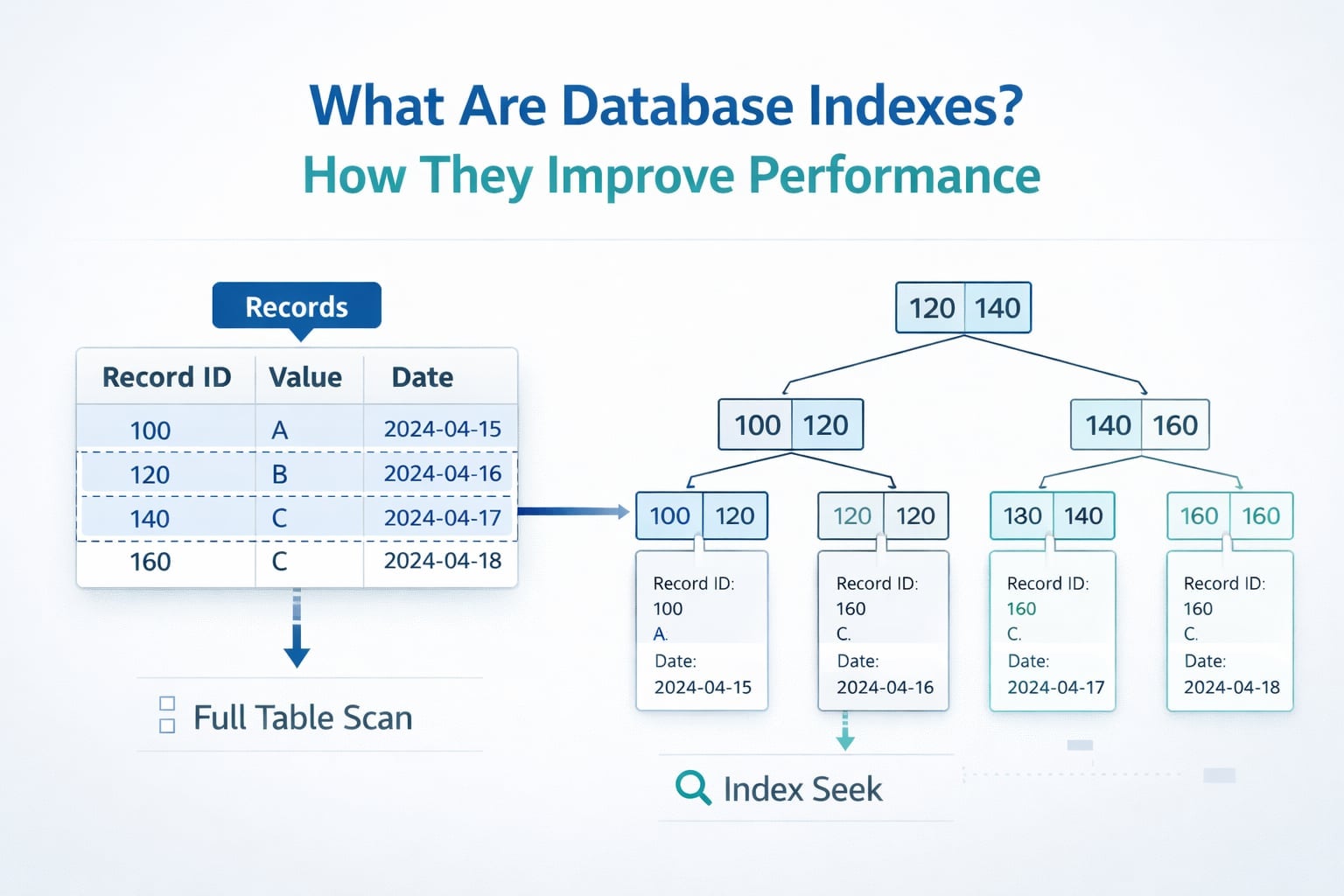
An endpoint that worked well at ten thousand orders begins timing out at ten million. The instinct is often to add a cache or a larger database instance, but the first question is simpler: which rows is the query reading, and can the database find them without scanning almost everything?
This guide explains database indexing as a workload decision: how B-tree indexes support a query, what they cost on writes, and how EXPLAIN ANALYZE proves whether a proposed index helps. Read SQL vs NoSQL: How to Choose in System Design for the storage choice, then use the Backend Developer Interview Guide for the full path. The Database Fundamentals series and Database tag provide the broader foundations.
Table of Contents
Open Table of Contents
- What Is a Database Index?
- How a B-Tree Index Finds Rows
- Why Indexes Improve Query Performance
- How Query Plans Change with Indexes
- Common Types of Database Indexes
- SQL Examples: Creating Useful Indexes
- When to Add an Index (and When Not To)
- How to Diagnose a Slow Query Safely
- Common Indexing Mistakes
- Real-World Examples
- Interview Questions
- 1. What is a database index, and why is it useful?
- 2. Why can too many indexes hurt performance?
- 3. How do you choose index column order for a composite index?
- 4. What is the difference between clustered and non-clustered indexes?
- 5. When should you use a partial index?
- 6. How do you verify that an index is actually helping?
- Conclusion
- References
- YouTube Videos
What Is a Database Index?
A database index is a separate data structure that helps the database find rows faster, without scanning every row in a table.
A good mental model is a book index:
- Without an index, you read every page to find a topic.
- With an index, you jump straight to likely pages.
In SQL databases, indexes are usually built on one or more columns, such as email, created_at, or (tenant_id, status).
How a B-Tree Index Finds Rows
Most relational databases use a B-tree or B+ tree for ordinary indexes. Its keys are ordered, so the engine can descend through a small number of branch pages, find the matching leaf range, then fetch only the candidate table rows. That ordered structure supports equality, ranges, and ordered scans; it is why a B-tree is such a useful default.
flowchart TD
    A[Query: customer_id = 101] --> B{Matching B-tree index?}
    B -->|No| C[Sequential scan of table]
    B -->|Yes| D[Traverse root and branch pages]
    D --> E[Read matching leaf entries]
    E --> F[Fetch table rows or return index-only result]
    C --> G[Filter matching rows]
    F --> H[Return result]
    G --> H
The important caveat is selectivity. If a predicate matches most of a tiny table, or most of a large table, a sequential scan can be cheaper than an index plus many random table reads. The query planner chooses from estimates; an index existing does not require the planner to use it.
Why Indexes Improve Query Performance
Without a matching index, the database often performs a full table scan.
SELECT *
FROM orders
WHERE customer_id = 101;
If orders has 20 million rows and no index on customer_id, the engine may read all 20 million rows to find matches.
With an index on customer_id, the engine can jump directly to matching row locations and fetch only relevant records.
The Read-Write Trade-off
An index can lower latency for selective WHERE, JOIN, and ORDER BY paths. It also consumes storage and must be maintained on every matching INSERT, UPDATE, and DELETE. A write-heavy event table with six speculative indexes can become slower and more expensive even if no reader uses most of them.
That is why indexing begins with observed query patterns and a latency problem, not an instruction to index every column. The index should make a frequent, valuable query cheaper enough to justify its write tax.
How Query Plans Change with Indexes
Most SQL engines expose a query planner (EXPLAIN) to show how a query will execute.
Example Without an Index
EXPLAIN ANALYZE SELECT *
FROM orders
WHERE customer_id = 101;
Typical plan shape:
Seq Scan(PostgreSQL) orTable Scan(other engines)
Example With an Index
CREATE INDEX CONCURRENTLY idx_orders_customer_id
  ON orders(customer_id);

-- Run this outside an application transaction in PostgreSQL.
-- CONCURRENTLY avoids blocking ordinary writes while the index is built.

EXPLAIN ANALYZE SELECT *
FROM orders
WHERE customer_id = 101;
Typical plan shape:
Index ScanorIndex Seek
The exact terms differ by engine, but the idea is the same: less scanning, faster lookup.
EXPLAIN ANALYZE executes the query, so use it carefully against production-shaped workloads. Compare actual rows, elapsed time, and buffer or I/O details before and after. A plan that estimates 100 rows but reads 10 million points to stale statistics or a modeling issue, not automatically a missing index.
Common Types of Database Indexes
1. Single-Column Index
Best for frequent filters on one column.
CREATE INDEX idx_users_email ON users(email);2. Composite (Multi-Column) Index
Best when queries filter by a recurring column combination.
CREATE INDEX idx_orders_tenant_status_created
  ON orders(tenant_id, status, created_at);
Order matters. An index on (tenant_id, status, created_at) can efficiently support a query that constrains tenant_id, then status, and then reads a created_at range or order. It normally cannot use the same ordered path as efficiently for a query that filters only status; this is commonly called the leftmost-prefix rule. The dedicated next article will cover column-order trade-offs in depth.
3. Unique Index
Enforces uniqueness while improving lookups.
CREATE UNIQUE INDEX idx_users_email_unique
  ON users(email);
4. Covering Index (Engine-dependent)
A covering index contains all columns needed for a query, so the database may avoid extra table lookups.
-- Example concept; exact syntax/features vary by engine
CREATE INDEX idx_orders_customer_created_total
  ON orders(customer_id, created_at, total_amount);
5. Partial/Filtered Index (Engine-dependent)
Indexes only a subset of rows, useful for skewed data.
-- PostgreSQL example
CREATE INDEX idx_orders_active_status
  ON orders(status)
  WHERE status IN ('PLACED', 'PROCESSING');
SQL Examples: Creating Useful Indexes
Imagine a frequent dashboard query:
SELECT order_id, customer_id, status, created_at
FROM orders
WHERE tenant_id = 42
  AND status = 'PLACED'
ORDER BY created_at DESC
LIMIT 50;
Better Index for This Query Pattern
CREATE INDEX CONCURRENTLY idx_orders_tenant_status_created_desc
  ON orders(tenant_id, status, created_at DESC);
Why this helps:
tenant_idandstatussupport filteringcreated_at DESCsupports orderingLIMIT 50returns quickly from the top of the index range
Join Example
SELECT o.order_id, c.full_name
FROM orders o
JOIN customers c ON c.customer_id = o.customer_id
WHERE o.created_at >= '2026-04-01';
Likely helpful indexes:
CREATE INDEX idx_orders_created_at ON orders(created_at);
CREATE INDEX idx_orders_customer_id ON orders(customer_id);
As your workload grows, indexing and partitioning strategy may evolve into broader scaling choices like database sharding.
When to Add an Index (and When Not To)
Add Indexes When
- A query is slow and appears frequently
- The same filter/join pattern repeats in production traffic
- You confirmed scan-heavy query plans with
EXPLAIN
Avoid Adding Indexes When
- The table is tiny (scan is already cheap)
- The column has very low selectivity (for example, mostly one repeated value)
- The workload is write-heavy and read benefits are minimal
- You are indexing “just in case” without observing real query patterns
How to Diagnose a Slow Query Safely
- Capture the query shape and scope. Record the parameters, frequency, p95/p99 latency, rows returned, and whether the slowdown affects one tenant or all of them. Do not tune a query that is merely unusual before proving it drives meaningful load.
- Read the actual plan. Use the database’s plan tooling (
EXPLAIN ANALYZEin PostgreSQL, for example) in a safe environment or on a carefully bounded production query. Look for full scans, large sort operations, row-estimate errors, and repeated nested-loop work. - Make one hypothesis. An index must match a real filter, join, range, and ordering pattern. Rewrite a non-sargable predicate such as
WHERE DATE(created_at) = ...into a range where appropriate before adding an index that only masks the query shape. - Measure the new cost. Validate plan, latency, I/O, and write impact after the change. Build large production indexes with the engine’s online/concurrent mechanism and have a rollback plan if write latency or replication lag rises.
For a payment or inventory path, pair index work with database transactions and ACID properties. A fast query does not make a concurrent write correct.
Common Indexing Mistakes
1. Indexing Every Column
This increases write cost and storage but does not guarantee better read performance. It can also give the optimizer more poor alternatives and make maintenance operations heavier. Begin with the few queries that dominate user-facing latency or database load.
2. Wrong Column Order in Composite Indexes
Index order should follow your most common filter pattern, equality predicates, and required ordering. An index on (tenant_id, status, created_at) is shaped differently from one on (status, tenant_id, created_at) even though the same columns appear. Verify the specific plan because range predicates can prevent later columns from narrowing the search as expected.
3. Missing Indexes on Join Keys
Frequent joins on unindexed keys lead to avoidable scans and CPU spikes.
4. Forgetting to Re-check Plans
After adding an index, verify with EXPLAIN ANALYZE that the plan and actual runtime improved. The optimizer may skip a valid index because it estimates a table scan is cheaper, because the predicate is not indexable, or because statistics are stale. The plan is evidence; the CREATE INDEX statement is only a hypothesis.
5. Ignoring Data Distribution
A column with few distinct values may not benefit from a standard index as much as you expect.
Real-World Examples
E-commerce Catalog and Orders
An online store often queries by tenant_id, status, and created_at for seller dashboards. Composite indexes on those columns can reduce dashboard latency from seconds to milliseconds.
Payment and Ledger Systems
Fintech systems frequently query recent transactions by account_id and time range. A tuned index on (account_id, created_at) supports fast audit and statement queries.
Multi-Tenant SaaS
SaaS apps commonly scope almost every query by tenant. Indexes that lead with tenant_id prevent cross-tenant full scans and keep latency stable as customer count increases.
Interview Questions
1. What is a database index, and why is it useful?
A database index is a separate structure that maps ordered key values to rows or row locations. It can let the engine locate a small candidate set instead of scanning the table, which helps repeated selective filters, joins, ranges, and ordered reads. The index is not free: every affected write must keep it current, so it is valuable only when the read benefit outweighs the write and storage cost.
2. Why can too many indexes hurt performance?
Every insert, delete, and indexed-column update must update all affected indexes. Too many indexes increase write latency, WAL or redo volume, storage, backup cost, and maintenance work. Keep indexes tied to measured access patterns and periodically remove ones that are unused after reviewing safety constraints such as uniqueness.
3. How do you choose index column order for a composite index?
Start with the most stable equality filters that partition the query, then consider range and ordering columns. For a common WHERE tenant_id = ? AND status = ? ORDER BY created_at DESC LIMIT 50, (tenant_id, status, created_at DESC) is a reasonable hypothesis; reverse the first two only if the workload proves that pattern is more useful. Test actual plans and data distribution rather than memorizing one universal ordering rule.
4. What is the difference between clustered and non-clustered indexes?
The terminology is engine-specific. In systems such as SQL Server, a clustered index determines the table’s row organization while a non-clustered index is a separate structure with row locators; PostgreSQL uses different storage behavior and its CLUSTER command is not the same durable table property. State the database before making a claim, then explain the general distinction between data-organizing and secondary lookup structures.
5. When should you use a partial index?
Use a partial or filtered index when one subset of rows is both small and queried frequently, such as orders whose status is PLACED or PROCESSING. It can reduce index size and maintenance compared with indexing every historical row. The query predicate must imply the index predicate, so confirm that the real query matches it and inspect the plan.
6. How do you verify that an index is actually helping?
Measure before and after with actual query plans, execution time, rows read, I/O, and the write-path impact. Test representative parameters because a selective tenant can have a different plan from a large tenant. Keep the index only when it improves the target workload without creating unacceptable write, storage, or replication costs.
Conclusion
Database indexes are one of the most practical ways to improve SQL performance, but they are not a blind speed switch. The right index aligns with an observed filter, join, range, or ordering pattern; the wrong one adds a permanent write and storage tax.
Use actual plans, representative data, and a safe rollout to prove the change. After that, learn how database transactions protect correctness and how composite-index order sharpens this same workload-first reasoning.
References
- PostgreSQL Documentation: Indexes
- PostgreSQL Documentation: Using EXPLAIN
- MySQL Documentation: Optimization and Indexes
YouTube Videos
- “How do SQL Indexes Work” - Hussein Nasser [https://www.youtube.com/watch?v=YuRO9-rOgv4]