 ADevGuide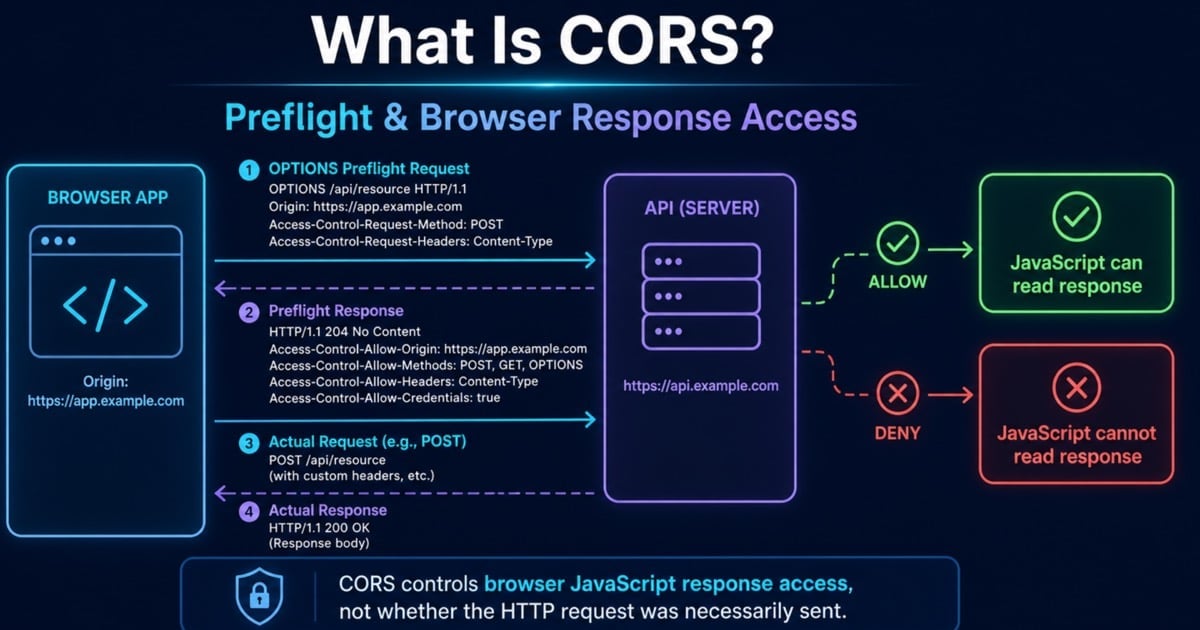
CORS is one of the first browser security features that confuses backend and frontend developers. The browser says a request was blocked, Postman works fine, the API might even return 200, and suddenly it feels like the network is lying to you.
This guide explains what CORS really is, why browsers enforce it, how preflight requests work, and how to configure the right headers without accidentally exposing your API too broadly. It follows webhooks in the Backend Developer Interview Guide. If the overall request-response lifecycle is still fuzzy, start with How APIs Work: A Simple Guide for Beginners and then come back here.
Table of Contents
Open Table of Contents
- Quick Definition
- What “Origin” Means in the Browser
- Why Browsers Block Cross-Origin Reads
- How CORS Works Step by Step
- Simple Requests vs Preflight Requests
- Common CORS Headers Explained
- CORS with Cookies and Credentials
- Why Postman Works When the Browser Fails
- Common CORS Mistakes Developers Make
- Real-World Example: Frontend App Calling an API
- Interview Questions
- 1. What problem does CORS actually solve?
- 2. Why does Postman succeed while browser
fetch()fails with a CORS error? - 3. What triggers a preflight request?
- 4. Why can you not combine
Access-Control-Allow-Origin: *with credentials? - 5. Is CORS a replacement for authentication or authorization?
- 6. Why do some CORS failures still hit the backend?
- Conclusion
- References
- YouTube Videos
Quick Definition
CORS stands for Cross-Origin Resource Sharing.
In plain English:
- A browser page loaded from one origin tries to read data from a different origin.
- The browser applies the same-origin policy by default.
- The server can opt in by sending specific HTTP headers that tell the browser the cross-origin read is allowed.
The important part is this:
CORS is mostly a browser security rule about whether frontend JavaScript can read a cross-origin response. It is not a replacement for authentication, authorization, or CSRF protection.
What “Origin” Means in the Browser
An origin is the combination of:
- Scheme (
httporhttps) - Host (
app.example.com) - Port (
443,3000,8080)
Examples:
https://app.example.com->https://api.example.comis cross-origin because the host is different.http://app.example.com->https://app.example.comis cross-origin because the scheme is different.https://app.example.com:3000->https://app.example.com:443is cross-origin because the port is different.
That second case is why transport details matter. If you have not read it yet, HTTP vs HTTPS: What’s the Difference? is useful context because the scheme is part of the origin, not just a security decoration.
Why Browsers Block Cross-Origin Reads
Browsers do not block cross-origin requests randomly. They do it because allowing any website to read any other site’s responses would create major security problems.
Imagine this attack:
- You are logged in to
bank.example.com. - You visit a malicious website in another tab.
- That site runs JavaScript that silently calls the bank API with your browser cookies.
- If the browser exposed the bank response to that malicious script by default, the attacker could read private account data.
The same-origin policy exists to stop that kind of cross-site data leak.
CORS is the controlled exception. It lets the server say, “Yes, this particular other origin may read this response from the browser.”
One subtle point matters in production:
- CORS controls browser access to the response.
- It does not mean the server was never reached.
- For some simple cross-origin requests, the browser may send the request and then block JavaScript from reading the response.
- For preflighted requests, the browser may stop before the real request if the preflight check fails.
How CORS Works Step by Step
flowchart TD
    A[Browser App on https://app.example.com] --> B[Send fetch request to https://api.example.com]
    B --> C{Cross-origin request?}
    C -->|No| D[Normal same-origin flow]
    D --> A
    C -->|Yes| E{Needs preflight?}
    E -->|No| F[Send actual request with Origin header]
    F --> G[API responds with CORS headers]
    G --> H{Origin allowed?}
    H -->|Yes| I[Browser exposes response to JavaScript]
    H -->|No| J[Browser blocks response access]
    I --> A
    J --> A
    E -->|Yes| K[Browser sends OPTIONS preflight]
    K --> L[API returns allowed methods headers origins]
    L --> M{Preflight approved?}
    M -->|No| J
    M -->|Yes| F

    classDef cors fill:#e8f0fe,stroke:#1a73e8,stroke-width:2px,color:#000000;
    class A,B,C,D,E,F,G,H,I,J,K,L,M cors;
The browser usually adds an Origin header automatically on cross-origin requests:
Origin: https://app.example.comIf the API wants to allow that origin, it answers with a header such as:
Access-Control-Allow-Origin: https://app.example.comIf the response headers match what the browser expects, the browser lets your JavaScript read the response. If not, the browser blocks access and surfaces a CORS error in DevTools.
Simple Requests vs Preflight Requests
Not every cross-origin request triggers the extra OPTIONS round trip.
Simple requests
A request is usually simple when it looks close to what normal HTML forms could already send:
- Commonly
GET,HEAD, orPOST - No unusual custom request headers
- Only simple content types such as form-encoded or plain text
Example:
fetch("https://api.example.com/products");In that case, the browser can send the request directly and then decide whether the response is readable based on the returned CORS headers.
Preflight requests
A preflight happens before the real request when the browser needs to check whether the server allows a more sensitive cross-origin operation.
Common triggers:
- Methods like
PUT,PATCH, orDELETE - Custom headers such as
AuthorizationorX-Request-ID Content-Type: application/json
Example preflight:
OPTIONS /orders/ord_42 HTTP/1.1
Origin: https://app.example.com
Access-Control-Request-Method: DELETE
Access-Control-Request-Headers: authorization, content-type
Example approval:
HTTP/1.1 204 No Content
Access-Control-Allow-Origin: https://app.example.com
Access-Control-Allow-Methods: GET, POST, PUT, PATCH, DELETE, OPTIONS
Access-Control-Allow-Headers: Authorization, Content-Type
Access-Control-Max-Age: 86400
If you want a refresher on why DELETE, PATCH, and other methods carry different semantics, HTTP Methods Explained: GET vs POST vs PUT vs DELETE connects method choice back to CORS behavior.
Common CORS Headers Explained
These are the headers developers see most often.
Access-Control-Allow-Origin
This is the core decision header. It tells the browser which origin is allowed to read the response.
Examples:
Access-Control-Allow-Origin: https://app.example.comor
Access-Control-Allow-Origin: *Use * only for truly public, non-credentialed resources. It is a bad default for private APIs.
Access-Control-Allow-Methods
Used in preflight responses to list allowed methods.
Access-Control-Allow-Methods: GET, POST, PUT, PATCH, DELETE, OPTIONSAccess-Control-Allow-Headers
Used in preflight responses to say which custom request headers are allowed.
Access-Control-Allow-Headers: Authorization, Content-Type, X-Request-IDAccess-Control-Allow-Credentials
Tells the browser that credentials such as cookies or HTTP auth may be included.
Access-Control-Allow-Credentials: trueThis setting changes the risk profile, so it should be used narrowly.
Access-Control-Max-Age
Lets the browser cache successful preflight results for a while so it does not need to repeat the OPTIONS request every time.
Access-Control-Max-Age: 86400CORS with Cookies and Credentials
Credentials make CORS more sensitive because now the browser may be sending cookies, client certificates, or HTTP auth automatically.
When credentials are involved:
- The frontend must opt in, for example
credentials: "include"infetch. - The server must return
Access-Control-Allow-Credentials: true. - The server must return a specific allowed origin, not
*.
Example:
await fetch("https://api.example.com/account", {
  method: "GET",
  credentials: "include",
});
This is also where developers often mix up CORS and identity. CORS does not decide who the user is. It only decides whether the browser exposes the response to frontend code from another origin. Identity and permission checks still belong to your auth layer. If you want that distinction clearly separated, Authentication vs Authorization: What’s the Difference? is the right companion post.
Why Postman Works When the Browser Fails
This is one of the most common beginner questions.
Postman is not a browser page running inside browser security boundaries. It can send HTTP requests directly without enforcing the same-origin policy the way a browser does for frontend JavaScript.
That means:
- Your API can work perfectly in Postman.
- The same API can fail in the browser with a CORS error.
- The problem is not always the endpoint logic. It is often the missing CORS response headers.
This is also why server-to-server calls usually do not care about CORS. A backend calling another backend is not blocked by browser-origin rules.
Common CORS Mistakes Developers Make
1. Treating CORS as an authentication system
CORS is not login and not authorization. It does not stop an allowed origin from sending a bad request, and it does not prove who the caller is.
2. Returning Access-Control-Allow-Origin: * on private APIs
If an API is user-specific or uses credentials, a wildcard is too broad.
3. Forgetting the OPTIONS path
Teams add Access-Control-Allow-Origin to normal responses but never handle preflight requests, so PUT, PATCH, DELETE, or auth-heavy calls still fail.
4. Allowing every origin by reflecting whatever arrives
Blindly copying the incoming Origin header without an allowlist turns CORS into an accidental open policy. That is especially risky when credentials are enabled.
5. Debugging only in application logs
Many CORS failures look invisible at the app level because the browser blocks access after the response. You have to check the browser network panel and response headers, not just server logs.
6. Assuming CORS is the only browser security concern
CORS solves one problem: controlled cross-origin reads. It does not replace CSRF protection, secure cookies, or HTTPS. For the broader path around those web boundaries, browse the Web Fundamentals hub and the API tag archive.
Real-World Example: Frontend App Calling an API
Imagine this deployment:
- Frontend React app:
https://app.adevguide.com - Backend API:
https://api.adevguide.com - User login uses a cookie-based session
From the browser’s perspective, this is cross-origin because the frontend and API are on different subdomains.
Typical request:
await fetch("https://api.adevguide.com/me", {
  credentials: "include",
  headers: {
    "Content-Type": "application/json",
  },
});
Because credentials and JSON are involved, the browser will usually preflight first. The API needs to answer something like:
HTTP/1.1 204 No Content
Access-Control-Allow-Origin: https://app.adevguide.com
Access-Control-Allow-Credentials: true
Access-Control-Allow-Methods: GET, POST, PUT, PATCH, DELETE, OPTIONS
Access-Control-Allow-Headers: Content-Type, Authorization
Access-Control-Max-Age: 600
A minimal Node-style allowlist implementation might look like this:
const allowedOrigins = new Set([
  "https://app.adevguide.com",
  "https://admin.adevguide.com",
]);

app.use((req, res, next) => {
  const origin = req.headers.origin;

  if (origin && allowedOrigins.has(origin)) {
    res.setHeader("Access-Control-Allow-Origin", origin);
    res.setHeader("Access-Control-Allow-Credentials", "true");
    res.setHeader(
      "Access-Control-Allow-Methods",
      "GET, POST, PUT, PATCH, DELETE, OPTIONS"
    );
    res.setHeader(
      "Access-Control-Allow-Headers",
      "Authorization, Content-Type"
    );
  }

  if (req.method === "OPTIONS") {
    res.status(204).end();
    return;
  }

  next();
});
Why this design is safer:
- Only known frontend origins are allowed.
- Credentials are enabled only for those approved origins.
- Preflight requests are handled explicitly instead of failing mysteriously.
- The policy is narrow enough to evolve as environments change.
Interview Questions
1. What problem does CORS actually solve?
CORS solves a browser security problem, not a generic network problem. It gives servers a way to explicitly allow frontend JavaScript from one origin to read responses from another origin.
In interviews, I would say it is a controlled exception to the same-origin policy. Without it, browsers would expose too much cross-site data. With it, servers can allow selected cross-origin access instead of opening everything.
2. Why does Postman succeed while browser fetch() fails with a CORS error?
Because Postman is not enforcing browser same-origin rules on behalf of a web page. It is just an HTTP client. The browser, by contrast, is protecting the user against scripts from one site reading sensitive responses from another site.
That is why a backend can be healthy, reachable, and return 200, while the frontend still sees a CORS failure. The browser is blocking access to the response, not claiming the server is down.
3. What triggers a preflight request?
A preflight is triggered when the browser sees a cross-origin request that is more sensitive than a simple form-style request. Common triggers are methods like PUT, PATCH, and DELETE, custom headers such as Authorization, or content types like application/json.
The key idea is that the browser wants server approval before sending the real request. That approval happens through an OPTIONS request.
4. Why can you not combine Access-Control-Allow-Origin: * with credentials?
Because credentials make the request user-specific and more sensitive. If the browser allowed credentialed cross-origin reads from every origin, any website could potentially read authenticated responses on behalf of the user.
So when credentials are involved, the server has to name specific allowed origins and opt in deliberately. A wildcard is too broad for that case.
5. Is CORS a replacement for authentication or authorization?
No. CORS only affects whether the browser exposes a cross-origin response to frontend JavaScript. Authentication still proves identity, and authorization still decides whether that identity can access a resource.
If your API skips auth checks but has a strict CORS policy, it is still insecure. CORS is a browser access rule, not an identity system.
6. Why do some CORS failures still hit the backend?
Because not every failure happens before the request leaves the browser. For simple requests, the browser may send the request, receive the response, and then refuse to expose that response to JavaScript because the CORS headers are missing or wrong.
For preflighted requests, the failure can happen earlier, because the browser may block the real request if the preflight response does not approve it. That difference is important when debugging logs and traces.
Conclusion
- CORS is a browser-enforced permission to expose a cross-origin response to JavaScript; it is not API authentication.
- An origin combines scheme, host, and port, so development and production URLs are often distinct origins.
- Preflight lets the browser check sensitive methods and headers before it sends the real request.
- Credentialed requests require explicit allowed origins;
*is not a safe substitute. - The safest policy names only known origins, methods, and headers, while keeping authorization independent.
The next topic in this series is API Gateway vs Load Balancer vs Reverse Proxy - a comparison of three components often confused at the API edge. Revisit authentication vs authorization to keep browser access policy separate from identity and permission decisions.
References
- MDN: Cross-Origin Resource Sharing (CORS)
https://developer.mozilla.org/en-US/docs/Web/HTTP/Guides/CORS - MDN: Preflight request
https://developer.mozilla.org/en-US/docs/Glossary/Preflight_request - MDN: Same-origin policy
https://developer.mozilla.org/en-US/docs/Web/Security/Same-origin_policy - MDN: Cross-Origin Resource Sharing (CORS) configuration
https://developer.mozilla.org/en-US/docs/Web/Security/Practical_implementation_guides/CORS
YouTube Videos
- “CORS in 100 Seconds” - Fireship
https://www.youtube.com/watch?v=4KHiSt0oLJ0 - “Learn CORS In 6 Minutes” - Web Dev Simplified
https://www.youtube.com/watch?v=PNtFSVU-YTI - “What is CORS? Blocked by CORS policy error explained” - Dave Gray
https://www.youtube.com/watch?v=1iOeoRCUD4M