 ADevGuide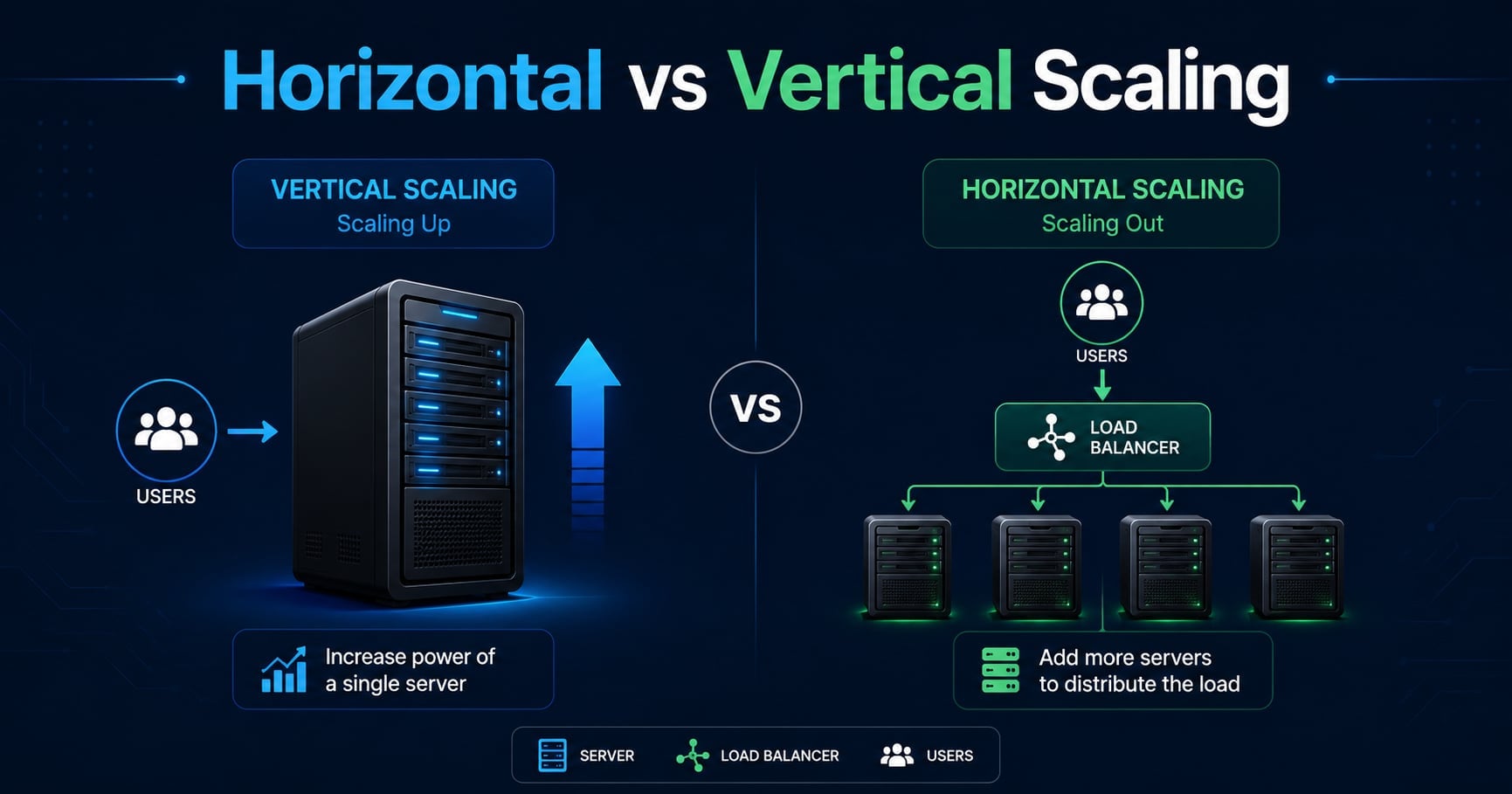
Your app is healthy… right up until the first real spike.
Maybe it’s a Black Friday promo, a big customer onboarded, or a TikTok mention. Suddenly CPU hits 100%, response times explode, and you’re staring at a decision that sounds simple but isn’t:
- Do we make one server bigger?
- Or do we add more servers?
That’s the core trade-off between vertical scaling (scale up) and horizontal scaling (scale out).
If you’re following the learning path, start with What Is Scalability? A Beginner’s Guide for Developers first. This post goes deeper on the comparison and helps you choose the right move for your system.
For the full roadmap, use the System Design Foundations series as the pillar page and the System Design tag as a category page.
Related foundation posts that pair well with this topic:
- What Is Load Balancing and How It Works
- What Is Client-Server Architecture? Beginner Guide
- What Is Database Connection Pooling and Why It Matters
Table of Contents
Open Table of Contents
- Quick Definition: Scale Up vs Scale Out
- Vertical Scaling (Scale Up): What It Is
- Horizontal Scaling (Scale Out): What It Is
- Side-by-Side Comparison: Pros, Cons, and Failure Modes
- A Practical Decision Framework: Which Should You Choose?
- Real-World Examples
- Common Mistakes
- Interview Questions
- 1. What is the difference between horizontal and vertical scaling?
- 2. Why is horizontal scaling usually associated with load balancers?
- 3. What does it mean for a service to be stateless, and why does it matter for scaling out?
- 4. When would you choose vertical scaling instead of horizontal scaling?
- 5. What are common bottlenecks that appear after scaling out an application tier?
- Conclusion
- References
- YouTube Videos
Quick Definition: Scale Up vs Scale Out
Vertical scaling (scale up) means upgrading one machine: more CPU, more RAM, faster disk, bigger network.
Horizontal scaling (scale out) means adding more machines and distributing work across them.
A useful mental model is: vertical scaling is “bigger engine,” horizontal scaling is “more cars.”
flowchart TD
    A[Growing load] --> B{Choose scaling strategy}

    B -->|Scale up| C[One bigger server]
    C --> D[More CPU/RAM/IO]

    B -->|Scale out| E[More servers]
    E --> F[Load balancer / routing]
    F --> G[Shared state moved out of servers]
In real systems, you rarely pick only one forever. You typically:
- scale up early (fastest win)
- scale out when availability, elasticity, or hard limits force you
Vertical Scaling (Scale Up): What It Is
Vertical scaling keeps your architecture mostly the same. You run the same app on the same server, then upgrade the server.
Why vertical scaling is so common early
It’s the lowest-complexity move you can make:
- no load balancer required
- no cross-node coordination
- fewer “distributed system” failure modes
In practice, vertical scaling is often a single configuration change: upgrade your VM instance size, increase container CPU/memory limits, or move to a stronger database instance.
Where vertical scaling hits limits
Vertical scaling always runs into three constraints:
- A hard ceiling: the biggest machine your provider offers.
- A cost curve: bigger machines often get disproportionately expensive.
- A single point of failure: one machine dying can still be a full outage.
Vertical scaling is a great first move, but it’s not a long-term availability strategy.
Example: scaling up a single API server
If one API server is CPU-bound (for example, heavy JSON serialization or expensive crypto), scaling up is often the fastest fix. But it also means every deploy and every failure is riskier because “the one box” matters.
Horizontal Scaling (Scale Out): What It Is
Horizontal scaling adds more servers and splits traffic or work across them.
For typical web apps, that looks like:
- a load balancer in front
- a pool of identical application servers
- shared state stored outside the app servers
flowchart TD
    U[Users] --> LB[Load Balancer]

    LB --> A1[App Server 1]
    LB --> A2[App Server 2]
    LB --> A3[App Server 3]

    A1 --> S[(Shared state:
Redis / DB / Object storage)]
    A2 --> S
    A3 --> S
The big requirement: stateless servers
Horizontal scaling works best when app servers are stateless.
That means you avoid designs like:
- sessions stored only in server memory
- uploads written to local disk
- “this instance has the cache” assumptions
Instead, you move state into shared infrastructure:
- session store (often Redis)
- object storage for uploads (S3/GCS)
- centralized caches (Redis/Memcached)
What horizontal scaling buys you
Horizontal scaling is not just about throughput. The biggest wins are often:
- high availability: one instance can die without an outage
- elasticity: scale out during spikes, scale in when quiet
- independent scaling: different services scale based on their own bottlenecks
The trade-off is operational complexity: health checks, deployments across many nodes, distributed caching, and more moving parts.
Side-by-Side Comparison: Pros, Cons, and Failure Modes
Here’s the comparison I use when making this decision in real projects.
| Dimension | Vertical scaling (up) | Horizontal scaling (out) |
|---|---|---|
| Implementation effort | Low | Medium to high |
| Availability | Weak (one box can be outage) | Stronger (instance failures tolerated) |
| Scalability limit | Hard ceiling | Higher ceiling (but still bottlenecks move) |
| Cost profile | Often non-linear | More linear, but more overhead |
| Operational complexity | Lower | Higher |
| Typical prerequisites | None | Load balancing + stateless design |
| Common failure mode | “Big server died” | “One dependency became bottleneck” |
Two nuances worth calling out:
- Horizontal scaling mostly applies cleanly to stateless tiers (app servers, workers). State-heavy tiers (databases) require special patterns like read replicas, partitioning, or sharding.
- Scaling out can make your bottleneck more obvious. If you add 10 app servers, your database or cache might become the saturation point.
A Practical Decision Framework: Which Should You Choose?
When someone asks “scale up or scale out?”, what they usually mean is “what’s the next move that reduces outages and buys time?”
Here’s the framework:
1. Is your bottleneck actually the app server?
If the database is saturated, adding app servers often makes it worse (more concurrent queries, more connections, more pressure).
A quick sanity check is to look at:
- database CPU / IOPS
- slow query logs
- connection pool wait time
If those are the real limiters, fix them first (indexes, query shape, caching, pooling).
2. Do you need high availability right now?
If downtime is unacceptable (paid customers, SLA, critical business workflows), you’re already in “scale out” territory for most tiers.
Even if you scale up, you’ll still want redundancy:
- at least two app instances
- health checks
- rolling deploys
3. Is your app stateful today?
If you rely on in-memory sessions or local disk, scaling out forces you to refactor.
A practical migration path is:
- scale up first to stabilize
- move session state + uploads out of the server
- introduce a load balancer and add a second instance
- scale out from there
4. Is your traffic spiky or predictable?
Spiky traffic is a great match for scaling out with autoscaling because you don’t have to pay for peak capacity all day.
Predictable traffic can be fine with scale up for longer, especially if you prefer operational simplicity.
5. What tier are you scaling?
Most systems end up with a hybrid strategy:
- API layer: scale out behind a load balancer
- background workers: scale out by increasing worker count
- cache layer: scale out using Redis cluster / sharding
- database: scale up first, then add read replicas, then consider sharding only at very large scale
Real-World Examples
Stack Overflow: vertical scaling done extremely well
Stack Overflow is a famous example of running high traffic on a small number of very powerful servers. The lesson isn’t “horizontal scaling is bad.” The lesson is that vertical scaling + caching + tight performance discipline can take you much further than most teams expect.
Netflix: scale out + independent service scaling
Netflix’s architecture is designed around elasticity: when a tier needs more capacity, they add more instances of that tier without re-architecting the whole system. This is the real promise of horizontal scaling: scale components independently as bottlenecks shift.
Databases: scale up first, then replicate
For relational databases, the common progression is:
- scale up (bigger primary)
- add read replicas (scale reads out)
- introduce caching
- consider partitioning or sharding only when writes or storage exceed a single-node ceiling
If you want the database-specific version of this discussion, see Vertical vs Horizontal Sharding: Key Differences Explained.
Common Mistakes
1. Treating “add servers” as the solution to every slowdown
Scaling out app servers won’t fix a database bottleneck, a slow dependency, or a single hot query. It often amplifies it.
2. Scaling out while keeping state on the server
Sticky sessions can hide this problem temporarily, but they don’t eliminate it. If one server dies, every user “stuck” to it loses state.
3. Ignoring connection pooling limits
When you scale out, the number of database connection pools multiplies. If each app instance can open 50 connections and you add 20 instances, you can exhaust the database quickly.
If this is new to you, read What Is Database Connection Pooling and Why It Matters before you scale out.
4. No load testing before switching strategies
The goal is not “more servers.” The goal is “handle higher load without breaking.”
A small load test that validates latency and error rates under expected peak is often more valuable than adding another instance.
Interview Questions
1. What is the difference between horizontal and vertical scaling?
Vertical scaling means upgrading a single machine by adding more CPU, RAM, or faster storage, so the system can handle more work without changing its topology. Horizontal scaling means adding more machines and distributing work across them using a load balancer, queue, or routing layer. Vertical scaling is usually simpler but has a hard ceiling and keeps a single point of failure. Horizontal scaling improves availability and elasticity, but it forces you to deal with statelessness and distributed system complexity.
2. Why is horizontal scaling usually associated with load balancers?
In a web system, horizontal scaling only helps if incoming requests are routed across multiple instances. A load balancer provides a stable entry point and chooses a healthy backend for each request using an algorithm like round robin or least connections. It also performs health checks and removes unhealthy instances automatically. Without a load balancer (or an equivalent routing layer), you can add servers but traffic still concentrates on one machine.
3. What does it mean for a service to be stateless, and why does it matter for scaling out?
A stateless service does not store user-specific session state or durable data on the server instance itself between requests. This matters for scaling out because any request might land on any instance, and instances must be interchangeable for failover and autoscaling to work. Statelessness usually means storing sessions in a shared store, putting uploads in object storage, and treating in-memory caches as best-effort. It slightly increases dependency on shared infrastructure, but it makes horizontal scaling operationally sane.
4. When would you choose vertical scaling instead of horizontal scaling?
I would choose vertical scaling when I need a fast stability win, the bottleneck is clearly CPU or memory on a single node, and high availability is not yet a hard requirement. It’s also a good fit for stateful components that are hard to distribute, like databases early in a product’s life. The risk is that you eventually hit a ceiling and still have a single point of failure. In practice, teams often scale up first to buy time, then scale out once the architecture is ready.
5. What are common bottlenecks that appear after scaling out an application tier?
After scaling out app servers, the bottleneck often shifts to the database, cache, or a downstream service. You might see more concurrent queries, connection pool exhaustion, or higher write amplification if requests trigger retries. Another common bottleneck is shared state like a session store that wasn’t sized for the increased concurrency. Scaling out changes the concurrency profile of the whole system, so you need to re-check every shared dependency.
Conclusion
- Vertical scaling (scale up) is the simplest way to increase capacity quickly, but it has a hard ceiling and keeps a single point of failure.
- Horizontal scaling (scale out) increases availability and elasticity, but it requires stateless services and introduces distributed-system complexity.
- Scaling out app servers often moves the bottleneck to shared dependencies like databases, caches, and connection pools.
- Most production systems use a hybrid approach: scale out stateless tiers and scale up stateful tiers first, then replicate and shard as needed.
- The right next move depends on your bottleneck, your availability needs, and whether your app is stateful today.
The next topic in this series covers sticky sessions - why they exist, when they help, and why they can become a trap if you use them as a substitute for stateless design.
For a quick refresher on the big-picture goal, revisit What Is Scalability? A Beginner’s Guide for Developers. For the practical routing layer that makes scale-out work, see What Is Load Balancing and How It Works.
References
- Vertical vs. Horizontal Scaling: Key Differences, Pros, and Use Cases - Cockroach Labs
https://www.cockroachlabs.com/blog/vertical-scaling-vs-horizontal-scaling/ - Horizontal vs. Vertical Scaling: Which Should You Choose? - CloudZero
https://www.cloudzero.com/blog/horizontal-vs-vertical-scaling/ - Horizontal vs. Vertical Scaling - MongoDB
https://www.mongodb.com/resources/basics/horizontal-vs-vertical-scaling
YouTube Videos
- “System Design BASICS: Horizontal vs. Vertical Scaling”
https://www.youtube.com/watch?v=xpDnVSmNFX0 - “System Design: What is Horizontal vs Vertical Scaling?“
https://www.youtube.com/watch?v=p1YQU5sEz4g - “Vertical vs Horizontal Scaling Tutorial - System Design Basics”
https://www.youtube.com/watch?v=seeiGC2HP48