 ADevGuide
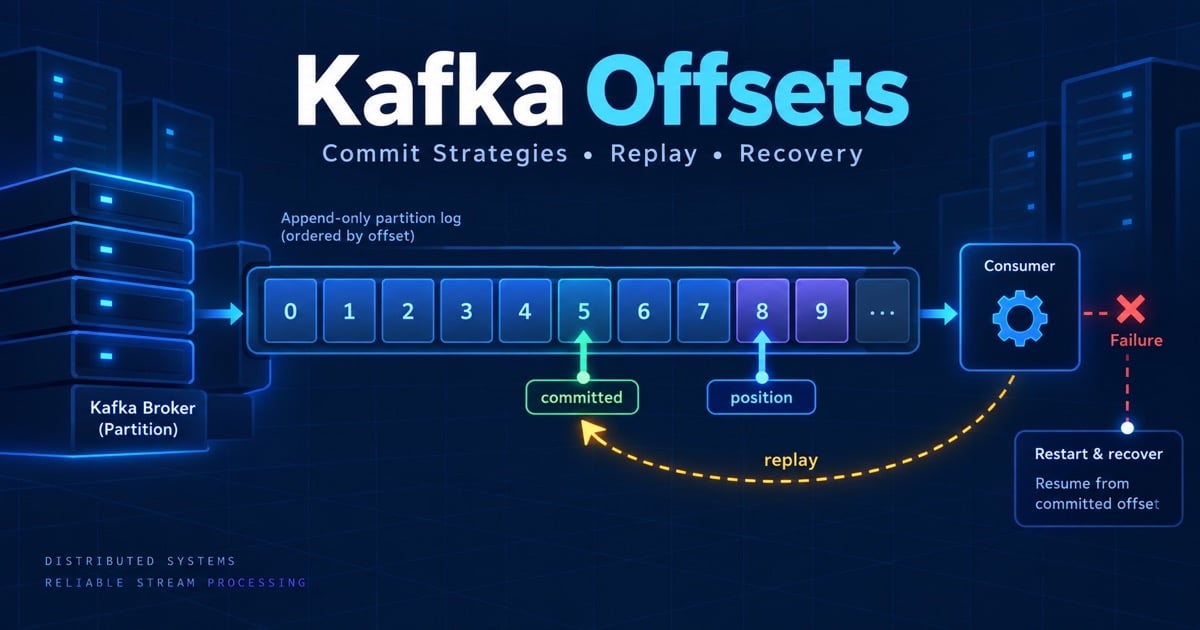
A consumer receives an order, charges a card, and crashes before it records progress. When it restarts, should Kafka send the order again? The answer depends on which offset was committed and when that commit happened relative to the business effect. Kafka offsets are small numbers with large correctness consequences.
This guide explains Kafka offsets, automatic and manual commit strategies, replay, recovery, and the difference between consumer position and durable business completion. Read Kafka consumer groups first, then continue to Kafka ordering guarantees.
Table of Contents
Open Table of Contents
- What Is a Kafka Offset?
- Position, Committed Offset, and Log End Offset
- When Should a Consumer Commit?
- Automatic vs Manual Commits
- Failure Windows and Replay
- Resetting and Replaying Offsets
- Transactional Offset Commits
- Operational Runbook
- Production Example
- Interview Questions
- 1. What does a Kafka offset represent?
- 2. Should you commit before or after processing?
- 3. What happens if a commit fails after processing succeeds?
- 4. How do you safely reset offsets?
- 5. Do Kafka transactions make a database write exactly once?
- 6. Why can a consumer have low committed progress but no current error?
- Conclusion
- References
- YouTube Videos
What Is a Kafka Offset?
An offset is the position of a record within one partition. It is not a topic-wide ID, timestamp, or business acknowledgement. A record at offset 42 in partition 0 has no ordering relationship with offset 42 in partition 1.
Kafka does not delete a record when a consumer processes it. The broker retains it according to the topic’s retention policy, while a consumer group stores its progress. This separation makes replay possible and lets two groups process the same event history at different speeds.
flowchart TD
    A[Partition log] --> B[Offset 0]
    B --> C[Offset 1]
    C --> D[Offset 2]
    D --> E[Offset 3]
    E --> F[Next record]
    G[Consumer position] --> D
    H[Committed group offset] --> C
    I[Log end offset] --> F
Consumers commit the next offset they intend to read, so after successfully processing record 2 they commonly commit offset 3. Exact client API details vary, but the semantic boundary is the same: a committed position tells Kafka where recovery should resume.
Position, Committed Offset, and Log End Offset
Three values are useful when diagnosing a consumer:
| Value | Meaning | Why it matters |
|---|---|---|
| Current position | The next record the running consumer will fetch | Shows what this process has read or staged |
| Committed offset | The group’s durable recovery position | Determines where a new owner resumes |
| Log end offset | The newest position currently available | Defines the producer-to-consumer gap |
Consumer lag is commonly calculated as log end offset - committed offset. A process can have a current position ahead of its committed offset while it works through a batch. If it crashes, those uncommitted records may be delivered again. That is normal at-least-once behavior, not proof that Kafka duplicated a record in storage.
When Should a Consumer Commit?
Commit after the effect that matters is durable. For a database sink, that usually means the database transaction committed. For a Kafka-to-Kafka pipeline, a Kafka transaction can bind output records and consumed offsets. For an external payment provider, Kafka cannot make the provider’s charge part of its transaction; use an idempotency key and a reconciliation state machine.
flowchart TD
    A[Poll records] --> B[Validate schema]
    B --> C[Apply business effect]
    C --> D{Durable success?}
    D -->|No| E[Retry, pause, or route to DLQ]
    D -->|Yes| F[Commit next offset]
    F --> G[Poll next batch]
    E --> H[Do not advance recovery position]
Committing before processing favors lower duplicate risk at the cost of possible loss. Committing after processing favors recoverability at the cost of duplicate delivery. For orders, payments, and inventory, the second model plus idempotent effects is usually the safer contract.
Automatic vs Manual Commits
Automatic commits periodically record progress based on the consumer’s polling behavior. They are easy to start with, but the commit timer does not understand whether a database transaction, HTTP request, or file write has finished. A long or asynchronous handler can therefore commit work that has not actually succeeded.
Manual commits put the application in charge of the boundary. A synchronous commit waits for the broker response and is simpler to reason about, but it adds latency. An asynchronous commit improves throughput, but a later commit can supersede an earlier failed callback; the application needs ordering and shutdown rules.
consumer.subscribe(List.of("orders"));
consumer.poll(Duration.ofMillis(500)).forEach(record -> {
    orderRepository.applyIdempotently(record.value());
});

// Commit only after every record in this bounded batch has a durable effect.
consumer.commitSync();
Batch commits reduce request overhead but enlarge the replay window. If one record fails, do not blindly commit the whole batch. Pause the partition, retry the transient failure, or move a permanent poison record to a dead-letter topic with enough metadata to replay it safely.
Failure Windows and Replay
The processing sequence has two important crash windows:
- Effect succeeds, commit fails. The record is processed again. An idempotency key or unique event table must make the second attempt harmless.
- Commit succeeds, effect fails. The group skips the record on restart. This is why committing before durable work is dangerous for non-repeatable business effects.
Network timeouts create uncertainty in both directions. A commit request may have reached Kafka even when the client did not receive the response. Retry and inspect the authoritative group offset; do not infer success from a local exception alone.
The offset itself cannot protect an external side effect. A payment provider, email API, or database needs its own idempotency boundary. Delivery guarantees explains why this distinction matters when a system claims “exactly once.”
Resetting and Replaying Offsets
Offset resets are operational actions, not routine fixes. Before changing a group, record the current offsets, retention horizon, affected partitions, and expected business effect. Common choices include replaying from a timestamp, moving backward by a bounded number of records, or moving to the latest position after an explicitly approved data-loss decision.
# Inspect lag and committed positions before changing anything.
kafka-consumer-groups.sh \
  --bootstrap-server kafka:9092 \
  --describe --group inventory

# Dry-run a timestamp-based reset; review the result before execution.
kafka-consumer-groups.sh \
  --bootstrap-server kafka:9092 \
  --group inventory --topic orders \
  --reset-offsets --to-datetime 2026-09-19T12:00:00.000 \
  --dry-run
Replay must be designed with the sink in mind. A search index can usually upsert by event ID; a ledger may need a unique transaction reference; an email sender needs a provider idempotency key. Replaying Kafka without replaying those safeguards turns recovery into a second incident.
Transactional Offset Commits
Kafka transactions can atomically publish output records and commit consumed offsets for a Kafka-to-Kafka pipeline. This prevents downstream consumers from seeing output that is not associated with the input progress. It does not make a PostgreSQL write, HTTP call, or card charge atomic with Kafka.
For an external database, use an outbox or inbox pattern, a unique event record, or a transaction that stores both the business state and the processed-event marker. The right pattern depends on which system owns the invariant. State that boundary explicitly in an interview instead of saying “Kafka gives exactly once.”
Operational Runbook
When a group is not progressing:
- Compare log-end, current, and committed offsets per partition.
- Check whether the consumer is alive, assigned, and repeatedly rebalancing.
- Inspect processing latency, downstream errors, poll intervals, and commit failures.
- Decide whether the record is transiently failing, permanently invalid, or simply slow.
- Preserve the original offset and event ID when retrying or moving to a DLQ.
- Verify the sink’s idempotency before replaying any range.
Alert on lag age, not only lag count. Ten thousand records can be one second behind on a high-throughput topic or an hour behind on a quiet topic. Kafka consumer lag covers the monitoring and capacity side.
Production Example
An inventory consumer reads order.created.v1, updates stock in PostgreSQL, and writes an inbox row keyed by (consumer_name, event_id). The database transaction inserts the inbox row and decrements stock only if the event has not been seen. After commit, the consumer commits Kafka’s next offset.
If the process crashes after the database commit but before the Kafka commit, Kafka redelivers the event and the inbox uniqueness check returns “already applied.” If the database is unavailable, the consumer does not advance the offset; it retries with bounded backoff and eventually routes a permanent failure to a DLQ. The offset is therefore a recovery pointer, while the database is the effect’s correctness boundary.
Interview Questions
1. What does a Kafka offset represent?
It represents a record position inside one partition and is scoped by topic, partition, and consumer group when used for recovery. It is not a global sequence number or proof that the business side effect completed. A good answer distinguishes the running consumer position, committed group offset, and log end offset.
2. Should you commit before or after processing?
Commit after the durable effect when losing a record is worse than processing it twice. This creates at-least-once delivery, so the effect must be idempotent through a unique event ID, transaction, or state transition. Commit-before-processing can approximate at-most-once behavior, but a crash can permanently skip work.
3. What happens if a commit fails after processing succeeds?
The consumer may process the record again after restart or rebalance. That is expected; the sink must recognize the same event and return the prior result rather than applying a second charge or reservation. I also inspect whether the broker actually accepted the commit before deciding whether a manual replay is needed.
4. How do you safely reset offsets?
Capture the current group state, choose a bounded timestamp or offset range, dry-run the reset, and validate retention and sink capacity. Replay only after confirming the sink is idempotent and the business owner accepts the resulting effects. Keep an audit record of who approved the reset and which partitions changed.
5. Do Kafka transactions make a database write exactly once?
No. Kafka transactions can atomically produce to Kafka and commit Kafka offsets, but an external database or payment provider is outside that transaction. Use an outbox, inbox, idempotency key, or reconciliation workflow to protect the external effect, then describe the remaining uncertainty explicitly.
6. Why can a consumer have low committed progress but no current error?
It may be processing a large batch, blocked on a slow dependency, or repeatedly losing ownership during rebalances. The committed offset advances only after the chosen completion boundary, so inspect processing time, assignment state, poll health, and commit latency together. A single lag number cannot identify the cause.
Conclusion
Kafka offsets turn a distributed stream into a recoverable processing contract. Commit after durable effects, expect replay, make sinks idempotent, and treat offset resets as controlled incident operations. The safest answer is not “commit once”; it is “define what completion means, then commit at that boundary.”
References
- Apache Kafka: Consumer Design
- Confluent: Consumer Configuration and Offset Management
- Apache Kafka: Design and Delivery Semantics
YouTube Videos
- “Kafka Consumer Offsets Explained” - Tech With Aman [https://www.youtube.com/watch?v=KOu6DVdaY24]