 ADevGuide
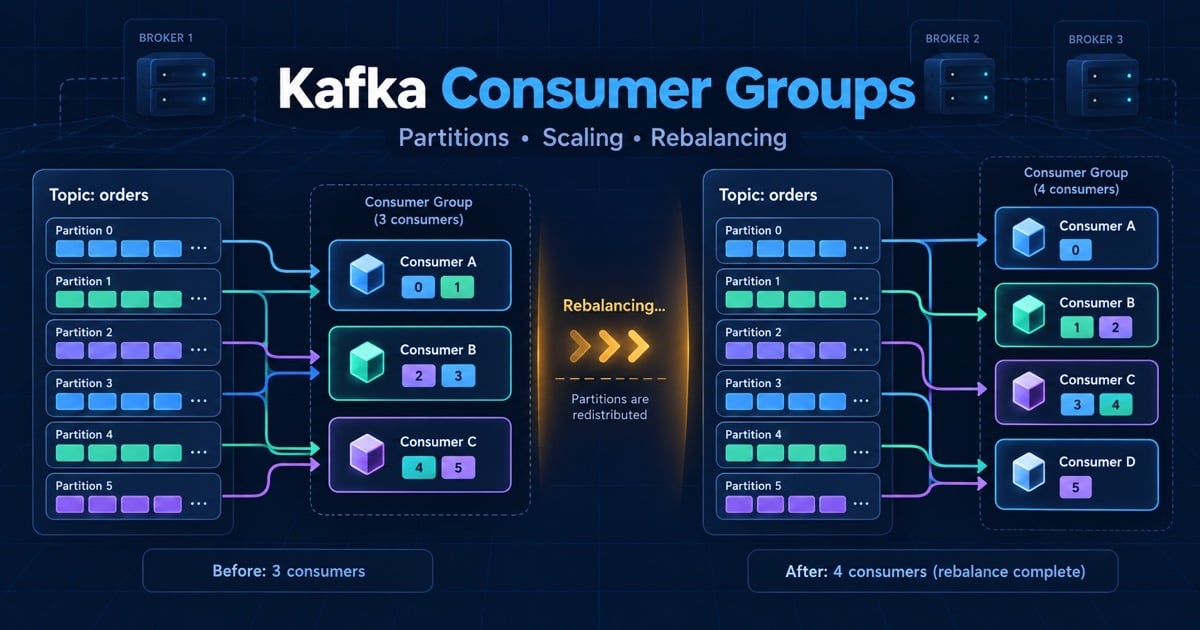
A team adds six Kafka consumer instances to handle a traffic spike and discovers that only four are doing work. Minutes later, a deployment triggers a rebalance and processing pauses long enough to breach the order-processing SLA. The missing mental model is that Kafka scales a consumer group by assigning partitions, not by splitting one partition among arbitrary threads.
This guide explains Kafka consumer groups, partition ownership, scaling limits, rebalancing, and safe recovery. Continue from Kafka partitions and Kafka architecture; the Backend Developer Interview Guide connects this topic to the wider preparation path.
Table of Contents
Open Table of Contents
- What Is a Kafka Consumer Group?
- How Partition Assignment Works
- Scaling Consumers
- What Happens During a Rebalance?
- Cooperative Rebalancing and Static Membership
- Designing a Safe Consumer
- Monitoring and Failure Recovery
- Production Example
- Interview Questions
- 1. Why can a consumer group not use more consumers than partitions?
- 2. What triggers a rebalance?
- 3. How do you scale a Kafka consumer group safely?
- 4. What is the difference between a consumer group and a topic subscription?
- 5. How do you prevent duplicates during a rebalance?
- 6. Why are extra consumers sometimes idle?
- Conclusion
- References
- YouTube Videos
What Is a Kafka Consumer Group?
A consumer group is a set of consumers that cooperate to process a topic. Kafka assigns each partition subscribed by the group to at most one active member at a time. Every group has its own committed offsets, so billing, search, analytics, and notifications can independently read the same topic without sharing progress.
The partition is the unit of parallelism. If a topic has six partitions, one group can have at most six active consumers for that topic. A seventh consumer may be useful for failover or other topics, but it cannot create a seventh unit of work for this topic.
flowchart TD
    A[Orders topic] --> P0[Partition 0]
    A --> P1[Partition 1]
    A --> P2[Partition 2]
    A --> P3[Partition 3]
    P0 --> C1[Consumer A]
    P1 --> C1
    P2 --> C2[Consumer B]
    P3 --> C3[Consumer C]
    C1 --> G[Order processing group]
    C2 --> G
    C3 --> G
Do not confuse a group with a broadcast subscription. Two consumers in one group share the work; two different groups each receive the full topic according to their own offsets. That distinction is why a topic can drive both a real-time service and a replayable warehouse pipeline.
How Partition Assignment Works
When a group joins a topic, the group coordinator records its members and assigns partitions using an assignment strategy. The assignment is metadata, not a copy of the records. A consumer fetches records from the partitions it owns and commits progress for those partitions.
| Situation | Result | Design implication |
|---|---|---|
| Consumers fewer than partitions | Some consumers own multiple partitions | Increase consumers until downstream capacity or partition count is reached |
| Consumers equal to partitions | Each consumer can own one partition | Maximum active parallelism for that topic in the group |
| Consumers more than partitions | Extra consumers are idle | More replicas do not help until the topic has more partitions |
| A consumer leaves | Its partitions move to surviving members | In-flight work must be safe to replay |
Assignments can change when a member joins, leaves, fails heartbeats, a subscription changes, or topic metadata changes. The consumer must treat a partition assignment as temporary ownership. Persist business effects before committing offsets, because a new owner may reread records after a crash or rebalance.
Scaling Consumers
Scale the group against the number of partitions and the slowest downstream dependency. Suppose a topic receives 12,000 records per second, each consumer can safely process 1,000 records per second, and the topic has 16 partitions. The first estimate is 12 active consumers, but capacity headroom, uneven keys, and deployment failure may justify 14 or 16. Sixteen consumers is still the ceiling unless the topic has more partitions.
Required consumers = producer rate / sustainable consumer rate
                  = 12,000 / 1,000
                  = 12

With 25% headroom: 12 * 1.25 = 15, rounded to 16
Adding partitions later is not a free scaling switch. New records can be distributed across the new layout, but existing records do not move, and a key-to-partition relationship can change. Decide expected peak throughput, recovery speed, and key distribution before creating the topic. Kafka partitions goes deeper on this trade-off.
Horizontal Scaling Versus Worker Threads
More group members increase partition-level parallelism but trigger assignment changes. More threads inside one consumer can improve CPU-bound work, but unconstrained threads can finish records out of order or acknowledge work before the intended durability boundary. Keep partition-order-sensitive processing serialized, or use an explicit per-key sequencing design.
What Happens During a Rebalance?
A rebalance redistributes partition ownership among the current group members. During a classic stop-the-world rebalance, consumers revoke assignments, join the group again, receive a new plan, and resume fetching. A long rebalance can look like consumer lag even when Kafka brokers are healthy.
flowchart TD
    A[Consumer B joins or fails] --> B[Coordinator detects membership change]
    B --> C[Members stop or cooperatively revoke partitions]
    C --> D[Coordinator computes assignment]
    D --> E[Consumers receive partitions]
    E --> F[Resume fetch and process]
    F --> G[Commit offsets after durable effects]
The most common causes are rolling deployments, frequent crashes, heartbeat timeouts, processing longer than max.poll.interval.ms, and unstable autoscaling. A rebalance does not itself lose messages, but it increases the window in which a record may be processed again. Idempotency and commit ordering remain application responsibilities.
Cooperative Rebalancing and Static Membership
Cooperative rebalancing moves only the partitions that must change instead of revoking everything at once. It reduces disruption during a planned scale event, but it does not make a slow or unhealthy consumer safe. The application still needs to finish or hand off work cleanly when partitions are revoked.
Static membership gives a consumer a stable identity across short restarts. A rolling deployment can then avoid treating every replacement as a brand-new member, provided the instance returns within the configured session window. It is useful for stable workloads, not a substitute for graceful shutdown, readiness checks, or a recovery plan when a node is permanently gone.
Designing a Safe Consumer
Use the following processing contract:
- Poll a bounded batch.
- Validate the event schema and reject permanent failures explicitly.
- Apply the business effect in an idempotent transaction or with a durable event key.
- Commit the offset only after the effect is durable.
- On revoke, stop taking new work and finish, pause, or hand off bounded in-flight work.
for (ConsumerRecord<String, OrderEvent> record : records) {
    processedEvents.insertIfAbsent(record.topic(), record.partition(), record.offset());
    // The uniqueness boundary makes a replay harmless before the order update runs.
    orderService.apply(record.value());
}
consumer.commitSync(); // Commit only after the batch's durable effects succeed.
The example’s exact transaction depends on the database and client, but the invariant is stable: an offset is a recovery position, not proof that an external side effect happened. For offset choices and replay behavior, continue to Kafka offsets.
Monitoring and Failure Recovery
Monitor group membership, assigned partitions, records-consumed rate, processing latency, commit latency, rebalance count, rebalance duration, max lag per partition, oldest record age, and downstream error rate. Topic-level averages hide a single hot partition, so dashboards must preserve group, topic, and partition dimensions.
When a group falls behind:
- Confirm whether lag is growing or recovering after a planned replay.
- Check whether active consumers equal partitions; more consumers cannot help beyond that ceiling.
- Inspect slow handlers, database latency, garbage-collection pauses, and blocked network calls.
- Check rebalance frequency and poll-loop violations.
- Scale only after identifying the bottleneck, then verify that the downstream system can absorb the added concurrency.
If the group cannot recover before retention expires, choose deliberately between adding capacity, extending retention, pausing producers, or replaying from a durable source. Blindly resetting offsets may discard business events and should require an explicit incident decision.
Production Example
An order topic has 24 partitions and three consumer groups: inventory, fraud, and analytics. Inventory runs 20 consumers because its database is the bottleneck; fraud runs 8 consumers because its model is CPU-heavy; analytics runs 24 consumers during a backfill. Each group sees the same records but has independent offsets and scaling decisions.
During a deployment, inventory uses cooperative assignment and graceful shutdown. A consumer finishes its current bounded batch, commits the successful effects, and leaves. The replacement receives the partition and may see the last record again; the inventory database’s event key prevents a duplicate reservation. Analytics can replay from an earlier offset without delaying checkout because it is a different group.
Interview Questions
1. Why can a consumer group not use more consumers than partitions?
Kafka assigns a partition to one active member within a group at a time to preserve the group’s ordered read boundary. A second consumer cannot split the same partition without coordination that would undermine that simple ownership model. If more parallelism is needed, increase partition capacity only after reviewing key distribution, ordering, and storage costs.
2. What triggers a rebalance?
A consumer joining, leaving, crashing, changing its subscription, or missing heartbeats can change group membership. Topic metadata changes and some assignment configuration changes also require a new plan. I investigate rebalances by correlating group membership, deployment events, poll-loop latency, heartbeat errors, and lag rather than treating every lag spike as a broker problem.
3. How do you scale a Kafka consumer group safely?
First measure producer rate, per-record processing time, partition skew, and downstream capacity. Add consumers up to the partition count, use cooperative rebalancing for planned changes, and keep processing idempotent because ownership changes can replay records. If the group is already at the partition ceiling, fix the handler or redesign the topic rather than adding idle instances.
4. What is the difference between a consumer group and a topic subscription?
A topic is the retained stream; a consumer group is one independent processing view of that stream. Consumers sharing a group divide partitions, while separate groups each read all assigned partitions and maintain separate offsets. This lets inventory and analytics process the same order event without sharing throughput or failure state.
5. How do you prevent duplicates during a rebalance?
You cannot rely on a rebalance never replaying a record. Commit after the durable business effect and use a unique event ID, idempotency key, or transactionally protected state transition in the sink. This gives at-least-once delivery a safe effect boundary while preserving recovery when a consumer crashes before its commit.
6. Why are extra consumers sometimes idle?
The topic’s partition count is the upper bound on active members for one group. If 24 consumers subscribe to a topic with 16 partitions, at least eight have no assignment for that topic. They can provide failover or consume other topics, but they do not increase active throughput for this one.
Conclusion
Kafka consumer groups provide parallelism through partition ownership. A strong production design sizes partitions and consumers together, treats rebalances as normal ownership changes, uses cooperative or static membership where appropriate, and protects effects against replay. The key interview sentence is simple: one partition, one active consumer per group; scaling stops at the partition boundary.
References
- Apache Kafka: Consumer Groups and Rebalancing
- Confluent: Consumer Design and Rebalance Protocols
- Apache Kafka: Consumer Configuration
YouTube Videos
- “Kafka Scaling Explained: Partitions, Consumer Groups & Rebalancing” - LevelUp With Suhail [https://www.youtube.com/watch?v=hJiGMJKdzNI]