 ADevGuide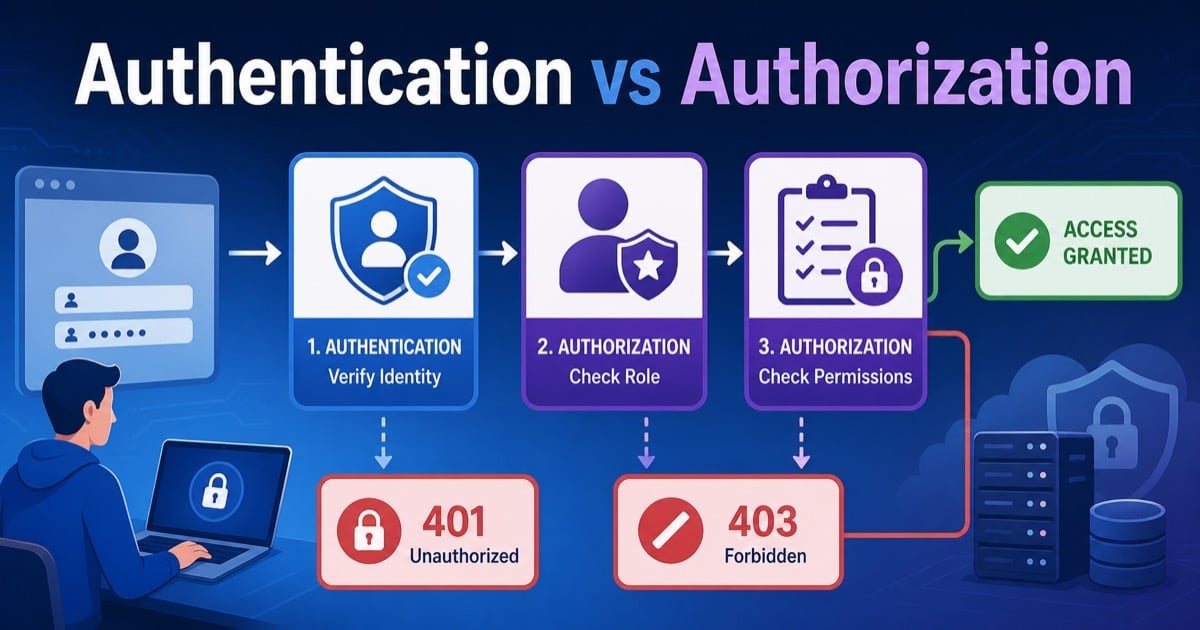
Authentication and authorization are closely related, but they solve different problems. Authentication proves who the caller is. Authorization decides what that caller is allowed to do after identity is known.
If you are still building the bigger request-response picture, start with How APIs Work: A Simple Guide for Beginners and What Is REST API? Beginner’s Guide with Examples first, then come back here.
Table of Contents
Open Table of Contents
- Quick Definition
- Why Authentication and Authorization Get Confused
- What Authentication Actually Checks
- What Authorization Actually Checks
- How Both Fit Into One Request Flow
- Common Authentication Methods
- Common Authorization Models
- 401 vs 403 Explained Clearly
- Real-World Example: Internal Admin Dashboard
- Common Mistakes Developers Make
- 1. Treating login as the only authentication step
- 2. Assuming frontend role checks are enough
- 3. Confusing possession of a token with permission
- 4. Returning
403when the real problem is missing identity - 5. Encoding roles in a token and never re-checking server-side rules
- 6. Forgetting object-level authorization
- Interview Questions
- 1. What is the difference between authentication and authorization in one sentence?
- 2. Why do many APIs return
401before they even evaluate business rules? - 3. Why is OAuth 2.0 not the same thing as authentication?
- 4. Can a request pass authentication and still fail authorization?
- 5. Why is object-level authorization so important in SaaS systems?
- 6. When would you choose RBAC over ABAC?
- Conclusion
- References
- YouTube Videos
Quick Definition
- Authentication answers: “Who are you?”
- Authorization answers: “What are you allowed to do?”
The simplest way to remember it:
- A user logs in with credentials, SSO, or a token.
- The backend verifies that identity.
- The backend then checks whether that identity can access a resource or perform an action.
| Topic | Authentication | Authorization |
|---|---|---|
| Core question | Who is this caller? | What can this caller do? |
| Typical data used | Password, MFA code, session, token, certificate | Role, scope, policy, ownership, tenant, ACL |
| Happens when | Login or request validation | After identity is known |
| Failure usually means | Caller is not proven | Caller is proven but blocked |
| Common HTTP result | 401 Unauthorized | 403 Forbidden |
Why Authentication and Authorization Get Confused
Beginners often see them happen in the same login flow, so they assume they are the same thing.
That is understandable because many systems do both in one request pipeline:
- Check the session cookie or bearer token.
- Identify the user or service.
- Check the user role, scope, or resource ownership.
- Allow or deny the operation.
But the fact that they run close together does not make them equivalent.
Real-world example:
- If you are not logged in to an admin panel, you fail authentication.
- If you are logged in as a support agent but try to change billing settings reserved for finance admins, you pass authentication and fail authorization.
That distinction matters for API design, incident debugging, frontend behavior, and security reviews.
What Authentication Actually Checks
Authentication verifies the identity of the user, service, or device making the request.
Typical authentication signals include:
- Username and password.
- Session cookie.
- Bearer token.
- API key.
- Client certificate.
- Second factor such as OTP, passkey, or security key.
In a browser app, authentication often starts at login and results in a session cookie or token. In API systems, the caller may instead send a bearer token or API key on every request.
flowchart TD
  A[User or Service] --> B[Send credentials]
  B --> C[Identity provider or app auth service]
  C --> D{Valid identity proof?}
  D -->|No| E[Reject request]
  D -->|Yes| F[Create session or issue token]
  F --> G[Authenticated identity]
Practical rule:
Authentication is not just a login page concept. It is the system’s proof that a caller is genuinely the identity it claims to be.
This is also why secure transport matters. If credentials or tokens travel over insecure channels, attackers may steal them before your backend ever gets a chance to validate them. If that part is still fuzzy, read HTTP vs HTTPS: What’s the Difference?.
What Authorization Actually Checks
Authorization decides whether an already identified caller is allowed to perform a specific action on a specific resource.
Authorization checks commonly look at:
- Role, such as admin, editor, viewer.
- Permission, such as
invoice.readoruser.delete. - Scope inside an access token.
- Resource ownership, such as “this order belongs to this customer.”
- Tenant boundary, such as “this user belongs to tenant A, not tenant B.”
- Context, such as time, location, or approval state.
Examples:
- A customer can view their own invoice but not another customer’s invoice.
- A read-only analyst can see a dashboard but cannot edit alert rules.
- A service token can call the reporting API but not the billing API.
Authorization should be enforced on every protected request, not assumed once at login.
That is one of the biggest production lessons: identity alone is not permission.
How Both Fit Into One Request Flow
In most modern backends, authentication and authorization are separate steps in the same request pipeline.
flowchart TD
  A[Client Request] --> B[Gateway or App]
  B --> C{Credentials present?}
  C -->|No| D[401 Unauthorized]
  C -->|Yes| E[Validate session or token]
  E --> F{Identity valid?}
  F -->|No| G[401 Unauthorized]
  F -->|Yes| H[Load roles scopes ownership]
  H --> I{Allowed to perform action?}
  I -->|No| J[403 Forbidden]
  I -->|Yes| K[Run business logic]
  K --> L[Return success response]
This is where a lot of API confusion disappears:
- Authentication happens first because the system needs to know who the caller is.
- Authorization happens second because the system needs identity context to evaluate permissions.
If you already understand client-server architecture, think of authentication as establishing the caller’s identity at the server boundary and authorization as enforcing business rules inside that boundary.
Common Authentication Methods
1. Session cookies
Common in server-rendered and browser-first applications.
How it works:
- User logs in.
- Server creates a session.
- Browser stores session ID in a cookie.
- Browser sends that cookie on later requests.
Good fit:
- Traditional web apps
- Admin portals
- Apps that benefit from server-side session invalidation
2. Bearer tokens
Common in APIs, SPAs, mobile apps, and service-to-service systems.
How it works:
- User or client authenticates.
- Identity provider issues an access token.
- Client sends
Authorization: Bearer <token>. - Backend validates token and extracts claims.
Important nuance:
A token proves authentication only if the backend actually validates issuer, audience, signature, and expiry. A token string by itself is not trust.
3. API keys
Common in partner integrations and machine-to-machine access.
API keys identify the calling application, but they are usually weaker than full user authentication. They often need extra controls such as IP allowlists, rate limits, or scoped access.
4. SSO and federated login
Enterprise systems often use OpenID Connect, SAML, or similar protocols so users authenticate with a central identity provider rather than separate passwords in every app.
This is why developers should be precise with terms:
- OpenID Connect is mainly about authentication and identity.
- OAuth 2.0 is mainly about delegated authorization to APIs.
Teams blur those terms constantly, but the difference matters when you design flows, tokens, and threat models.
Common Authorization Models
1. Role-Based Access Control (RBAC)
Users get roles, and roles map to permissions.
Example:
admincan create users and reset billing settings.editorcan update content.viewercan only read.
RBAC is simple and common, but it can become messy if too many custom roles pile up.
2. Attribute-Based Access Control (ABAC)
Access depends on attributes such as department, region, device trust, resource sensitivity, or time window.
Example:
- Finance managers in the US region can approve refunds over a threshold during business hours.
ABAC is more flexible than RBAC, but it is harder to reason about and test.
3. Scopes and claims
Very common in APIs protected by OAuth-style access tokens.
Example scopes:
orders.readorders.writebilling.refund
Scopes are useful for APIs because they express capability, but you still need server-side enforcement. A token claim is not enough if downstream services ignore it or trust the client too much.
4. Ownership and tenant checks
Many SaaS systems rely on resource-level authorization:
- Can this user access this exact document?
- Does this order belong to this account?
- Is this service request inside the current tenant?
This is where real authorization bugs appear most often. The system authenticates the caller correctly, but forgets to verify ownership.
401 vs 403 Explained Clearly
If this distinction is still blurry, compare it with the examples in HTTP Status Codes Explained (200, 404, 500 and More).
| Status | Meaning | Practical Example |
|---|---|---|
401 Unauthorized | Missing or invalid authentication | Token expired, cookie missing, API key invalid |
403 Forbidden | Authentication succeeded, but access is denied | User is logged in but lacks required role |
Common examples:
- No token sent to a protected API ->
401 - Expired session cookie ->
401 - Valid token, but caller lacks
adminpermission ->403 - Valid user, but wrong tenant or missing ownership -> often
403
One naming quirk confuses people:
401 Unauthorized is historically named, but in practice it usually means unauthenticated. The caller has not successfully proven identity yet.
Real-World Example: Internal Admin Dashboard
Imagine a company with one internal dashboard used by support, finance, and platform teams.
Step 1: Authentication
An employee signs in through the company’s identity provider using SSO and MFA. The app receives a session or access token that proves the employee’s identity.
At this point, the system knows:
- employee ID
- department
- group memberships
- tenant or organization
Step 2: Authorization
Now the dashboard checks what that employee can do:
- Support can view tickets and customer profiles.
- Finance can issue refunds.
- Platform admins can change infrastructure settings.
- Most employees cannot access production secrets at all.
Request examples
| Scenario | Authentication Result | Authorization Result | Response |
|---|---|---|---|
| User has no session cookie | Fail | Not evaluated | 401 |
| Support agent opens ticket detail | Pass | Pass | 200 |
| Support agent tries to issue refund | Pass | Fail | 403 |
| Finance admin issues refund | Pass | Pass | 200 or 201 |
Why this matters operationally
If your logs only say “access denied,” on-call engineers lose time. Good systems log whether the failure happened at identity validation or permission evaluation.
That is why authentication and authorization should be modeled, tested, and observed separately.
Common Mistakes Developers Make
1. Treating login as the only authentication step
Authentication must be validated when protected requests arrive, not just when the user first signs in.
2. Assuming frontend role checks are enough
Hiding a button in the UI is not security. The server must enforce authorization on the actual endpoint.
3. Confusing possession of a token with permission
A valid token does not automatically grant permission to every route. Authorization still needs resource and action checks.
4. Returning 403 when the real problem is missing identity
If the caller never proved identity, the response is usually 401, not 403.
5. Encoding roles in a token and never re-checking server-side rules
Long-lived claims can drift from reality. Users change departments, lose privileges, or switch tenants. Backends still need trustworthy policy enforcement.
6. Forgetting object-level authorization
This is a classic API bug: the endpoint checks that the user is logged in, but not that the resource belongs to that user.
For a broader path across these topics, browse the Web Fundamentals hub and the API tag archive. They connect this post to the surrounding HTTP, REST, and backend basics series.
Interview Questions
1. What is the difference between authentication and authorization in one sentence?
Authentication proves identity. Authorization decides what that proven identity is allowed to do.
In interviews, that short distinction is the baseline. A stronger answer also explains that authorization depends on authentication context, but they remain separate controls.
2. Why do many APIs return 401 before they even evaluate business rules?
Because the system cannot safely evaluate permissions until it knows who the caller is. Authentication happens first so the backend can attach identity, roles, scopes, or tenant information to the request context.
Without identity, authorization is either impossible or dangerously guess-based.
3. Why is OAuth 2.0 not the same thing as authentication?
OAuth 2.0 is primarily a delegated authorization framework for granting access to APIs and resources. It is about allowing one party to access another resource under controlled permissions.
Authentication is about proving user identity. OpenID Connect adds that identity layer on top of OAuth.
4. Can a request pass authentication and still fail authorization?
Yes, and that is normal. A user may be validly logged in but still lack permission for an operation, such as deleting another user’s data or accessing a restricted admin feature.
That case is one of the clearest real-world examples of why the two concepts are different.
5. Why is object-level authorization so important in SaaS systems?
Because many serious data leaks happen when the API verifies the caller but forgets to verify resource ownership or tenant boundaries.
A user should not be able to change the ID in /orders/123 to /orders/124 and see another customer’s data just because they are authenticated.
6. When would you choose RBAC over ABAC?
I would choose RBAC when the domain is simple enough that a small, stable role set maps cleanly to permissions. It is easier to explain, implement, and audit.
I would choose ABAC when access depends on multiple contextual attributes that roles alone cannot model well. The trade-off is more policy complexity and more testing effort.
Conclusion
Authentication and authorization are easiest to remember when you treat them as two checkpoints in sequence:
- Prove identity.
- Enforce permissions.
If your backend keeps those concerns separate, your APIs become easier to secure, debug, test, and explain in interviews. If your system blurs them together, you usually end up with confusing status codes, weak policy enforcement, and hard-to-find access control bugs.
References
- OWASP Authentication Cheat Sheet
https://cheatsheetseries.owasp.org/cheatsheets/Authentication_Cheat_Sheet.html - OWASP OAuth 2.0 Protocol Cheat Sheet
https://cheatsheetseries.owasp.org/cheatsheets/OAuth2_Cheat_Sheet.html - MDN: Authorization Header
https://developer.mozilla.org/docs/Web/HTTP/Reference/Headers/Authorization - RFC 9110 - HTTP Semantics
https://www.rfc-editor.org/rfc/rfc9110
YouTube Videos
- “Authentication vs Authorization” - Google Workspace Developers
https://www.youtube.com/watch?v=e43xy9x6vw4 - “Everything You Ever Wanted to Know About OAuth and OIDC” - OktaDev
https://www.youtube.com/watch?v=8aCyojTIW6U