 ADevGuide
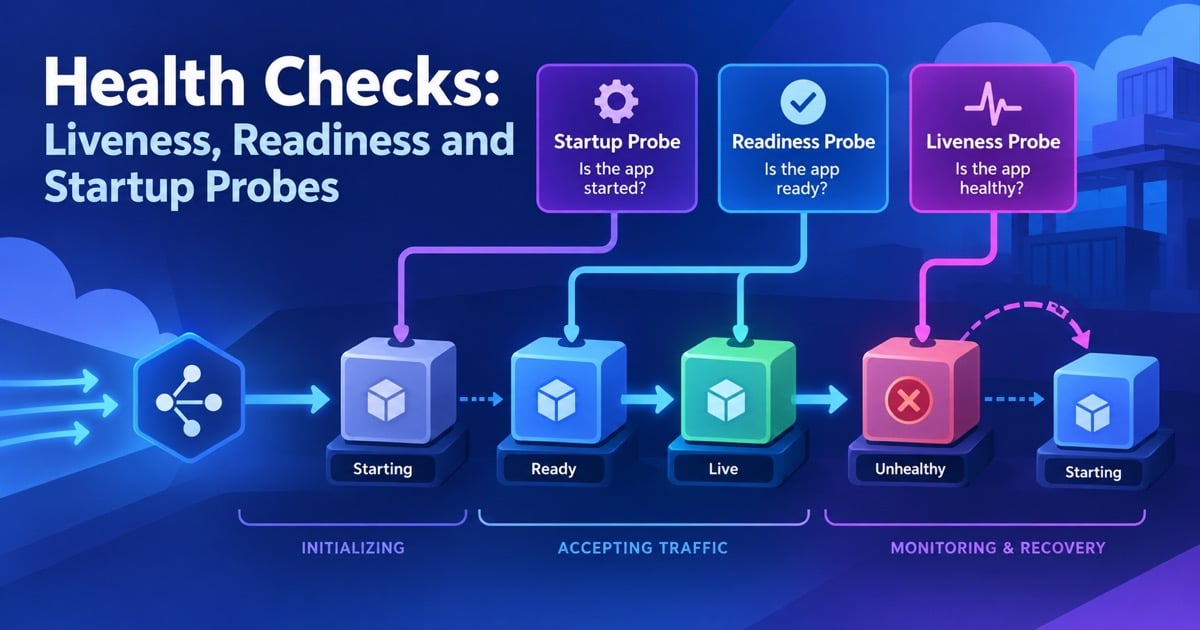
A service can be alive but unable to serve traffic while it loads a model, warms a cache, or loses its database connection. Restarting it because it is not ready creates a loop; sending traffic to it because its process exists creates errors. Liveness, readiness, and startup probes answer different operational questions.
This guide explains probe contracts, Kubernetes behavior, dependency checks, rollout safety, and common failure modes. Continue from service discovery, observability, and high availability.
Table of Contents
Open Table of Contents
Three Different Questions
| Probe | Question | Failure action |
|---|---|---|
| Liveness | Is the process stuck and unable to recover? | Restart the container |
| Readiness | Should this instance receive new traffic now? | Remove it from routing |
| Startup | Has slow initialization completed? | Delay liveness/readiness checks |
Do not put every dependency in liveness. A database outage should usually make a service unready or degraded, not cause every replica to restart and increase the outage. Liveness should detect deadlock, event-loop starvation, or an unrecoverable internal state that a restart can fix.
Probe Lifecycle
flowchart TD
    A[Container starts] --> B[Startup probe]
    B -->|Fail within startup budget| C[Keep starting; do not restart yet]
    B -->|Pass| D[Enable liveness and readiness]
    D --> E{Ready?}
    E -->|No| F[Remove from service endpoints]
    E -->|Yes| G[Receive traffic]
    D --> H{Liveness fails repeatedly?}
    H -->|Yes| I[Restart container]
    H -->|No| D
Probe intervals, timeouts, failure thresholds, and initial delays are part of the recovery design. A five-second interval with three failures means at least fifteen seconds before action, plus scheduling and endpoint propagation. Use a startup probe when the normal readiness path cannot be evaluated safely during initialization.
Designing Endpoints
Keep health endpoints cheap, bounded, authenticated where needed, and free from expensive fan-out. A shallow liveness endpoint can check that the process event loop or request handler responds. A readiness endpoint can check that required configuration is loaded, migrations are complete, and critical dependencies are usable within a small timeout.
Return structured diagnostics to operators but keep the probe response small. Separate public /healthz behavior from an authenticated diagnostic endpoint that includes dependency names and versions. A probe must not leak secrets or turn a monitoring request into a database denial-of-service.
Kubernetes Example
startupProbe:
  httpGet:
    path: /health/startup
    port: 8080
  periodSeconds: 5
  failureThreshold: 30
readinessProbe:
  httpGet:
    path: /health/ready
    port: 8080
  periodSeconds: 5
  timeoutSeconds: 2
  failureThreshold: 2
livenessProbe:
  httpGet:
    path: /health/live
    port: 8080
  periodSeconds: 10
  timeoutSeconds: 2
  failureThreshold: 3
The startup probe gives a slow process up to 150 seconds before normal checks apply. Readiness failures stop new traffic while the pod remains available to recover. Liveness failures restart only after repeated evidence of a stuck process. Tune these values with deployment and dependency behavior, not only with a local fast-start measurement.
Rollouts and Failure Modes
During a rolling deployment, an instance should become ready only after it can serve real traffic. On shutdown, mark it unready before draining connections and stop accepting new work. Grace periods and queue visibility timeouts must be long enough for active requests to finish.
Watch for probe-induced outages: a readiness check that requires an optional analytics service can remove every replica during an analytics incident; a liveness check that performs a slow database query can restart a healthy process under database load; and a startup threshold that is too small can create a crash loop during cold cache warmup.
Interview Questions
1. What is the difference between liveness and readiness?
Liveness asks whether a process is stuck and should be restarted. Readiness asks whether the instance should receive traffic right now. A service can be alive but unready during startup, dependency loss, drain, or overload.
2. Why use a startup probe?
It protects slow-starting applications from being restarted by liveness before initialization completes. The startup probe owns the initialization window, then normal liveness and readiness checks take over. This is safer than an excessively large liveness delay that hides later hangs.
3. Should a liveness probe check the database?
Usually not. A database outage is often recoverable without restarting the application, and restarting every replica can intensify the outage. Keep liveness local; express dependency availability in readiness or a separate diagnostic signal.
4. What happens when readiness fails?
The orchestrator removes the instance from eligible service endpoints while leaving the process running. Existing connections may drain according to the platform. The application should expose why readiness failed and recover it automatically when the dependency returns.
5. How do you test health checks?
Test slow startup, dependency timeouts, deadlocks, overloaded probes, graceful shutdown, DNS failure, and partial readiness by feature. Verify that the expected action occurs: traffic removal, restart, or no action. Load-test probe endpoints so monitoring does not become the incident.
Conclusion
Healthy production probes distinguish “alive,” “ready for traffic,” and “finished starting.” Keep liveness local, make readiness dependency-aware and bounded, use startup probes for slow initialization, and tune thresholds against real rollout and recovery behavior. Good health checks improve availability; bad ones create restart storms.
References
- Kubernetes: Configure Liveness, Readiness and Startup Probes
- Kubernetes: Container Lifecycle Hooks
- Google SRE Book: Practical alerting
YouTube Videos
- “Kubernetes Probes Explained | Liveness vs Readiness vs Startup” - VK Seth - AWS Devops [https://www.youtube.com/watch?v=8quZUZWm4oM]