 ADevGuide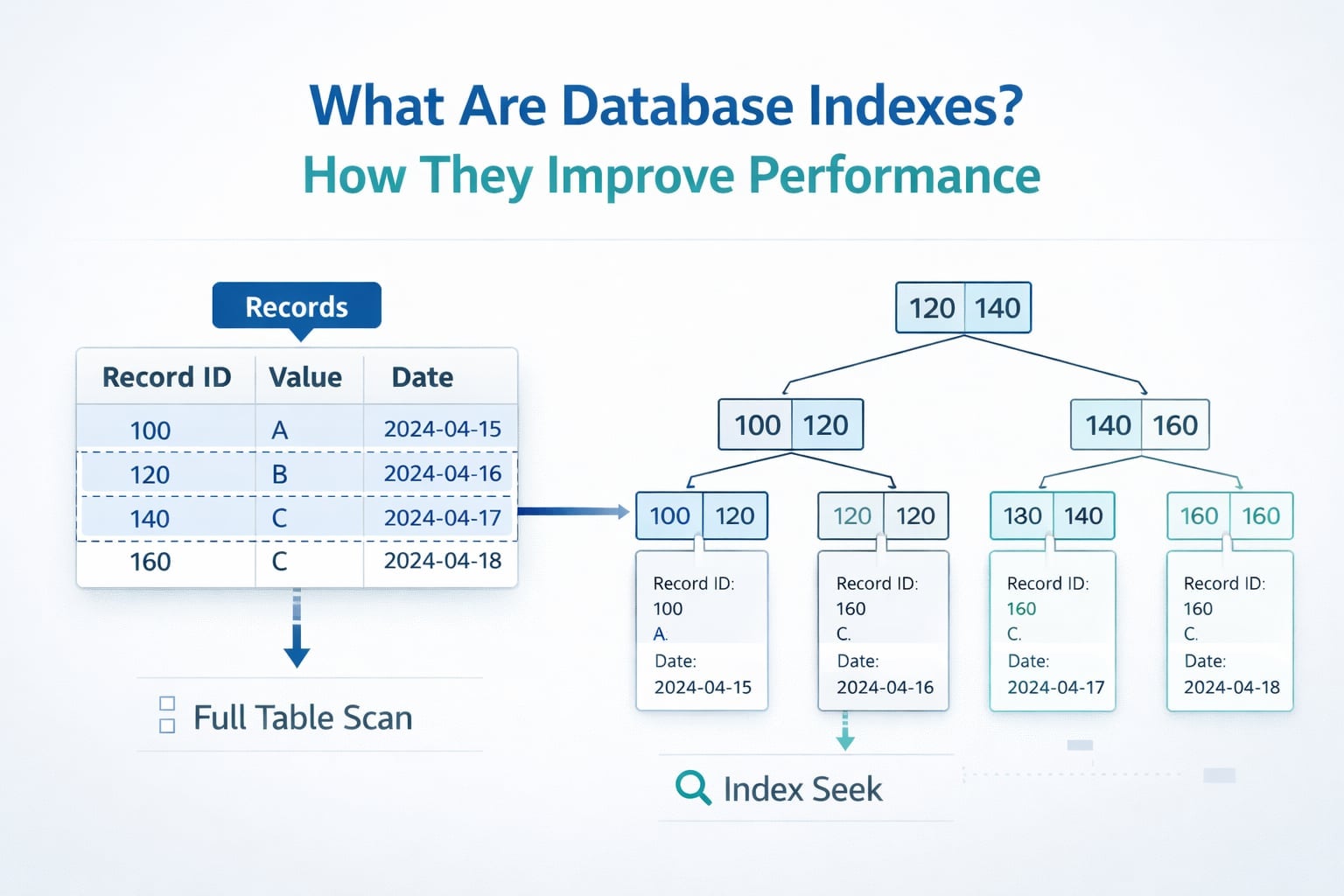
Database indexes are one of the highest-impact performance tools in SQL systems. When queries slow down as data grows, the root cause is often simple: the database is scanning far more rows than needed.
This guide explains what database indexes are, how they work, and when to add or avoid them. If you are building your fundamentals, read this with Relational Databases Explained: Tables, Rows, and Keys, Primary Key vs Foreign Key Explained with Examples, and SQL vs NoSQL: Complete Guide to Differences, Use Cases, and Examples. For the full roadmap, use the Database Fundamentals series as the pillar page and the Database tag as the category page.
Table of Contents
Open Table of Contents
- What Is a Database Index?
- Why Indexes Improve Query Performance
- How Query Plans Change with Indexes
- Common Types of Database Indexes
- SQL Examples: Creating Useful Indexes
- When to Add an Index (and When Not To)
- Common Indexing Mistakes
- Real-World Examples
- Interview Questions
- 1. What is a database index, and why is it useful?
- 2. Why can too many indexes hurt performance?
- 3. How do you choose index column order for a composite index?
- 4. What is the difference between clustered and non-clustered indexes?
- 5. When should you use a partial index?
- 6. How do you verify that an index is actually helping?
- Conclusion
- References
- YouTube Videos
What Is a Database Index?
A database index is a separate data structure that helps the database find rows faster, without scanning every row in a table.
A good mental model is a book index:
- Without an index, you read every page to find a topic.
- With an index, you jump straight to likely pages.
In SQL databases, indexes are usually built on one or more columns, such as email, created_at, or (tenant_id, status).
Why Indexes Improve Query Performance
Without a matching index, the database often performs a full table scan.
SELECT *
FROM orders
WHERE customer_id = 101;
If orders has 20 million rows and no index on customer_id, the engine may read all 20 million rows to find matches.
With an index on customer_id, the engine can jump directly to matching row locations and fetch only relevant records.
What Improves
- Lower latency for read-heavy queries
- Faster
WHERE,JOIN,ORDER BY, and sometimesGROUP BY - Better performance consistency as table size grows
What You Pay
Indexes are not free.
- Extra disk space
- Slower writes (
INSERT,UPDATE,DELETE) because indexes must be updated - Extra maintenance (reindexing/statistics in some engines)
This is why indexing is always a trade-off, not a default setting on every column.
How Query Plans Change with Indexes
Most SQL engines expose a query planner (EXPLAIN) to show how a query will execute.
Example Without an Index
EXPLAIN SELECT *
FROM orders
WHERE customer_id = 101;
Typical plan shape:
Seq Scan(PostgreSQL) orTable Scan(other engines)
Example With an Index
CREATE INDEX idx_orders_customer_id
  ON orders(customer_id);

EXPLAIN SELECT *
FROM orders
WHERE customer_id = 101;
Typical plan shape:
Index ScanorIndex Seek
The exact terms differ by engine, but the idea is the same: less scanning, faster lookup.
Common Types of Database Indexes
1. Single-Column Index
Best for frequent filters on one column.
CREATE INDEX idx_users_email ON users(email);2. Composite (Multi-Column) Index
Best when queries filter by a recurring column combination.
CREATE INDEX idx_orders_tenant_status_created
  ON orders(tenant_id, status, created_at);
Order matters. An index on (tenant_id, status, created_at) is not equivalent to (status, tenant_id, created_at).
3. Unique Index
Enforces uniqueness while improving lookups.
CREATE UNIQUE INDEX idx_users_email_unique
  ON users(email);
4. Covering Index (Engine-dependent)
A covering index contains all columns needed for a query, so the database may avoid extra table lookups.
-- Example concept; exact syntax/features vary by engine
CREATE INDEX idx_orders_customer_created_total
  ON orders(customer_id, created_at, total_amount);
5. Partial/Filtered Index (Engine-dependent)
Indexes only a subset of rows, useful for skewed data.
-- PostgreSQL example
CREATE INDEX idx_orders_active_status
  ON orders(status)
  WHERE status IN ('PLACED', 'PROCESSING');
SQL Examples: Creating Useful Indexes
Imagine a frequent dashboard query:
SELECT order_id, customer_id, status, created_at
FROM orders
WHERE tenant_id = 42
  AND status = 'PLACED'
ORDER BY created_at DESC
LIMIT 50;
Better Index for This Query Pattern
CREATE INDEX idx_orders_tenant_status_created_desc
  ON orders(tenant_id, status, created_at DESC);
Why this helps:
tenant_idandstatussupport filteringcreated_at DESCsupports orderingLIMIT 50returns quickly from the top of the index range
Join Example
SELECT o.order_id, c.full_name
FROM orders o
JOIN customers c ON c.customer_id = o.customer_id
WHERE o.created_at >= '2026-04-01';
Likely helpful indexes:
CREATE INDEX idx_orders_created_at ON orders(created_at);
CREATE INDEX idx_orders_customer_id ON orders(customer_id);
As your workload grows, indexing and partitioning strategy may evolve into broader scaling choices like database sharding.
When to Add an Index (and When Not To)
Add Indexes When
- A query is slow and appears frequently
- The same filter/join pattern repeats in production traffic
- You confirmed scan-heavy query plans with
EXPLAIN
Avoid Adding Indexes When
- The table is tiny (scan is already cheap)
- The column has very low selectivity (for example, mostly one repeated value)
- The workload is write-heavy and read benefits are minimal
- You are indexing “just in case” without observing real query patterns
Common Indexing Mistakes
1. Indexing Every Column
This increases write cost and storage but does not guarantee better read performance.
2. Wrong Column Order in Composite Indexes
Index order should follow your most common filter pattern.
3. Missing Indexes on Join Keys
Frequent joins on unindexed keys lead to avoidable scans and CPU spikes.
4. Forgetting to Re-check Plans
After adding an index, always verify with EXPLAIN that the planner actually uses it.
5. Ignoring Data Distribution
A column with few distinct values may not benefit from a standard index as much as you expect.
Real-World Examples
E-commerce Catalog and Orders
An online store often queries by tenant_id, status, and created_at for seller dashboards. Composite indexes on those columns can reduce dashboard latency from seconds to milliseconds.
Payment and Ledger Systems
Fintech systems frequently query recent transactions by account_id and time range. A tuned index on (account_id, created_at) supports fast audit and statement queries.
Multi-Tenant SaaS
SaaS apps commonly scope almost every query by tenant. Indexes that lead with tenant_id prevent cross-tenant full scans and keep latency stable as customer count increases.
Interview Questions
1. What is a database index, and why is it useful?
A database index is a structure that accelerates row lookup by avoiding full table scans. It improves read performance, especially for repeated filter and join patterns on large tables.
2. Why can too many indexes hurt performance?
Every write operation must update all affected indexes. Too many indexes increase write latency, storage usage, and maintenance overhead.
3. How do you choose index column order for a composite index?
Start with the columns used most consistently in WHERE clauses, then include columns used for sorting/range operations. Validate the result using real query plans.
4. What is the difference between clustered and non-clustered indexes?
A clustered index defines physical row order (engine-specific behavior), while a non-clustered index stores separate key-to-row references. Many engines allow one clustered order but multiple non-clustered indexes.
5. When should you use a partial index?
Use partial indexes when only a subset of rows is queried frequently, such as active orders. This reduces index size and can improve cache efficiency.
6. How do you verify that an index is actually helping?
Measure before and after: execution time, logical reads, and query plan changes (EXPLAIN / EXPLAIN ANALYZE). Keep the index only if it provides clear production value.
Conclusion
Database indexes are one of the most practical ways to improve SQL performance. The right index can eliminate full scans, reduce latency, and make your application scale more predictably.
The key is intentional indexing: use observed query patterns, verify plans, and balance read speed against write cost. As your schema evolves, revisit indexes the same way you revisit API and system design decisions.
References
- PostgreSQL Documentation: Indexes
- MySQL Documentation: Optimization and Indexes
- SQLite Documentation: Query Planning
YouTube Videos
-
“Database Indexing Explained (with PostgreSQL)” - Hussein Nasser [https://www.youtube.com/watch?v=-qNSXK7s7_w]
-
“SQL indexing best practices | How to make your database FASTER!” - CockroachDB [https://www.youtube.com/watch?v=BIlFTFrEFOI]
-
“MySQL: INDEXES are awesome” - Bro Code [https://www.youtube.com/watch?v=t0grczCICMk]