 ADevGuide
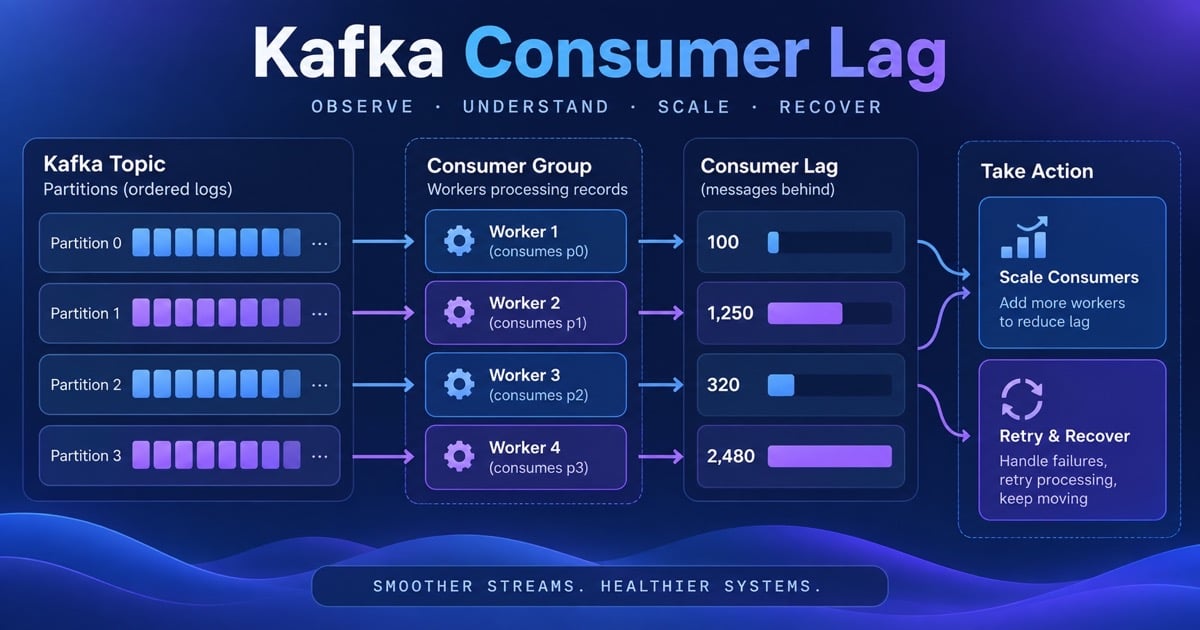
Lag is the distance between the latest partition offset and the committed consumer offset. It can grow because producers sped up, consumers slowed down, partitions are skewed, or a retry path is stuck. Use Kafka consumer groups, offset recovery, and backpressure to structure the answer.
The Interview Question
“A Kafka consumer group’s lag keeps growing after a traffic spike. How do you determine the bottleneck and recover without losing or duplicating messages?”
Clarifying Questions
Ask whether lag is count or age, one partition or all, whether processing is CPU or I/O bound, the commit strategy, and maximum recovery time. Assume 24 partitions, 12 consumers, 20,000 messages/second in, and 15,000/second processed.
The Naive Design and Why It Fails
Adding consumers above the partition count does nothing. Increasing batch size can exceed processing time and trigger rebalances. Committing offsets before side effects risks loss; retrying poison messages in place blocks the partition.
Better Diagnosis
Compare producer rate, consumer throughput, lag count and age, rebalance frequency, poll latency, processing latency, fetch wait, and error/DLQ rate. Scale only after checking partition skew and downstream capacity.
flowchart TD
    A[Lag alert] --> B[Measure rate, age, partition skew]
    B --> C{Root cause}
    C --> D[Producer burst]
    C --> E[Slow handler or downstream]
    C --> F[Rebalance or poison message]
    D --> G[Scale partitions or throttle producer]
    E --> H[Batch, parallelize, or add capacity]
    F --> I[Fix group stability and DLQ]
A Recovery Sequence That Does Not Make the Incident Worse
- Measure the shape of lag. Compare lag count and lag age by partition. A count of one million messages may be harmless if they are small and recent; an age of 20 minutes on a payment topic is an immediate customer-impact signal.
- Protect the downstream system. If the consumer is blocked on a database or HTTP provider, adding consumers can multiply pressure. Cap concurrency, pause optional topics, and negotiate a producer quota before scaling the group.
- Restore group stability. Check
max.poll.interval, handler duration, session timeouts, assignment churn, and consumer errors. A consumer that takes longer than the poll interval will repeatedly leave and rejoin, making lag worse. - Increase effective throughput. Add consumers only up to the useful partition parallelism, then batch or parallelize independent records. Keep per-key ordering by routing a key to one worker or serializing its state transition.
- Handle poison records separately. Bound attempts, preserve the original topic-partition-offset, and move failures to a delayed retry topic or DLQ. Do not block an entire partition forever on one malformed message.
Recovery is complete only when lag age returns to the SLO and the system can absorb the normal burst rate with headroom. A graph that briefly slopes downward while the database is approaching saturation is not a successful fix.
Commit and Delivery Semantics
Commit offsets after the side effect when losing a record is worse than duplicate processing. That creates at-least-once delivery: a crash after the database commit but before the offset commit causes a redelivery. Make the consumer idempotent with a unique event ID, an inbox table, or a compare-and-set state transition. Kafka transactions can coordinate consuming and producing Kafka records, but they do not automatically make an external database or API exactly once.
record = poll()
if inbox.insert(event_id) conflicts:
    commit offset and skip the duplicate
else:
    apply the business change
    mark inbox record complete
    commit offset
The inbox write and business update should share a transaction when they use the same database. If they cannot, model the state so a repeated event is a safe no-op and reconcile the rare ambiguous outcome.
Capacity and Partition Planning
With 20,000 messages per second arriving and 15,000 processed, the deficit is 5,000 per second. If a consumer safely handles 1,000 messages per second, five additional effective slots close the gap, but 24 partitions limit useful parallelism to 24 consumers. Before increasing partitions, check key distribution: a single hot key can keep one partition behind while the fleet looks mostly idle. Increasing partition count also changes ordering and operational cost, so document the keying strategy and migration plan.
Recovery and Trade-offs
Pause noncritical producers or apply quotas, increase consumers up to partition count, and parallelize work only when per-key ordering permits. Route poison records to a retry topic with delay and DLQ metadata. Commit after the side effect, using an idempotent consumer or transactional boundary.
Interview Follow-Ups
1. Why can adding consumers fail to reduce lag?
There may be fewer partitions than consumers, or one hot partition may hold most traffic. Consumers can also spend time waiting on a downstream service or rebalance repeatedly. Inspect assignment and per-partition throughput before scaling.
2. When is it safe to parallelize records?
When records are independent or keyed so each key remains ordered on one worker. Parallelizing a single key can reorder updates. Preserve the partition’s commit boundary and make downstream writes idempotent.
3. What is a poison message?
It consistently fails processing and blocks progress if retried synchronously. Bound attempts, record the error and original offset, move it to a retry or DLQ topic, and alert. Replay only after fixing the cause.
4. What does commit-after-processing imply?
A crash after the side effect but before the commit causes redelivery. The consumer must deduplicate by event ID or use an atomic downstream transaction. Commit-before-processing gives at-most-once behavior and can lose work.
5. Which lag metric matters most?
Lag age often expresses user impact better than record count because message rates vary. Track both, segmented by partition and group, plus rebalance count and oldest-event age. Alert on sustained growth, not a brief burst.
Related Practice
See delivery guarantees, dead-letter queues, and observability.
References
YouTube Videos
- “Kafka Consumer Lag Explained” - Confluent [https://www.youtube.com/watch?v=Ibf7wKf8MqU]